On this page
- What does WordPress need from a host in 2026?
- Which PHP version should your host offer?
- LiteSpeed, Apache or Nginx: does the web server matter?
- Where should the server be for visitors in Pakistan?
- What should backups, staging and SSL include?
- How should you pay for hosting from Pakistan?
- How do you test hosting support before you buy?
- The checklist: 12 questions for any WordPress host in Pakistan
- Summary
- References
Good WordPress hosting in Pakistan runs a supported PHP version (WordPress.org recommends 8.3 or newer), a current database (MySQL 8.0 or newer, ideally 8.4, or MariaDB 10.11 or newer), free SSL that renews itself, daily backups stored off the server and a staging copy, on a server close enough to your visitors to respond fast. Check those first, then compare PKR billing, payment methods and support, and only then price. This guide is a checklist, not a ranking of hosts.
We build and maintain WordPress sites for businesses in Pakistan, and every project starts by checking the hosting account the client has or is about to buy. These are the checks we use. Version numbers come from WordPress.org and php.net, and we have not reviewed or ranked any host, because plans and prices change too often for a list to stay true.
What does WordPress need from a host in 2026?
Two official pages set the bar. WordPress.org’s requirements page is written for site owners, and the WordPress Hosting Team’s server environment handbook is written for hosts and is stricter.
| Item | WordPress.org recommends | Hosting Team handbook | Still installs on (end of life) |
|---|---|---|---|
| PHP | 8.3 or newer | 8.4 or newer for production | 7.4 |
| Database | MySQL 8.0+ or MariaDB 10.11+ | MySQL 8.4 LTS, or MariaDB 11.8, 11.4 or 10.11 | MySQL 5.5.5 |
| HTTPS | HTTPS support | OpenSSL 3.0 or newer | Not required |
| Web server | Apache or Nginx | Current Apache 2.4, nginx, LiteSpeed or OpenLiteSpeed | Any that runs PHP |
| PHP memory | Not stated | 256M default, 512M or more for WooCommerce and page builders | WordPress asks for 40M |
Two details are worth knowing. The current release, WordPress 7.1, still installs on PHP 7.4 and MySQL 5.5.5, so “WordPress works on our servers” proves little. And the handbook notes that MySQL 8.0 reached end of life in April 2026, so ask for MySQL 8.4 or MariaDB 10.11 or newer on a new account. The handbook also lists required PHP extensions (json, hash and mysqli) and recommends OPcache plus an object cache such as Redis, Memcached or APCu.
To see what your current host runs, open Tools > Site Health > Info in WordPress and expand the Server and Database sections.
Which PHP version should your host offer?
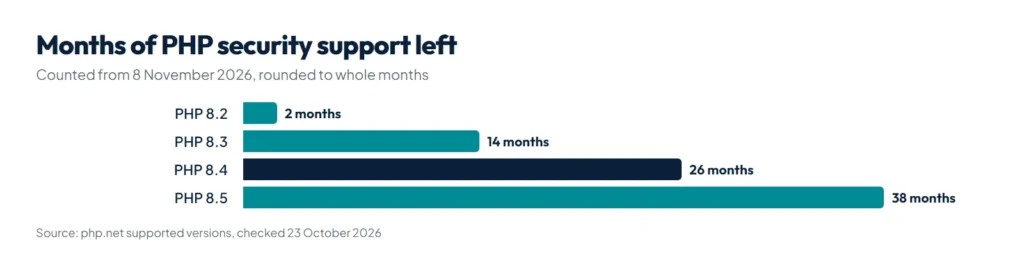
PHP versions get security fixes for a fixed period, then none. This is php.net’s supported versions schedule:
| PHP version | Active support until | Security fixes until |
|---|---|---|
| 7.4 | Ended | Ended 28 Nov 2022 |
| 8.1 | Ended | Ended 31 Dec 2025 |
| 8.2 | Ended | 31 Dec 2026 |
| 8.3 | Ended | 31 Dec 2027 |
| 8.4 | 31 Dec 2026 | 31 Dec 2028 |
| 8.5 | 31 Dec 2027 | 31 Dec 2029 |
A host should let you pick PHP 8.3, 8.4 or 8.5 for each site from the control panel. If a host only offers 7.4 or 8.1, its servers run code that no longer gets security fixes. Switch versions on a staging copy first: an old plugin that cannot handle the new version is a common cause of the “There has been a critical error on this website” message. Our guide to choosing a PHP version for WordPress shows how to check yours and switch safely in cPanel or hPanel.
LiteSpeed, Apache or Nginx: does the web server matter?
Less than hosting ads suggest. All three run WordPress well when configured properly. The practical differences are about .htaccess files and page caching:
| Server | .htaccess | Page caching | What it means for you |
|---|---|---|---|
| Apache | Read in every folder, and WordPress writes its own permalink rules | Through a caching plugin or the host | The most compatible setup for plugins that write .htaccess rules |
| Nginx | Not used. Rules are set at server level by an administrator | Set up by the host, or through a plugin | Ask who adds redirect and security rules, since WordPress cannot write them |
| LiteSpeed | LiteSpeed says its server reads Apache configuration and .htaccess | The LiteSpeed Cache plugin’s server-level page cache needs a LiteSpeed server or the QUIC.cloud CDN | Use LiteSpeed Cache only on a LiteSpeed server, or another cache elsewhere |
The Nginx row comes from WordPress’s Nginx guide, which says there is no directory-level file like Apache’s .htaccess, and the LiteSpeed row from LiteSpeed’s own product page and the LiteSpeed Cache plugin listing. What matters more than the server brand is whether page caching is actually switched on, how much CPU and memory your plan gets, and the PHP version.
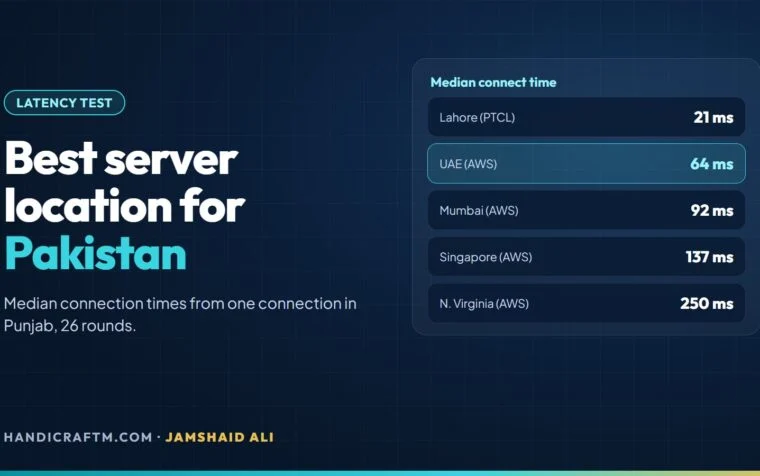
Where should the server be for visitors in Pakistan?
Every visit starts with DNS lookup, a connection, an SSL handshake and a wait for the server, and all of that is slower over long distances. Google’s web.dev guidance puts a good Time to First Byte at 0.8 seconds or less. Ask the host which city your server is in, and request a test site or IP address before you pay. Then measure from your own connections, both mobile data and broadband:
curl -o /dev/null -s -w "TTFB: %{time_starttransfer}s\n" https://example.com/Run it several times and compare hosts at the same hour. If many of your visitors are abroad, for example customers in the Gulf or the UK, a CDN in front of the site can serve them from closer locations. Our WordPress speed optimization guide covers the rest of the loading time.
What should backups, staging and SSL include?
- Backups: daily and automatic, files and database together, kept for at least a week, stored off the server, and restorable by you without a support ticket. Test one restore before you need it.
- Staging: a one-click copy of the live site for testing updates and PHP changes, with a way to push changes back.
- SSL: free and automatic. Let’s Encrypt does not charge for certificates and its default certificates last 90 days, so the host should install and renew them for you. There is no reason to pay extra for a basic certificate.
- Access: SFTP, and ideally SSH with WP-CLI, so you can fix a broken site without the dashboard.
- Email: if the host runs your email on the same server, a hacked WordPress site that sends spam can get that server’s IP blacklisted, which WordPress.org lists as a common result of a hack.
Even with host backups, keep your own copy somewhere else. WP Toolkit Studio sends backups to local storage, Nextcloud, Amazon S3 or S3-compatible storage, Google Drive, Dropbox, OneDrive, FTP or FTPS, and SFTP, and keeps a set number of daily, weekly and monthly copies. SFTP backups need the PHP ssh2 extension, which some shared hosts do not offer, so ask about it.
How should you pay for hosting from Pakistan?
Pakistani hosts and resellers commonly bill in rupees and accept local payment methods. Many hosts abroad bill in US dollars, which needs a card enabled for international payments, and your bank converts at its own rate and may add charges, so the rupee cost of every renewal moves with the exchange rate. Before you pay, check:
- the currency on the invoice and whether tax is included;
- which methods are accepted, such as bank transfer, JazzCash, Easypaisa or cards, on the host’s own billing page;
- the renewal price, not only the first-term price;
- the refund window;
- that the hosting account and domain are registered in your name, not your developer’s.
Prices vary by host, plan and billing term, so compare them on each host’s own page on the day you buy. Our guide to website prices in Pakistan shows where hosting fits in the total cost of a site.
How do you test hosting support before you buy?
Send a pre-sales question outside office hours and time the reply. Ask something specific, such as “Which PHP versions can I choose per site, and how do I restore one file from yesterday’s backup?” A good answer is quick and exact. Also ask which channels they use (ticket, chat, phone or WhatsApp), their hours in Pakistan time, whether they help with WordPress problems or only the server, and what they do when a site is hacked.
The checklist: 12 questions for any WordPress host in Pakistan
| # | Ask | A good answer |
|---|---|---|
| 1 | Which PHP versions can I choose? | 8.3, 8.4 and 8.5, switchable per site |
| 2 | Which MySQL or MariaDB version? | MySQL 8.4, or MariaDB 10.11 or newer |
| 3 | What is the PHP memory limit? | 256M, more for WooCommerce |
| 4 | Which web server and page cache? | Named server with page caching set up |
| 5 | Which city is the server in? | A named city and a test IP |
| 6 | How are backups made and restored? | Daily, off-server, restore it yourself |
| 7 | Is there staging? | One click, with push to live |
| 8 | How does SSL work? | Free, installed and renewed automatically |
| 9 | Do I get SFTP, SSH and WP-CLI? | Yes |
| 10 | What currency and payment methods? | PKR or clear USD, methods you can use |
| 11 | What is the renewal price? | Written down before you pay |
| 12 | What happens if my site is hacked? | A clear cleanup and restore process |
If your current host fails several of these, moving is easier than it sounds. WP Toolkit Studio’s Quick Migration creates a one-hour link on the old site; you paste it on the new site, and it imports the database and content, rewrites every URL without breaking serialized data and checks the new address afterwards.
Summary
Choose WordPress hosting in Pakistan on facts you can check: PHP 8.3 or newer (8.4 is what the Hosting Team recommends), MySQL 8.4 or MariaDB 10.11 or newer, at least 256M of PHP memory, free auto-renewed SSL, daily off-server backups, staging, a server location you have tested, billing you can pay and support that answers specific questions. Then compare prices on each host’s own page. Keep your own off-server backups and move hosts easily with WP Toolkit Studio.
References
- Requirements, WordPress.org
- Server environment, WordPress Hosting Team handbook
- Supported versions, php.net
- Unsupported branches, php.net
- Nginx, WordPress Developer Resources
- LiteSpeed Web Server, LiteSpeed Technologies
- LiteSpeed Cache plugin, WordPress.org
- Time to First Byte (TTFB), web.dev
- FAQ, Let’s Encrypt