

On this page
For visitors in Pakistan, the best hosting server location is inside Pakistan, and the best foreign cloud region we tested is the UAE. From our connection in Punjab, servers in Lahore, Islamabad and Karachi took 21 to 51 ms to connect, the UAE 64 ms, Mumbai 92 ms, Singapore 137 ms, Frankfurt 174 ms, London 181 ms and Virginia 250 ms (medians). Mumbai is nearer to Punjab on the map than the UAE, yet it was slower, a sign that the network path, not the map, decides the time.
We build and host WordPress sites for businesses in Pakistan, and choosing a server region comes up on almost every project. Hosting pages usually answer it with sales copy, so we measured it instead: 390 timed connections from one Pakistani connection to servers whose locations are published, over about two hours. The script and every raw result are saved, and this post explains what the numbers mean for a visitor and what they cannot show.
Which server location is fastest from Pakistan?
The table shows the median time to open a TCP connection, which is about one network round trip, the middle half of all results, and the median time to the first byte of a reply over a brand new HTTPS connection. Each row is 26 measurements.
| Location | Server | Median connect (ms) | Middle half (ms) | First byte, new HTTPS connection (ms) |
|---|---|---|---|---|
| Lahore, Pakistan | PTCL speed test server | 21 | 19 to 37 | 166 |
| Islamabad, Pakistan | PTCL speed test server | 40 | 32 to 48 | 162 |
| Karachi, Pakistan | PTCL speed test server | 41 | 37 to 55 | 205 |
| Karachi, Pakistan | Transworld speed test server | 51 | 41 to 60 | 243 |
| UAE | AWS me-central-1 | 64 | 59 to 82 | 341 |
| Mumbai, India | AWS ap-south-1 | 92 | 82 to 97 | 418 |
| Hyderabad, India | AWS ap-south-2 | 141 | 135 to 146 | 661 |
| Singapore | AWS ap-southeast-1 | 137 | 129 to 153 | 622 |
| Frankfurt, Germany | AWS eu-central-1 | 174 | 164 to 184 | 754 |
| Milan, Italy | AWS eu-south-1 | 174 | 158 to 181 | 742 |
| London, UK | AWS eu-west-2 | 181 | 178 to 194 | 820 |
| N. Virginia, US | AWS us-east-1 | 250 | 242 to 258 | 1098 |
| Bahrain | AWS me-south-1 | No answer (26 tries) | None | None |
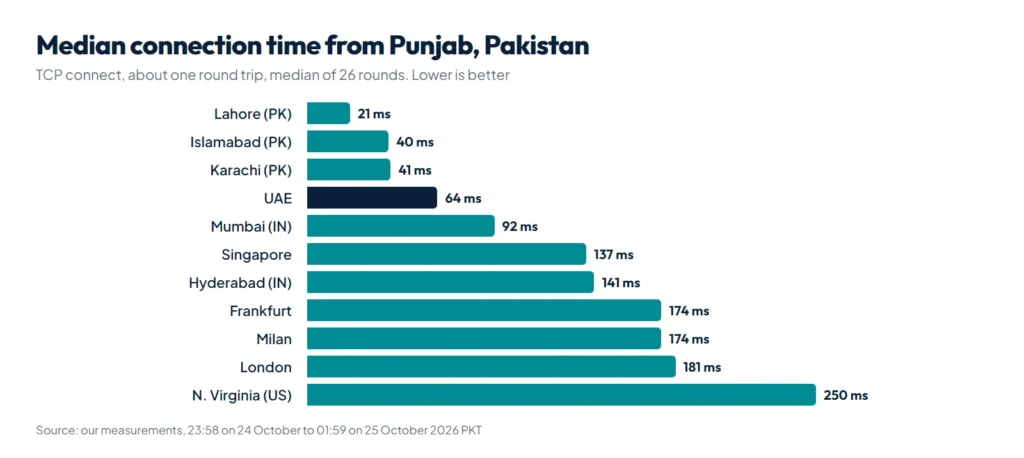
Three things stand out. Servers inside Pakistan were fastest, as expected. Among the big cloud regions, the UAE beat Mumbai, the region that common advice, such as an answer on Amazon’s re:Post forum, suggests for Pakistani audiences. And a region in India is not automatically close: Hyderabad took 141 ms, about the same as Singapore at 137 ms. The AWS Bahrain region never answered from our connection, and from timing alone we cannot tell whether the problem was on AWS’s side or on the route.
How we did this
- Where we measured from: one internet connection from a small Pakistani ISP, in Punjab. We confirmed the country with Cloudflare’s trace page, which reported loc=PK. We did not record our IP address.
- What we measured: a Python 3.12 script using only the standard library opened a fresh IPv4 connection to each server, timed the TCP connect, the TLS handshake and the wait for the first byte of an HTTPS reply, then closed it. DNS lookup time was recorded separately and is not included.
- Servers and how we know where they are: 9 AWS regional endpoints (their
/pingaddress), with locations from the AWS Regions page; 4 speed test servers in Pakistan, with city and operator from Ookla’s public server list; Cloudflare’s trace page, which names the data center that answered; and our own site, handicraftm.com. - When and how often: 26 rounds, one every 5 minutes, from 23:58 on 24 October to 01:59 on 25 October 2026 Pakistan time (390 measurements). Each round visited the servers in random order, one request each, at least 0.6 seconds apart.
- How we report it: medians, because one slow packet can make a single result huge, plus the middle half (25th to 75th percentile).
What do these milliseconds mean for a visitor?
Round-trip time is how long a message takes to reach a server and come back. Cloudflare’s explainer lists physical distance along the path, the network medium and traffic as the main factors. A browser pays that round trip several times before it sees anything:
- DNS lookup to find the server’s address, unless it is cached.
- TCP connect: one round trip.
- TLS handshake: one round trip with TLS 1.3, two with TLS 1.2, as Cloudflare explains.
- The request itself: one more round trip, plus the time the server needs to build the page.
So a new HTTPS connection costs at least three round trips before the first byte. In our data for the cloud regions, the first byte arrived after 4.3 to 5.4 times the connect time. Google’s web.dev guidance calls a Time to First Byte of 0.8 seconds or less good, and its count includes DNS, connection and TLS time. From our connection, the trip alone to London, UK and N. Virginia, US used up more than that 0.8 seconds even without DNS and before any real page was built, while the servers in Pakistan took 162 to 243 ms.
The first byte is only the start. The browser then fetches CSS, scripts, fonts and images, and every other domain the page uses (a font service, an analytics script, a separate file server) needs its own connection setup, which web.dev notes adds latency. That is why a far-away server feels slower than its milliseconds suggest. For the rest of a page’s load time, see our WordPress speed optimization guide and how Core Web Vitals measure it.
Does a CDN fix the distance?
A CDN keeps copies of your files on edge servers close to visitors, and web.dev’s TTFB optimization guide recommends one for exactly this reason. But it only helps if visitors actually reach a nearby edge. Cloudflare’s status page lists data centers in Karachi, Lahore and Islamabad. Yet for our first 13 rounds in a row, Cloudflare’s trace page reported its Singapore data center, at a median 137 ms to connect and 652 ms to the first byte. From 00:59 onward it mostly reported Karachi instead, at 42 ms and 242 ms, but it still went back to Singapore in 3 of the remaining 13 rounds. Same CDN, same connection, same night, and the connect time changed by a factor of three. Which edge you reach depends on how your ISP’s network reaches the CDN at that moment, so test from the networks your visitors use, more than once.
Our own site makes the same point. handicraftm.com sits behind its host’s CDN, and from our connection it took a median 135 ms to connect and 763 ms to the first byte, just under web.dev’s 0.8 second line. The CDN’s own header marked the page as DYNAMIC in 26 of 26 requests, which means the HTML was not served from the edge cache, and its upstream timing header showed the origin server needed a median 163 ms. Most of the wait was distance to the edge, not the server’s work.
So which location should you choose?
| Your visitors | Good choice | Why, from our numbers |
|---|---|---|
| Mostly in Pakistan | A data center in Pakistan | 21 to 51 ms, the fastest group |
| Pakistan, and you need a big cloud provider | UAE | 64 ms, the fastest cloud region we tested |
| Pakistan and the Gulf | UAE | 64 ms from Pakistan, and inside the Gulf |
| Pakistan and the UK or Europe | Frankfurt or London with a CDN | 174 to 181 ms from Pakistan, near for Europe |
| Worldwide or mostly US | US or Europe with a CDN | 250 ms from Pakistan to Virginia |
Two practical notes. The AWS UAE and Hyderabad regions are disabled by default, so you have to enable them in your AWS account first, and a Pakistani data center is only an advantage if the host is otherwise good, which our WordPress hosting in Pakistan checklist covers. Our website development service includes choosing and testing the hosting with you.
How do you test a host from your own connection?
Ask the host for a test site or IP address in the location you are considering, then run this a few times at different hours, from broadband and from mobile data:
curl -o /dev/null -s -w "connect %{time_connect} tls %{time_appconnect} first byte %{time_starttransfer}\n" https://example.com/Compare the medians, not the best single result, and compare hosts at the same hour. If your visitors are spread across cities and networks, our speed test of Pakistani online stores shows how much real sites vary.
What this data cannot show
- One connection in one place. Every number comes from a single ISP in Punjab. Visitors on other ISPs, on mobile data or in Karachi will see different times, and the order may change.
- Late night only. We measured between about midnight and 2 a.m. Even within those two hours the medians moved: the UAE went from 76 ms in the midnight hour to 60 ms after 1 a.m. Evening peak hours may be slower.
- Test endpoints, not websites. AWS ping endpoints and speed test servers answer instantly. A real site adds its own server time on top.
- A few providers. Other clouds and hosts in the same cities can sit on different routes and give different results.
- No cause. Timing shows how long the trip took, not which way it went. A traceroute we ran hid the middle of the route, so we cannot say why Mumbai was slower than the UAE.
Summary
From one connection in Punjab, servers inside Pakistan connected in 21 to 51 ms, the UAE was the fastest cloud region at 64 ms, Mumbai followed at 92 ms, and Europe and the US were 174 to 250 ms away. Host in Pakistan or the UAE when your visitors are in Pakistan, add a CDN for audiences abroad, and check from your visitors’ own networks which edge they reach. If you want this tested for your own site and host, our website development team can do it before you buy.
References
- AWS Regions, Amazon Web Services
- What is round-trip time?, Cloudflare
- Why use TLS 1.3?, Cloudflare
- Time to First Byte (TTFB), web.dev
- Optimize Time to First Byte, web.dev
- Cloudflare System Status, data center list