
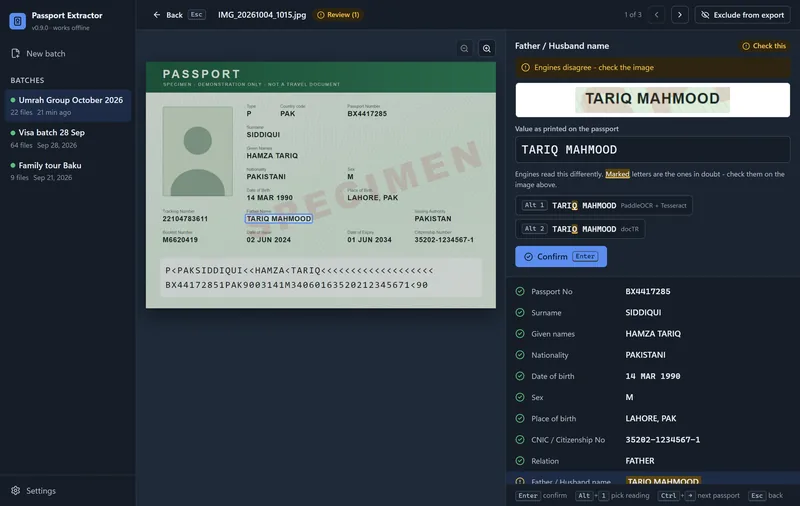


Review without the mouse
Confirm a field with Enter, pick an engine's reading with Alt+1, jump to the next passport with Ctrl+Right. A group of 50 is checked in minutes.
Passport Extractor v0.9 · Offline passport OCR for Windows
Drop in phone photos, scans, PDFs or a ZIP from WhatsApp. Passport Extractor reads every Pakistani passport on your own PC, checks each field against the MRZ check digits, and flags anything it is not sure of, so nothing wrong slips into your visa or ticketing list.
Passport Extractor is offline batch passport OCR software for Windows, made by Handicraft Marketing in Pakistan. It reads Pakistani passport data pages from photos, scans, PDFs and ZIP files and exports 17 fields per passport to Excel, CSV, PDF or JSON. Every value is checked against the MRZ check digits and three OCR engines, and anything that cannot be proven goes to a quick review screen instead of being guessed. It costs PKR 20,000 once, with a free 30-passport trial.
Why teams use it
Typing 50 passports for one Umrah group takes a whole day.
Drop the folder in and get every passport in one spreadsheet, while you get on with other work.
One wrong digit and the visa or ticket bounces.
Passport numbers, CNIC and dates are checked against the MRZ check digits before they are marked verified.
Passports arrive as WhatsApp photos, PDFs and ZIP files.
JPG, PNG, HEIC, TIFF, PDF and ZIP, from a folder, a USB drive or a synced cloud folder.
Online OCR sites want you to upload clients' passports.
Everything runs on your own PC. No upload, no account and no internet needed.
Every portal wants the columns in a different order.
Ready templates for visa upload and airline ticketing; rename, reorder and save your own.
Expired passports and double entries found too late.
Expired, under-6-month and duplicate passports are flagged before you export.
How it works
Real screens from Passport Extractor 0.9, shown with fictional specimen data. Choose a step, and click any screenshot to enlarge it.
Accuracy
A wrong passport number can cost a visa or a ticket. So Passport Extractor only marks a field Verified when it can prove it, and shows you everything else.
Specimen data. Not a real person.
Our benchmark on a test set of 23 real Pakistani passports and 1 CNIC. The remaining 2-3% of fields go to review, usually already showing the right value. Results depend on photo quality.
Made for operators
Confirm a field with Enter, pick an engine's reading with Alt+1, jump to the next passport with Ctrl+Right. A group of 50 is checked in minutes.
When engines read a field differently, the letters they disagree on are marked, next to a zoomed crop of the passport. You only look where it matters.
Scanning is completely offline. Images and results stay on your computer, which is how clients' passport data should be handled.
WhatsApp photos, flatbed scans, multi-page PDFs and ZIP files, from a folder, a USB drive or a synced Google Drive, OneDrive, MEGA or Dropbox folder. Folders are searched including sub-folders.
Automatic mode uses as many parallel workers as the PC can spare. Light mode keeps the computer usable for other work while it scans.
Export
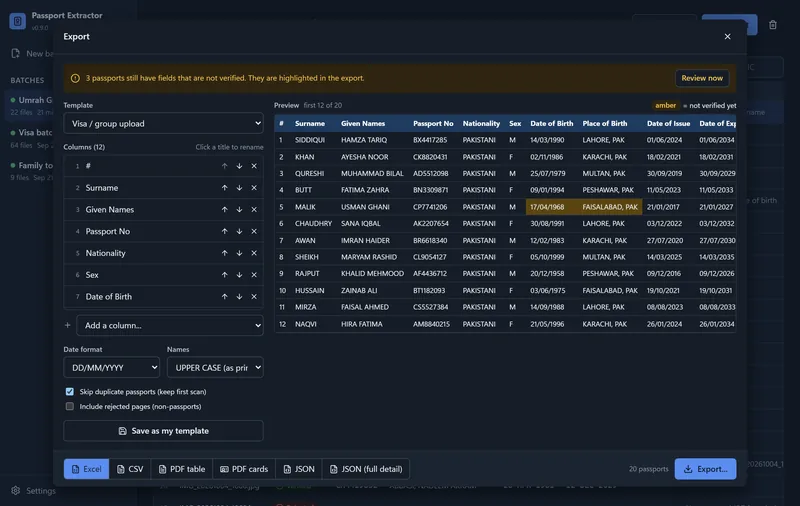
Pick a template, see a live preview, export. Fields that still need review are highlighted in amber, so nothing unchecked is passed on silently.
Templates: Visa / group upload, Airline ticketing, Standard (all fields) and Minimal, plus your own. Six date formats, UPPER or Title Case names, duplicates skipped.
Who it's for
Group visa lists for 50 to 500 pilgrims without retyping a single passport.
Clean applicant data, ready for visa portals and application forms.
Names, dates of birth and passport numbers exactly as the airline needs them.
Bulk candidate records with CNIC and father's name for every applicant.
Running a full travel agency? See Safar Studio, our offline travel and Umrah agency software. More for tour operators and travel businesses.
Compare
| Capability | Passport Extractor | Online OCR websites | Typing by hand |
|---|---|---|---|
| Works with no internet | Yes | No | Yes |
| Passports stay on your PC | Yes | No | Yes |
| Hundreds of passports in one batch | Yes | Sometimes | No |
| Checks the MRZ check digits | Yes | Rarely | No |
| Flags the fields it is not sure about | Yes | Rarely | No |
| Pakistani fields: CNIC, father or husband, tracking and booklet no. | Yes | No | By hand |
| Excel templates for visa and ticketing | Yes | Sometimes | By hand |
| Price | PKR 20,000 once | Per scan or per month | Staff hours on every group |
Pricing in PKR
Try it free on 30 of your own passports first. If it saves you time, buy the lifetime license.
Try it on your own passports
PKR 030 passports
Pay once, use it permanently
PKR 20,000one-time
Made to fit your workflow
Custom quote
Prices in Pakistani Rupees. One license covers one Windows PC. Need it on more computers? Ask for a multi-PC price.
Getting started
Questions, answered
Still unsure? Ask the engineer directly on a free 30-minute call.
Book a free consultationPassport Extractor is offline batch passport OCR software for Windows made by Handicraft Marketing in Pakistan. It reads Pakistani passport data pages from photos, scans, PDFs and ZIP files and exports the details of every passport to Excel, CSV, PDF or JSON.
It is built and tested for Pakistani passport data pages, including the CNIC number, father or husband name, tracking number and booklet number. Support for other countries' passports or other documents can be added as a paid custom change.
A field is only marked Verified when it is proven, for example by an MRZ check digit, or by several OCR engines agreeing and passing Pakistani passport rules. Everything else goes to review. In our benchmark on 23 real Pakistani passports, no wrong value was marked Verified and 97 to 98% of fields were verified automatically.
No. Scanning runs completely offline on your own PC. Passport images and results stay on your computer and nothing is uploaded.
JPG, PNG, HEIC, TIFF, BMP and WebP images, PDF files and ZIP files, or whole folders including sub-folders. You can pick them from a USB drive or from synced Google Drive, OneDrive, MEGA and Dropbox folders.
Roughly 2 to 6 seconds per passport on a typical office PC. With enough memory it scans several passports in parallel, and you can review finished passports while the rest are still scanning.
Pages that are not passport data pages, such as a CNIC, are detected and set aside. If a field cannot be read clearly it is marked for review, and you type or pick the right value while looking at a zoomed crop of the passport.
Yes. Choose a template such as Visa / group upload or Airline ticketing, or build your own by adding, removing, renaming and reordering columns, with six date formats. Export to Excel, CSV, PDF table, PDF cards with photos or JSON.
PKR 20,000 one-time for a lifetime license on one Windows PC, with no monthly or per-scan fees. Custom changes, such as a new export layout, are quoted and charged separately.
Yes. The free trial scans up to 30 passports with every feature unlocked. Batches you scanned stay available for review and export after the trial ends.
Each license is activated for one Windows PC using its machine ID. If you need it on more computers, message us on WhatsApp for a multi-PC price.
Windows 10 or 11 (64-bit), 4 GB of RAM (8 GB or more for faster parallel scanning) and about 500 MB of disk space. The installer adds the Microsoft WebView2 runtime if your PC does not have it.
 Lead Technical Consultant
Jamshaid Ali
PSEB Registered Developer
Lead Technical Consultant
Jamshaid Ali
PSEB Registered Developer
Scan 30 passports free with every feature unlocked. If it saves your team a day of typing, the lifetime license is PKR 20,000, once.