
Honest by design
The plugin's own documentation lists what each module cannot do, from the limits of geo-blocking to why it never sends a generic Content-Security-Policy. You know exactly what you are getting.
WP Toolkit Studio v4.19.1 · WordPress security, backup and maintenance suite
A firewall, malware scanner, login protection, scheduled backups to eight storage destinations, one-click migration, auto-updates, a cookie banner and image optimization. Built for agencies, with white-label branding and a multi-site dashboard.
WP Toolkit Studio is an all-in-one WordPress security and maintenance plugin by Handicraft Marketing. It combines a web application firewall, malware and file integrity scanning, login protection with two-factor authentication, scheduled backups to local storage or eight cloud destinations, site migration, safe auto-updates, a GDPR cookie consent banner and image optimization in one plugin, with white-label branding for agencies.
Why site owners use it
Five plugins for security, backups, cookies and speed, each with its own bill.
One plugin and one price, with every module switchable on or off.
A hacked site is found by a client, days later.
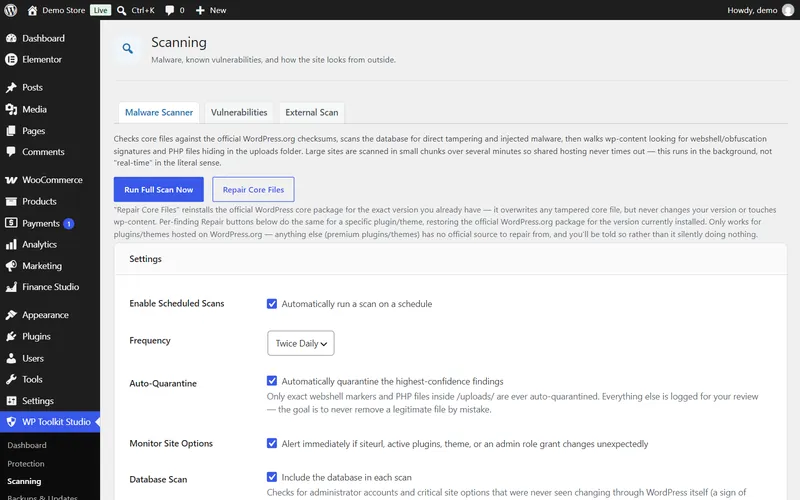
Scheduled scans compare core, plugin and theme files with official WordPress.org copies and alert you.
Bots hammer wp-login.php all day.
Hidden login URL, brute-force lockout, two-factor authentication and a honeypot.
Backups that fail silently until the day you need one.
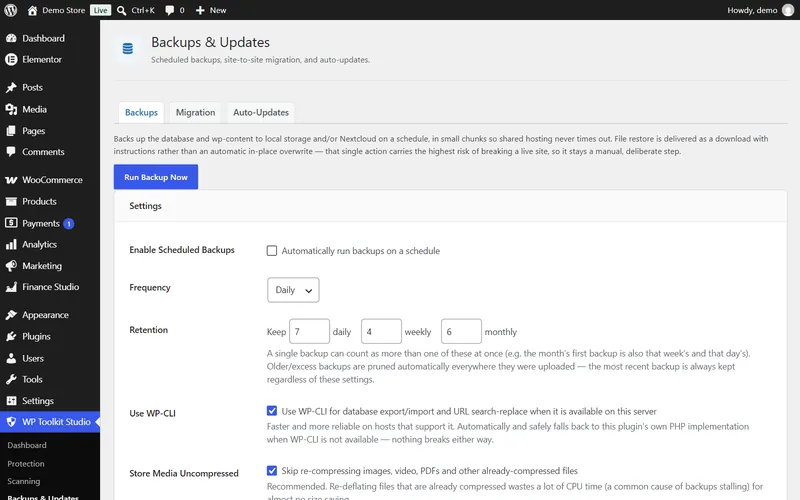
Chunked backups built for shared hosting, checksums, tiered retention and alerts by email or Discord.
Moving a site means hours of search-replace by hand.
Quick Migration with a one-hour link and a serialization-safe URL rewrite that verifies itself.
A cookie banner that only hides scripts on paper.
Scripts stay blocked until consent, with Google Consent Mode v2 and a consent log.
Feature tour
Real screens from version 4.19.1 on a test WordPress site. Choose a feature, and click any screenshot to enlarge it.
Advantages
The plugin's own documentation lists what each module cannot do, from the limits of geo-blocking to why it never sends a generic Content-Security-Policy. You know exactly what you are getting.
Several detections were added after the plugin cleaned a real malware infection on a live client site, including database persistence that survives file cleanup.
Findings are quarantined, never deleted on the spot, and files that are byte-identical to their official WordPress.org release are never auto-removed.
Rebrand it under your agency name, watch every client site from one Fleet hub, and share a blocklist across your portfolio.
Who it's for
One plugin and one dashboard for every client site, under your own brand.
Hand over sites that are protected, backed up and consent-ready from day one.
Replace a stack of plugins with one you can understand.
Cookie consent with real script blocking and a consent log.
More on how we work with IT Agencies & Freelance Developers.
Compare
| Capability | WP Toolkit Studio | Typical security plugin | Separate plugins for each job |
|---|---|---|---|
| Firewall and malware scanning | Yes | Yes | Yes |
| Backups to cloud storage | Yes | Rarely | Yes |
| Site migration | Yes | No | Sometimes |
| Cookie consent banner | Yes | No | Yes |
| White-label for agencies | Yes | Sometimes | Rarely |
| Plugins to install and update | 1 | 1 | 4 to 6 |
| Pricing | PKR, one plan | USD per year | Several subscriptions |
Straight answers
Knowing the limits up front saves you a support ticket later.
Pricing in PKR
Every plan includes the full plugin and updates. Pick monthly to start small, yearly to save, or pay once and keep it permanently.
Start small, cancel any time
PKR 2,200per month
Save PKR 11,400 a year
PKR 15,000per year
Pay once, keep it permanently
PKR 35,000one-time
Prices in Pakistani Rupees, per website. Running several sites or an agency? Ask for a multi-site price. Need changes to the plugin? Request them below.
Getting started
Custom plugin development
We build custom WordPress and WooCommerce plugins, from a single calculator or checkout tweak to a complete system connected to your software. You talk directly to the developer, and you get a written scope and price before any work starts.
Bigger than a plugin? See custom software development.
Questions, answered
Still unsure? Ask the developer directly on a free 30-minute call.
Book a free consultationWP Toolkit Studio is an all-in-one WordPress security and maintenance plugin by Handicraft Marketing. It combines a firewall, malware scanning, login protection, backups, migration, auto-updates, a cookie consent banner and image optimization, with white-label branding for agencies.
For most sites, yes: it covers a firewall, malware scanning, login protection, backups, migration, cookie consent and image optimization. Run one plugin per job, though; switch off the matching module or the old plugin so two firewalls or two backups do not run at once.
It compares WordPress core files, and plugins and themes hosted on WordPress.org, byte for byte with official checksums. It also matches known malware signatures, analyses what obfuscated code actually does, scans the database and watches critical site settings.
It quarantines instead of deleting, and only the highest-confidence findings are quarantined automatically. A file that is byte-identical to its official WordPress.org release is never removed automatically, and permanently deleted quarantine files are kept for 30 days first.
It finds and quarantines malware, removes known malicious database entries for confirmed malware families, and repairs core, plugin and theme files by reinstalling the official package. Badly compromised sites may still need a manual review, which we can do for you.
No. The firewall only inspects anonymous, logged-out traffic, and it starts in learning mode, which logs matches without blocking. Switch to block mode after a few days, once the log looks right.
On the server itself, Nextcloud, Amazon S3 or S3-compatible storage such as Wasabi, Backblaze or DigitalOcean Spaces, Google Drive, Dropbox, OneDrive, FTP or FTPS, and SFTP. You can keep a set number of daily, weekly and monthly copies.
Database restores are automatic: the plugin takes a safety snapshot first and asks you to type a confirmation. Files are restored by downloading the archive and extracting it, which is safer than overwriting a live site automatically.
Yes. Quick Migration creates a one-hour link on the old site. Paste it on the new site, confirm, and it imports the database and content, rewrites every URL without breaking serialized data, and checks the new address afterwards.
Yes. Scans and backups run in small, time-boxed chunks so they finish on shared hosting without timing out, and a circuit breaker keeps a problem in the plugin from taking the site down.
Yes. The banner has necessary, functional, analytics and marketing categories, blocks tracking scripts until consent, sends Google Consent Mode v2 signals, logs consent, and can build a cookie declaration for your privacy policy.
Yes. Users can turn on two-factor login with an authenticator app, with backup codes for when they lose their phone. Secrets are sealed at rest and backup codes are stored hashed.
Add one line to wp-config.php to switch off the hidden login URL, the firewall or the whole plugin instantly, without database access. The constants are listed in the plugin readme.
Yes. Set your agency name, logo, support email and support link, and hide the powered-by line, so client dashboards and alert emails show your brand.
Yes. Fleet lets one site act as a hub that shows the status of every enrolled client site, and shares an IP blocklist across your portfolio.
An optional endpoint, off by default, that lets an AI assistant using the Model Context Protocol run scans and backups and read status. Destructive actions only work while an admin has armed it from WP Admin, and requests are signed.
Auto-updates are off by default. When you turn them on, a full backup runs first and the update uses WordPress's own updater. You can exclude any plugin you do not want updated automatically.
It includes WebP image conversion, missing image size fixes, emoji script removal, self-hosted Google Fonts and a performance audit. It is not a caching plugin, so keep your host's cache in place.
Yes, with a free WPScan API key. Checks are spread out over time to stay inside the free limit, and only publicly disclosed vulnerabilities can be detected.
Three plans in Pakistani Rupees: PKR 2,200 a month, PKR 15,000 a year, or PKR 35,000 once for lifetime use. Every plan includes the full plugin and updates. Prices are per website; ask on WhatsApp for a multi-site price.
Yes. Every plan includes updates: for as long as you are subscribed on the monthly or yearly plan, and for life on the lifetime plan.
WordPress 5.8 or newer and PHP 7.4 or newer. WP-CLI is used when available; SFTP backups need the PHP ssh2 extension, which some shared hosts do not offer.
 Your developer
Jamshaid Ali
Founder, Handicraft Marketing
Your developer
Jamshaid Ali
Founder, Handicraft Marketing
Pick a plan on WhatsApp and we help you set it up the right way: learning mode first, a baseline scan and a test backup.