On this page
- What are the Core Web Vitals targets?
- How do you measure WordPress speed properly?
- How do you read the results without fooling yourself?
- Which part of a slow LCP should you fix first?
- Which fix improves which metric?
- The 12 fixes, in order
- What does WordPress already do for speed?
- What should you avoid?
- How common is a slow WordPress site?
- When are speed fixes not enough?
- Summary
- References
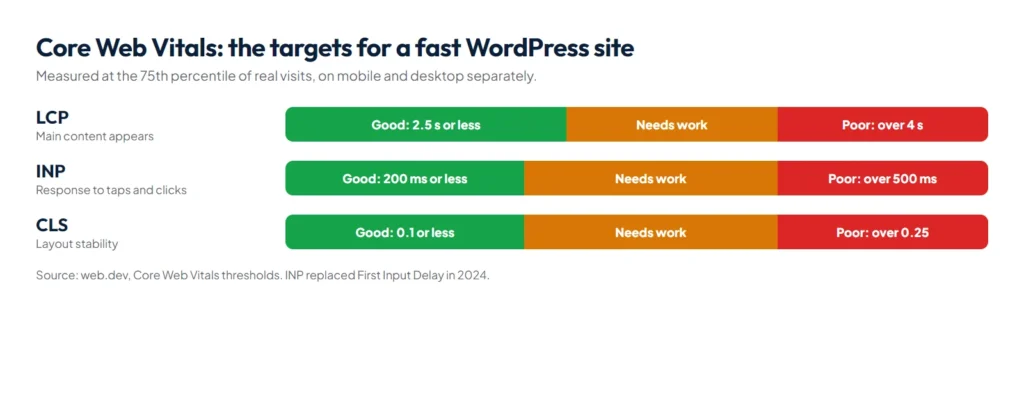
To speed up a WordPress site, fix the server first with good hosting and page caching, then the heaviest items on each page: oversized images, web fonts, third-party scripts and page-builder markup. Measure before and after with PageSpeed Insights, and aim for Google’s Core Web Vitals targets: Largest Contentful Paint within 2.5 seconds, Interaction to Next Paint of 200 milliseconds or less, and Cumulative Layout Shift of 0.1 or less, measured at the 75th percentile of visits.
We hold our own site to these targets. It runs a custom theme with self-hosted fonts and animated 3D hero sections, and it still scores 94 to 100 for mobile performance in Lighthouse, because the heavy parts wait until the visitor interacts with the page. The 12 fixes below are the ones we apply on client sites, in the order we apply them.
What are the Core Web Vitals targets?
| Metric | What it measures | Good | Poor |
|---|---|---|---|
| Largest Contentful Paint (LCP) | How fast the main content appears | 2.5 seconds or less | More than 4 seconds |
| Interaction to Next Paint (INP) | How quickly the page responds to taps and clicks | 200 ms or less | More than 500 ms |
| Cumulative Layout Shift (CLS) | How much the layout jumps while loading | 0.1 or less | More than 0.25 |
Thresholds are from web.dev; INP replaced First Input Delay as a Core Web Vital in 2024. Google says good scores align with “what our core ranking systems seek to reward”, so speed helps both visitors and search.
How do you measure WordPress speed properly?
- Use PageSpeed Insights on mobile. The top section shows real-visitor data when Google has enough of it; the lab score below is a single test run.
- Check the Core Web Vitals report in Search Console to see which groups of pages fail.
- Test each template, not just the home page: a service page, a blog post, a product page, the contact page.
- Test again after every change, so you know which fix helped and which one broke something.
How do you read the results without fooling yourself?
PageSpeed Insights shows two different things, and most confusion comes from mixing them up. The top section is field data from the Chrome UX Report (CrUX): real Chrome visitors over the previous 28 days, reported at the 75th percentile. The score below it is lab data from Lighthouse: one simulated load on one device with fixed network conditions. Lab data is for debugging; field data is what Google uses.
- “No data” in the top section means the page does not have enough real visits yet. PageSpeed Insights then falls back to the whole site (the origin), and if the site is too small as well, there is no field data at all. Use the lab score and Lighthouse to guide fixes until traffic grows.
- Field data moves slowly. Because it covers 28 days, a fix you ship today takes weeks to show fully in the field numbers. The lab score changes immediately.
- Search Console groups similar pages. Its Core Web Vitals report uses the same CrUX data, puts pages with a similar experience into groups, and gives each group the status of its slowest metric. Mobile and desktop are rated separately.
- Validation takes 28 days. After a fix, start validation for the issue in Search Console; it begins a 28-day monitoring period before the group can pass.
Which part of a slow LCP should you fix first?
Google’s web.dev guide splits Largest Contentful Paint into four parts. If you know which part is slow, you know which WordPress fix to make, instead of trying everything.
| LCP part | Suggested share of LCP | Usual WordPress cause | Fix |
|---|---|---|---|
| Time to first byte (TTFB) | About 40% | Slow hosting, no page cache, redirects | Page caching, better hosting, current PHP, remove redirect chains |
| Resource load delay | Under 10% | Hero image set as a CSS background, inside a slider, or lazy-loaded | Use a normal image tag for the hero, no lazy loading, high fetch priority |
| Resource load duration | About 40% | A 2 MB hero photo, no modern format | Resize to display size, WebP or AVIF, CDN for distant visitors |
| Element render delay | Under 10% | Render-blocking CSS and scripts in the head, builder JavaScript | Defer non-critical scripts, remove unused CSS, fewer plugins on the page |
For the server part on its own, web.dev rates a TTFB of 0.8 seconds or less as good and more than 1.8 seconds as poor. If your TTFB is already above 1.8 seconds, no image or font work will get LCP under 2.5 seconds; start with hosting and caching. This matters for Pakistani businesses that sell abroad: a server in one country and buyers in the UAE, UK or US add distance to every uncached request, which is where a CDN or a server near your main market pays off.
Which fix improves which metric?
| Problem you see | Metric it hurts | Fix from the list below | Typical effort |
|---|---|---|---|
| Slow server response, uncached pages | LCP | 1 and 2: hosting, PHP, page caching | Low, often a hosting setting |
| Large or lazy-loaded hero image | LCP | 3 and 4: image size, format and priority | Low |
| Text appears late or swaps font | LCP and CLS | 5: self-hosted, trimmed fonts | Low to medium |
| Taps on menus and buttons feel slow | INP | 6, 7, 8 and 11: fewer and delayed scripts, shorter tasks | Medium |
| Very large page structure | INP and LCP | 9: reduce page-builder nesting | Medium to high |
| Content jumps while loading | CLS | 10: image sizes, reserved space for embeds and banners | Low |
For INP, web.dev breaks each interaction into input delay, processing time and presentation delay. On WordPress sites the input delay is usually the problem: the main thread is busy running plugin, tracking and builder scripts when the visitor taps, so the tap waits. Removing or delaying those scripts helps more than any setting inside a speed plugin.
The 12 fixes, in order
- Get decent hosting and a current PHP version. A slow server delays everything. Use PHP 8.x and a plan with enough memory for your plugins.
- Turn on page caching. Serving a ready-made page is much faster than building it on every visit. Use your host’s server cache or one caching plugin, never several.
- Resize and compress images. Upload images at the size they are shown, in WebP or AVIF, and lazy-load images below the fold.
- Load the main image first. Never lazy-load the hero image; give it a high fetch priority so LCP happens early. Replace heavy hero sliders with one strong image.
- Self-host and trim fonts. Use one or two font families, only the weights you need, with font-display: swap, and preload the main one.
- Delay third-party scripts. Chat widgets, ad pixels, video and map embeds are often the heaviest things on the page. Load them after the first interaction, or show a lightweight preview until clicked. On our site, the 3D effects start only after the first interaction or a few seconds after load.
- Remove plugins you do not need. Each one can add its own CSS and JavaScript to every page.
- Load scripts only where they are used. A contact form’s scripts belong on the contact page, not on every blog post.
- Reduce page-builder bloat. Deeply nested sections and widgets create a large page structure that is slow to render and to update.
- Reserve space to stop layout shifts. Give every image and embed a width and height, and make cookie banners overlay the page instead of pushing it down.
- Break up long JavaScript tasks. Heavy sliders, animations and analytics code make taps feel slow, which hurts INP.
- Add compression and a CDN. Brotli or gzip compression and browser caching help every visitor; a CDN helps most when visitors are far from your server.
What does WordPress already do for speed?
Recent WordPress versions handle some of this for you, so check before you add a plugin that does the same job twice.
- Hero image priority: since WordPress 6.3, core adds
fetchpriority="high"to the image it judges most likely to be the LCP image and avoids lazy-loading images near the top of the page. Themes that print the hero as a CSS background, or sliders that build it with JavaScript, miss out on this. - Speculative loading: since WordPress 6.8, core uses the browser’s Speculation Rules API to start loading the next page when a logged-out visitor begins clicking a link, so moving between pages feels faster. It needs pretty permalinks.
- PHP version: WordPress.org recommends PHP 8.3 or greater and MySQL 8.0 or MariaDB 10.11 or greater. Many older sites still run PHP versions that WordPress no longer recommends; ask your host to upgrade after testing on a staging copy.
This is why a theme that follows WordPress standards often needs fewer speed plugins: the platform already does part of the work, as long as the theme does not undo it.
What should you avoid?
- Installing several speed plugins that do the same job and conflict with each other. If something breaks after a plugin change, our free WordPress plugin conflict checker walks you through finding the plugin at fault.
- Combining and minifying every file blindly, then not testing forms, menus and checkout.
- Chasing a perfect lab score while real visitors still have a slow experience.
- Lazy-loading the hero image, which delays the very thing LCP measures.
How common is a slow WordPress site?
Very common. The 2025 Web Almanac from HTTP Archive found that about 45% of WordPress sites pass Core Web Vitals on mobile, which places WordPress among the lower-ranked content management systems in its comparison. The platform is not the cause on its own: the theme, the page builder, the plugins and the hosting decide which side of that line a site lands on. That is why we build every site in our website development service on a lean, hand-coded theme and test it against these targets before launch.
When are speed fixes not enough?
If a site carries a heavy theme, a page builder and dozens of plugins, tuning only goes so far. At that point a rebuild on a lean theme is often cheaper than months of patching, and it fixes speed, editing and security together. Our website development service builds fast WordPress sites from the start, and our guide to the website price in Pakistan shows what that costs. Speed is also part of technical SEO; see our guide to SEO cost in Pakistan for what a good SEO package should include.
Summary
WordPress speed optimization works best in order: hosting and caching, then images and the hero image, then fonts and third-party scripts, then plugins and page-builder weight, then layout shifts and long tasks. Measure on mobile with PageSpeed Insights, aim for LCP within 2.5 seconds, INP of 200 milliseconds or less and CLS of 0.1 or less, and test after every change.
References
- Optimize Largest Contentful Paint, web.dev (Google)
- About PageSpeed Insights, Google for Developers
- Speculative loading in WordPress 6.8, Make WordPress Core
- Web Almanac 2025: CMS chapter, HTTP Archive