On this page
- What is each option?
- What can Gutenberg do now that it could not in 2018?
- Elementor vs Gutenberg vs custom theme compared
- What does each option cost over three years?
- How do you keep an Elementor site fast?
- Is Elementor bad for SEO?
- What happens if you want to switch later?
- Why we build custom themes
- Five questions that settle the choice
- Which should you choose?
- Summary
- References
Gutenberg, the WordPress block editor, is free, built in and the lightest way to build pages. Elementor is a drag-and-drop page builder that makes complex layouts easy without code, at the cost of a yearly Pro licence and heavier pages. A custom-coded theme gives the fastest and most tailored site with simple editing, but needs a developer to build. If speed and long-term cost matter most, choose Gutenberg or a custom theme. If you want to redesign pages yourself often, Elementor is the easier tool.
All three are legitimate choices, and the right one depends on who will maintain the site and how often its layout changes. Here is how they compare for a business website.
What is each option?
- Gutenberg (the block editor) has been the default WordPress editor since WordPress 5.0 in December 2018. You build pages from blocks such as headings, images, columns and buttons, and modern block themes let you edit headers and footers the same way.
- Elementor is a page-builder plugin with a visual drag-and-drop editor. The core plugin is free; Elementor Pro adds the theme builder, forms and many widgets for around PKR 10,000 a year per site, according to GoDaddy’s Pakistan price guide.
- A custom theme is designed and coded for your business. Each page type has its own template, and you edit the content through the WordPress dashboard, with fields or blocks set up for exactly what that page needs.
What can Gutenberg do now that it could not in 2018?
Much of the “Gutenberg is too basic” view dates from its first years. Three changes closed most of the gap for business sites:
- Full site editing (WordPress 5.9, January 2022): with a block theme, you edit headers, footers and page templates in the Site Editor with the same blocks you use for pages. Twenty Twenty-Two was the first default block theme. Before this, you needed a page builder or a developer to change a header.
- Patterns (WordPress 6.3): reusable blocks were renamed synced patterns. Edit a synced pattern once, such as a call-to-action band or a contact strip, and it updates everywhere it is used. Unsynced patterns work as ready-made starting layouts you can change per page.
- Global styles: colours, fonts and spacing are set once for the whole site in the Styles panel, so pages stay consistent without styling each block.
What Gutenberg still lacks compared with Elementor is fine visual control without code: motion effects, complex responsive tweaks per device, and a large library of ready-made widgets. For a services site that mainly needs clean pages, it is usually enough.
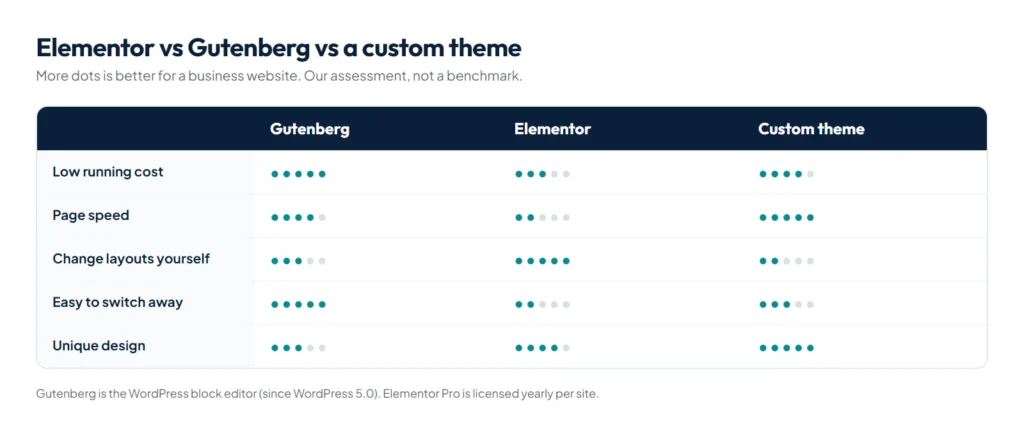
Elementor vs Gutenberg vs custom theme compared
| Gutenberg | Elementor | Custom theme | |
|---|---|---|---|
| Software cost | Free, part of WordPress | Free core; Pro licence renewed yearly | No builder licence; higher build cost |
| Page speed | Light | Heavier markup, CSS and JavaScript | Lightest: only the code the site needs |
| Editing text and images | Easy | Easy, visual | Easy, through set fields and blocks |
| Changing layouts yourself | Moderate, with patterns and blocks | Very easy, drag and drop | Limited by design; the developer adds new sections |
| Lock-in | Low | High: switching away means rebuilding pages | Medium: tied to the theme, content stays in WordPress |
| Upkeep | Updates with WordPress | Plugin and add-on updates, licence renewals | Theme maintained by the developer |
| Best for | Content-led sites and blogs | Owners who redesign pages often | Businesses that want speed, a unique design and low running costs |
What does each option cost over three years?
The build price is only part of the cost. Compare the full three years, because that is where builder licences and plugin upkeep add up.
| Cost item | Gutenberg | Elementor Pro | Custom theme |
|---|---|---|---|
| Editor licence | Free | From US$60 a year for one site, on Elementor’s pricing page | None |
| Licence over three years | Free | From about US$180, before any add-on plugins | None |
| Build cost | Lowest to mid, depending on design | Low to mid | Highest upfront |
| Add-on plugins | Few needed | Often one or more widget packs, each with its own renewal | Few needed |
| Cost of a redesign later | New theme, content stays | Pages rebuilt in the new tool | New templates, content stays |
Check the current Elementor price on its own site before you budget, since plans and offers change. For what each build type costs in Pakistan, see our guide to the website price in Pakistan.
How do you keep an Elementor site fast?
If you choose Elementor, these settings and habits make the biggest difference. All of them come from Elementor’s own features:
- Turn on the Performance features. Under Elementor’s Performance settings, enable Optimized Image Loading (prioritises the main above-the-fold image and defers the rest), Lazy Load Background Images, and Optimized Gutenberg Loading, which removes unused block editor scripts and styles on Elementor pages.
- Build with containers, not sections and columns. Flexbox containers produce less nested markup than the older section and column layout, which means a smaller page for the browser to render.
- Limit add-on widget packs. Each one can load its own CSS and JavaScript. Use one pack at most and remove the ones you tried and abandoned.
- Use real images for the hero. A hero set as a background image cannot be prioritised the same way as an image element, which slows Largest Contentful Paint.
- Disable Elementor’s default fonts and colours if your theme already sets them, so the browser does not load two sets of styles.
Then test every template on mobile in PageSpeed Insights. Our guide to WordPress speed optimization lists the fixes in priority order.
Is Elementor bad for SEO?
No. Google ranks pages on their content and usefulness, and an Elementor page can rank well. The risk is speed: page builders add extra layers of code, so heavy designs often struggle with Core Web Vitals on mobile. If you use Elementor, keep layouts simple, limit add-on plugins and test with PageSpeed Insights. Our guide to WordPress speed optimization covers the fixes.
What happens if you want to switch later?
Moving away from Elementor means rebuilding the pages, because it stores layouts in its own format; turn it off and pages lose their design. Content written in Gutenberg stays readable in any theme. With a custom theme, your pages, posts and media stay in WordPress, but a new theme needs its templates rebuilt.
Why we build custom themes
For our custom projects we code the theme for the business and set up simple editing for every page, with no page builder. This website is built that way: it has animated 3D sections and still scores 94 to 100 for mobile performance in Lighthouse. Clients edit their own text, images and posts, and there are no builder licences to renew each year.
Five questions that settle the choice
- Who will change the layout after launch? If it is you or your team, often, Elementor. If layouts rarely change and text and images are the main edits, Gutenberg or a custom theme.
- How much does mobile speed matter to your business? If you rely on Google traffic or paid ads, every extra layer of code costs you. The 2025 Web Almanac from HTTP Archive found that about 45% of WordPress sites pass Core Web Vitals on mobile, so a heavy build puts you on the wrong side of that line more easily.
- What is your budget split between now and later? Low upfront and ongoing licences points to Elementor. Higher upfront and low running costs points to a custom theme.
- How long will the site live? For three years or more, lock-in matters. Content in blocks or in a custom theme moves more easily than Elementor layouts.
- Do you have a developer you can reach? A custom theme is a good deal only if someone can add new sections when you need them. If not, choose a tool you can manage yourself.
Which should you choose?
- Choose Gutenberg if your site is mostly content, you want zero licence costs, and you are happy with block-based layouts.
- Choose Elementor if you or your team will redesign pages often and you accept the yearly licence and extra weight.
- Choose a custom theme if speed, a distinctive design and low running costs matter, and you have a developer for layout changes.
Whichever you choose, keep the plugin list short and the site backed up. Our WordPress backup and security plugin, WP Toolkit Studio, covers backups, a firewall and malware scanning in one plugin, and our free WordPress plugin conflict checker helps when two plugins clash.
Summary
Elementor vs Gutenberg vs a custom theme is a trade-off between design freedom, speed and long-term cost. Gutenberg is free and light, Elementor is the easiest for DIY layouts but heavier and licensed yearly, and a custom theme is the fastest and most tailored. For a custom build, see our website development service, and for costs, our guide to the website price in Pakistan.
References
- Synced Patterns (Reusable blocks), WordPress.org documentation
- Elementor pricing, Elementor
- Improve performance features, Elementor Help Center
- Web Almanac 2025: CMS chapter, HTTP Archive