On this page
- Why do contact forms get so much spam?
- What is a CAPTCHA and how does reCAPTCHA work?
- reCAPTCHA v2 vs v3: which is better?
- Is reCAPTCHA free?
- What are the best reCAPTCHA alternatives?
- How much does each CAPTCHA add to your page?
- How do you stop form spam without a CAPTCHA?
- How our own contact form stops spam
- How do you add Turnstile or reCAPTCHA correctly?
- How do you stop spam on WordPress forms?
- Do CAPTCHAs hurt accessibility and conversions?
- Why am I still getting spam with reCAPTCHA?
- Which spam protection should you choose?
- How we did this
- Summary
- References
To stop contact form spam, use layers instead of a single CAPTCHA: a hidden honeypot field, a minimum fill time, a limit on submissions per visitor and server-side checks stop most bots with no extra work for real visitors, and a CAPTCHA such as Cloudflare Turnstile or Google reCAPTCHA is added only where spam still gets through. Whichever CAPTCHA you use, the token must be verified on your server, or it protects nothing. This guide compares reCAPTCHA v2, v3, Turnstile, hCaptcha and ALTCHA with real prices from their own pages, shares a test of how much each one adds to a page, and gives the exact steps and code we use on our own forms.
We build and maintain business websites, and form spam is one of the most common complaints we hear from clients: fake leads, link spam, SEO pitches and sometimes thousands of junk entries a day. The contact form on this site uses no CAPTCHA at all. It runs on the layers below, and we explain exactly how it works further down.
Why do contact forms get so much spam?
A form is a public address that accepts text and usually sends an email. That makes it useful to several kinds of abuse:
- Spam bots crawl the web, find any form and post links to casinos, pills or SEO services, hoping the text ends up on a public page or in your inbox.
- Relay abuse: if your form sends the visitor “a copy of your message”, a bot can enter someone else’s email address and use your server to send spam to them. This can damage your domain’s email reputation.
- Subscription bombing: bots sign a victim up to hundreds of newsletters at once to bury an important email, so open signup forms without confirmation become part of an attack on someone else.
- Card testing and account abuse on checkout, login and registration forms, which is more serious than contact spam and needs stronger tools.
- Human spammers who type messages by hand, often SEO or web design pitches. No CAPTCHA stops a real person, so these need content filters.
Knowing which kind you get tells you which layer to add. Most small business sites mainly get the first and last kinds.
What is a CAPTCHA and how does reCAPTCHA work?
A CAPTCHA is a test that tries to tell humans and bots apart. Old CAPTCHAs asked you to type distorted letters. Modern ones mostly watch signals in the background, such as how the browser behaves and what the provider has seen from it before, and only show a puzzle when they are unsure. Every CAPTCHA works the same way underneath: a script on your page produces a token, the token is sent with the form, and your server asks the provider whether that token is valid.
Google reCAPTCHA comes in two main versions for websites:
- reCAPTCHA v2 is the “I’m not a robot” checkbox, which sometimes asks you to pick images. An invisible v2 variant runs when the visitor clicks submit and shows a puzzle only when needed.
- reCAPTCHA v3 never interrupts the visitor. It returns a score for each request, and you decide what to do with it. Google’s v3 documentation says to start with a threshold of 0.5 and adjust it after looking at your traffic in the admin console.
Both versions now live inside Google Cloud, which Google currently calls Fraud Defense, with the older admin console still available as the legacy console.
reCAPTCHA v2 vs v3: which is better?
| reCAPTCHA v2 checkbox | reCAPTCHA v3 | |
|---|---|---|
| What the visitor sees | A checkbox, sometimes an image puzzle | Nothing, apart from a small badge |
| What your server gets | Pass or fail | A score you set a threshold for |
| Effort to set up | Low | Higher: you must choose and tune the threshold and decide what happens to low scores |
| Risk | Puzzles annoy people and can block some users | A badly set threshold silently drops real leads |
| Best for | Simple sites that want a clear yes or no | Sites with steady traffic that can review scores |
The keys are not interchangeable: Contact Form 7’s documentation notes that v2 keys do not work with the v3 API, so you need to register the site again to switch. For v3, do not throw low scores away. Send low scoring messages to a spam folder you check weekly, at least until you trust your threshold.
Is reCAPTCHA free?
Yes, for most small sites. Google’s pricing page lists three tiers:
| Tier | Monthly cost on Google’s pricing page |
|---|---|
| Essentials | Free up to 10,000 assessments a month |
| Premium (needs a billing account in Google Cloud) | Free up to 10,000; a flat US$8 for 10,001 to 100,000; then US$1 per 1,000 |
| Enterprise | A fixed monthly volume commitment at US$1 per 1,000, with a minimum 12 month subscription |
An assessment is one token check. A contact form that gets a few hundred submissions a month is far inside the free tier. Sites that run reCAPTCHA on every page view, login and checkout reach the limit much faster.
What are the best reCAPTCHA alternatives?
| Option | Visitor friction | Price from its own page | Notes |
|---|---|---|---|
| Google reCAPTCHA | Low (v3) to medium (v2 puzzles) | Free up to 10,000 assessments a month | The most widely supported by plugins |
| Cloudflare Turnstile | Low: managed, non-interactive or invisible modes, no image puzzles | Free plan with up to 20 widgets and unlimited challenges | Works on any website without moving it to Cloudflare |
| hCaptcha | Medium on the free plan | Basic is free; Pro is US$139 a month billed monthly, with 100,000 checks included | Positions itself on privacy |
| ALTCHA | Very low: the browser solves a small proof-of-work task | Self-hosted | No cookies or fingerprinting according to its documentation; you generate challenges on your own server |
| Honeypot and time checks | None | Free, built into many form plugins | Stops simple bots; add a CAPTCHA if spam continues |
Cloudflare’s documentation says Turnstile can be embedded into any website without sending traffic through Cloudflare, and that it does not access, store or send form entries. Contact Form 7’s own guide goes as far as recommending Turnstile for its forms.
How much does each CAPTCHA add to your page?
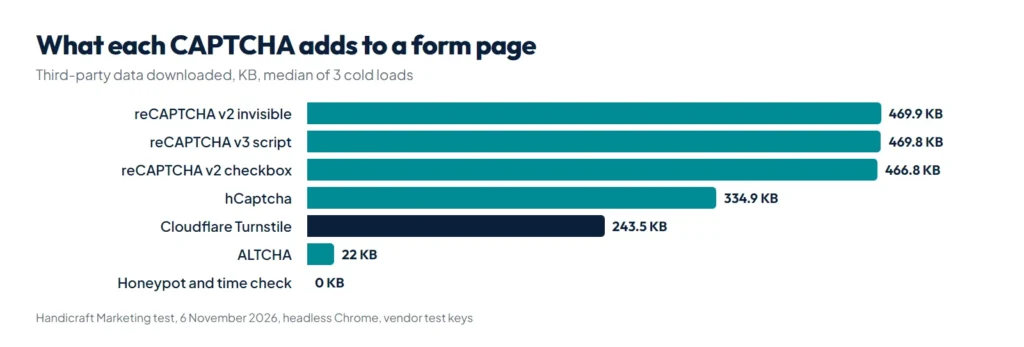
Every CAPTCHA loads code from its provider, and that code is downloaded by every visitor who opens the page, not only those who submit the form. We loaded the same simple form with each option in a fresh browser and measured what the provider’s code downloaded.
| Option | Data downloaded | Requests | Third-party domains contacted |
|---|---|---|---|
| Honeypot and time check | 0 KB | 0 | None |
| ALTCHA | 22.0 KB | 1 | The CDN we loaded it from (can be self-hosted) |
| Cloudflare Turnstile | 243.5 KB | 2 | challenges.cloudflare.com |
| hCaptcha | 334.9 KB | 9 | hcaptcha.com subdomains |
| reCAPTCHA v2 checkbox | 466.8 KB | 13 | google.com, gstatic.com, fonts.gstatic.com |
| reCAPTCHA v2 invisible | 469.9 KB | 12 | google.com, gstatic.com, fonts.gstatic.com |
| reCAPTCHA v3 script | 469.8 KB | 12 | google.com, gstatic.com, fonts.gstatic.com |
In our test, reCAPTCHA added close to half a megabyte, about twice what Turnstile added. Visitors who come back have some of this in their browser cache, but first-time mobile visitors, the people you most want to convert, download it all. Two practical rules follow:
- Load the CAPTCHA only on pages with a form, not site-wide. Many WordPress plugins load the script on every page by default; check the settings.
- Start without one. If honeypot and time checks stop your spam, you have saved every visitor the download.
If your site already struggles with speed, our guide to fixing a failed Core Web Vitals assessment on WordPress explains how third-party scripts affect the scores.
How do you stop form spam without a CAPTCHA?
These layers stop most automated spam and cost real visitors nothing. Use as many as your form tool allows:
- Honeypot field. Add a field that people never see, such as “website”, hidden off screen with CSS (not just display:none, which some bots skip), marked aria-hidden=”true”, with tabindex=”-1″ and autocomplete=”off” so screen readers, keyboards and autofill leave it alone. Bots that fill every field reveal themselves.
- Minimum fill time. Record when the form was shown and reject submissions that arrive within about 3 seconds. No person reads and fills a form that fast.
- A token tied to the page, such as a WordPress nonce, so bots cannot post straight to your form handler without loading the page first.
- Rate limiting. Allow a few submissions per IP address per hour. This stops floods even from bots that pass every other check.
- Server-side validation. Check the email format, require a minimum message length, and treat messages with many links as suspicious. Never trust checks done only in JavaScript.
- Content filtering. A service like Akismet compares messages against spam it has seen elsewhere, which also catches human spammers.
- No copies to the sender. Remove “send me a copy” options and do not include the visitor’s message in auto replies, so your form cannot be used to send spam to others.
- Double opt-in on newsletter forms, so only addresses that confirm are added, which also protects you from subscription bombing.
Two details decide whether these layers work. First, when the honeypot or time check fails, show the normal success message but discard the entry, so the bot gets no signal to adapt. Second, if your pages are cached, the timestamp and nonce in the cached HTML can be hours old: exclude form pages from the page cache or fill those values in fresh when the page loads.
How our own contact form stops spam
The contact form on this site, which we wrote ourselves as part of our custom WordPress theme, uses four of the layers above and no CAPTCHA:
- A WordPress nonce checked on submit.
- A hidden “Leave this empty” field positioned off screen. If it is filled, the visitor sees the normal thank you page and nothing is saved.
- A hidden timestamp. Submissions faster than 3 seconds are treated the same way.
- A limit of 5 messages per IP address per hour, after which the visitor is asked to try later or reach us on WhatsApp.
The contact page is also excluded from the page cache, so every visitor gets a fresh nonce and timestamp. The core check is only a few lines of PHP:
// Bots: honeypot filled or submitted faster than a human could type.
$started = (int) ($_POST['hm_started'] ?? 0);
if (!empty($_POST['hm_website']) || ($started && time() - $started < 3)) {
    wp_safe_redirect(add_query_arg('sent', '1', $back));
    exit; // pretend it worked, save nothing
}
On a production site, sign the timestamp or store it on the server so a bot cannot simply send an old value, and keep the nonce check in front of it as we do.
How do you add Turnstile or reCAPTCHA correctly?
The most common mistake we see is a CAPTCHA widget on the page with no check on the server. A bot can skip the widget and post directly to the form handler. Cloudflare’s own documentation is blunt about this: the client-side widget alone does not protect your forms. The steps:
- Create a site key and secret key in the Cloudflare or Google console, and add only your real domains.
- Add the provider’s script and widget to the form page only.
- On submit, read the token from the form:
cf-turnstile-responsefor Turnstile,g-recaptcha-responsefor reCAPTCHA. - Send it with your secret key to the provider’s verify address from your server, and reject the form unless the answer says it passed.
- Keep the secret key in your server configuration, never in the page or in a public repository.
A Turnstile check in WordPress looks like this:
$res = wp_remote_post('https://challenges.cloudflare.com/turnstile/v0/siteverify', [
    'timeout' => 10,
    'body'    => [
        'secret'   => TURNSTILE_SECRET, // defined in wp-config.php
        'response' => sanitize_text_field(wp_unslash($_POST['cf-turnstile-response'] ?? '')),
        'remoteip' => $_SERVER['REMOTE_ADDR'] ?? '',
    ],
]);
$out = json_decode(wp_remote_retrieve_body($res), true);
if (empty($out['success'])) {
    // reject: show "Please confirm you are human" and keep the visitor's text
}
For reCAPTCHA the verify address is https://www.google.com/recaptcha/api/siteverify with the same secret and response fields. With v3, also check that the score is at or above your threshold and that the returned action matches the action you set on the page. Mind the time limits: reCAPTCHA tokens are valid for two minutes and Turnstile tokens for 300 seconds, and each token can be verified only once. With reCAPTCHA v3, call it when the visitor clicks submit, not when the page loads, or slow typists will send an expired token.
How do you stop spam on WordPress forms?
Most WordPress form plugins already include these layers; you only need to switch them on:
- Contact Form 7 has built-in modules for reCAPTCHA v3 and Cloudflare Turnstile, and works with Akismet by adding options such as
akismet:authorandakismet:author_emailto the name and email fields. - WPForms has a honeypot based “modern anti-spam protection” that needs JavaScript, a minimum time to submit setting, and integrations for Akismet, reCAPTCHA, hCaptcha and Turnstile, which its documentation says work in the free WPForms Lite too.
- Elementor, Gravity Forms, Fluent Forms and Forminator offer honeypot and CAPTCHA options too; check the form’s settings rather than adding another plugin.
On Akismet’s pricing page, personal sites can name their own price, while commercial sites need the Pro plan, from US$9.95 a month billed yearly for 500 spam checks a month on one site. A business site should not use the personal plan.
Every extra security plugin is one more thing that can clash with your theme or form builder. If something breaks after you add one, our free WordPress plugin conflict checker helps you find the cause step by step. Form spam protection is one item in a bigger picture: our WordPress security checklist covers logins, updates and backups, and if spam links have started appearing on your pages rather than in your inbox, read what to do when a WordPress site is hacked.
Do CAPTCHAs hurt accessibility and conversions?
They can. The W3C’s note on the inaccessibility of CAPTCHA explains that image puzzles exclude many blind and low vision users, audio puzzles exclude deaf users, and text puzzles assume people can read English characters. Every puzzle also costs you some real leads who give up. That is why the invisible and managed modes, and the no-CAPTCHA layers above, are better defaults. If you must show a challenge, make sure people can still contact you another way, such as a phone number, an email address or a WhatsApp chat link made with our free WhatsApp link generator.
Privacy matters too. Google’s FAQ says reCAPTCHA sets a necessary cookie, and that you can load it from www.recaptcha.net instead of www.google.com to avoid other Google cookies. If you hide the reCAPTCHA badge, Google requires you to show its branding text in the form instead. Mention whichever service you use in your privacy policy.
Why am I still getting spam with reCAPTCHA?
- The token is not verified on the server, so bots post around the widget. This is the first thing to check.
- Bots post to an old endpoint, such as an earlier form or a form plugin you replaced that still accepts submissions.
- The v3 threshold is too low, or low scores are accepted anyway.
- The spam is typed by people. A CAPTCHA cannot stop humans; content filtering and rate limits can reduce it.
- CAPTCHA solving services exist that use people or software to pass challenges for bots, which is why CAPTCHA should be one layer, not the only one.
Which spam protection should you choose?
| Your form | Start with | Add if spam continues |
|---|---|---|
| Small business contact form | Honeypot, minimum time, rate limit, server validation | Turnstile in managed mode, or Akismet |
| Quote or lead form from paid ads | The same layers, with no puzzles, since each lost lead costs money | Invisible Turnstile or reCAPTCHA v3, with low scores sent to review |
| Newsletter signup | Honeypot and double opt-in | Turnstile |
| Login and registration | Login attempt limits and two-factor authentication | Turnstile or reCAPTCHA on registration |
| Checkout | Your payment gateway’s fraud checks and rate limits | A CAPTCHA on checkout only during attacks |
If you would rather have this set up for you, our website development service includes spam protected forms that send leads to your email or CRM, built to load fast on mobile.
How we did this
On 6 November 2026 we made eight copies of one simple HTML form (name, email, message) and served them from a local web server: no protection, a honeypot with a hidden timestamp, reCAPTCHA v2 checkbox, invisible reCAPTCHA v2, the reCAPTCHA v3 script, Cloudflare Turnstile, hCaptcha and the ALTCHA widget. Each page was opened in a new, empty Chrome profile (headless, mobile sized window), we waited 10 seconds, and we added up the bytes transferred for every request to a third-party domain, including requests made inside the widget frames. Each page was loaded 3 times and we report the median; the three runs differed by under 1%.
Limits: we used each provider’s public test keys (for the v3 script, Google’s v2 test key, as Google offers no v3 test key), and real keys may load more or less. ALTCHA was loaded from a public CDN and its challenge, which comes from your own server, is not counted. Providers change their code often, so treat the numbers as a snapshot of relative size, not fixed values.
Summary
To stop contact form spam, start with layers that cost visitors nothing: a honeypot field, a minimum fill time, a nonce, rate limits and server-side validation, and discard caught bots quietly. Add a CAPTCHA only if spam continues, load it only on form pages, and always verify its token on your server. Cloudflare Turnstile is free and added about half the data of reCAPTCHA in our test, reCAPTCHA is free up to 10,000 assessments a month, and Akismet helps against human spam. Keep a second way to reach you, such as a link from our WhatsApp link generator, and check the rest of your site against our WordPress security checklist.
References
- Handicraft Marketing CAPTCHA page weight test, 6 November 2026 (method above)
- Google Cloud: reCAPTCHA pricing
- Google: reCAPTCHA v3 documentation and verifying the user’s response
- Cloudflare: Turnstile server-side validation and Turnstile plans
- hCaptcha plans
- W3C: Inaccessibility of CAPTCHA
- Contact Form 7: Cloudflare Turnstile integration and WPForms: how to prevent spam