On this page
- What are the ways to make a website for free?
- What do free website plans include, and what do they leave out?
- How do you make a website for free, step by step?
- Can you make a website for free with AI?
- When does a free website stop being enough?
- Is a free website bad for SEO?
- What does a free website cost over time?
- Summary
- References
You can make a website for free with a builder such as Google Sites, WordPress.com, Wix, or a free static host like GitHub Pages or Cloudflare Pages. Free plans give you a subdomain address, limited storage and the builder’s branding, so they suit a portfolio, a school project or a test, while a business usually needs a paid plan or its own domain and hosting once it wants trust, email and payments. This guide compares the free options, shows how to build a free site step by step, and explains the exact point where free stops working.
We build websites for businesses in Pakistan every week, and many of them come to us after starting on a free plan. Every plan limit below comes from the provider’s own pricing or help page, checked in November 2026. Prices change, so open the linked page before you decide.
What are the ways to make a website for free?
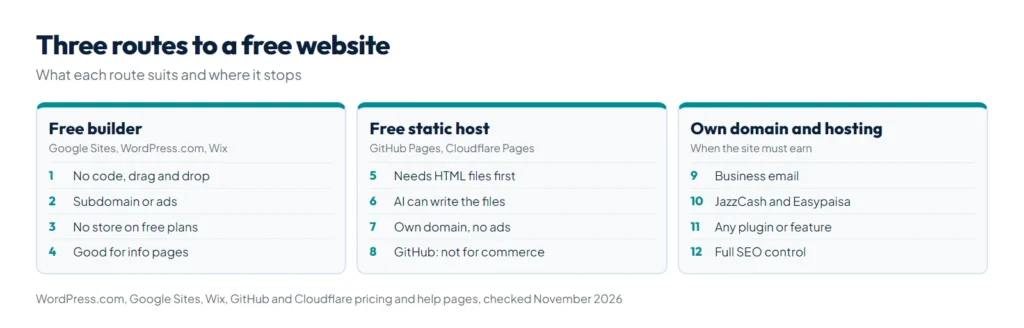
There are three kinds of free website. Each has a different catch, so pick by what you need the site to do, not by the template you like most.
| Option | What you get free | The main limit | Best for |
|---|---|---|---|
| Google Sites | Drag and drop pages with a Google account, can connect your own domain | Very few design and business features, no online store | Simple info page, school or club site |
| WordPress.com Free | A WordPress.com subdomain, 1 GB storage, unlimited pages and posts | Ads shown to visitors, no plugins, no custom domain | Blog or personal site |
| Wix Free | Drag and drop editor, hosting and templates | Wix address; your own domain and selling need a paid plan | Trying out a design before paying |
| GitHub Pages | Hosting for HTML, CSS and JavaScript files, up to 1 GB | You write or generate the code yourself; not meant for commercial sites | Portfolio, developer projects |
| Cloudflare Pages | Static hosting with 500 builds a month and your own domains | You need the site files first | A static site made by hand or with AI |
The free builders (the first three) are the easiest. The free hosts (the last two) give you more control and no ads, but only if you already have the site files, for example from a code editor or from an AI tool like Claude.
What do free website plans include, and what do they leave out?
WordPress.com Free
The WordPress.com pricing page lists the Free plan at US$0 with no expiry: a WordPress.com subdomain, 1 GB of storage, unlimited pages and posts, and basic stats for the last 7 days. It does not include a custom domain or plugin installation, and visitors see WordPress.com ads. The cheapest paid plan, Personal, is listed at US$2.75 a month when billed every three years, or US$9 billed monthly, and adds a free domain for the first year.
Note that WordPress.com is a hosted service. It is not the same as installing WordPress on your own hosting, where every plugin and payment gateway is open to you.
Google Sites
Google Sites comes with a Google account and is the fastest way to publish a few clean pages. Google’s custom domain help page confirms you can connect a domain you own, up to five per site, using a subdomain such as www and a CNAME record at your registrar. It also says that DNS changes can take up to 48 hours to show. You cannot run an online store on it, and design choices are limited.
Wix Free
Wix’s plans page shows a free plan with hosting, the drag and drop editor and templates, while connecting your own domain and selling online belong to the paid plans. Wix also notes that prices and currency vary by location, so check the price shown to you in Pakistan.
GitHub Pages and Cloudflare Pages
These host files rather than build pages for you. GitHub’s limits page sets a 1 GB maximum site size and a soft limit of 100 GB of bandwidth a month, and says GitHub Pages is not intended for running a business, an online store or a site mainly used for commercial transactions. Cloudflare Pages allows 500 builds a month on the free plan, 20,000 files per site, files up to 25 MiB and up to 100 custom domains per project.
How do you make a website for free, step by step?
This works for any of the builders above. We use Google Sites as the example because it has no ads and needs nothing but a Google account.
- Write the content first. One line on what you do, three to five services or products, your area, prices or a starting price, and a way to contact you. A site with clear text beats a pretty site with none.
- Open the builder and pick the simplest template. In Google Sites, start a blank site or a template, then add pages for Home, Services and Contact.
- Add your text, photos and a contact button. In Pakistan most enquiries come by WhatsApp, so add a button that opens a chat. Our free WhatsApp link generator turns 0300 1234567 into a wa.me link with a ready message.
- Check it on a phone. Use the builder’s mobile preview, then open the live site on your own phone. Fix any text that is too small or buttons that are hard to tap.
- Publish and connect a domain if you have one. A free subdomain works, but your own domain looks more trustworthy. Our guide to .pk domain registration explains the extensions and the steps.
- Tell Google it exists. Add the site to Google Search Console and, if you have a shop or office, link it from your Google Business Profile.
Can you make a website for free with AI?
Yes. AI chat tools can now write a complete one page website as a single HTML file, which you can then publish on a free host like Cloudflare Pages. We explain the full method, with prompts, in our guide on how to make a website with Claude. AI website builders are another route; we compare their ownership, SEO limits and three year cost in AI website builder vs developer.
The catch with AI made sites is the same as with hand coded ones: every later change means editing code, and there is no admin panel for a non technical owner.
When does a free website stop being enough?
A free plan is fine while the site is a test or a personal page. These are the signs it is time to pay for a domain and hosting:
- Customers cannot find you by name. A subdomain such as yourname.wordpress.com is harder to remember and share than yourname.pk or yourname.com.
- You want business email. An address like info@yourbusiness.pk needs your own domain.
- You want to take payments. Local options such as JazzCash and Easypaisa need a plugin or custom code. See how to add JazzCash and Easypaisa to WooCommerce.
- You need features the builder does not have, for example bookings, a product filter, a calculator or a members area.
- Ads or builder branding appear on your pages and make the business look small.
- The rules forbid your use. GitHub Pages, for example, is not meant for commercial sites.
Is a free website bad for SEO?
Not by itself. Google ranks pages, not price plans. Free sites tend to rank worse for practical reasons: thin content, a subdomain that earns no lasting authority for your brand, slow templates, and limited control over titles, structured data and page speed. If you start free, write real content, use clear page titles and plan your move to your own domain early, because moving later means redirects and lost links. Our SEO checklist for small business websites lists what to fix first.
What does a free website cost over time?
The plan is free, but most owners end up paying for a domain within the first year, and moving later costs time. Think of the real choice as: free plan now and rebuild later, or a small paid setup now that you keep. For current domain, hosting and build prices in rupees, see our website price in Pakistan guide. If you want a proper WordPress site without the wait, our WordPress website in 24 hours service builds one on your own domain.
Summary
To make a website for free, use Google Sites for a quick clean info page, WordPress.com Free for a blog, Wix Free to try designs, or GitHub Pages and Cloudflare Pages if you already have the site files. All free plans trade something away: a subdomain, ads, no plugins or no selling. Start free to test your idea, add a WhatsApp button with our WhatsApp link generator, and move to your own domain and hosting as soon as the site needs to win customers, take payments or rank. When that day comes, our WordPress website in 24 hours service is the quick route.