
On this page
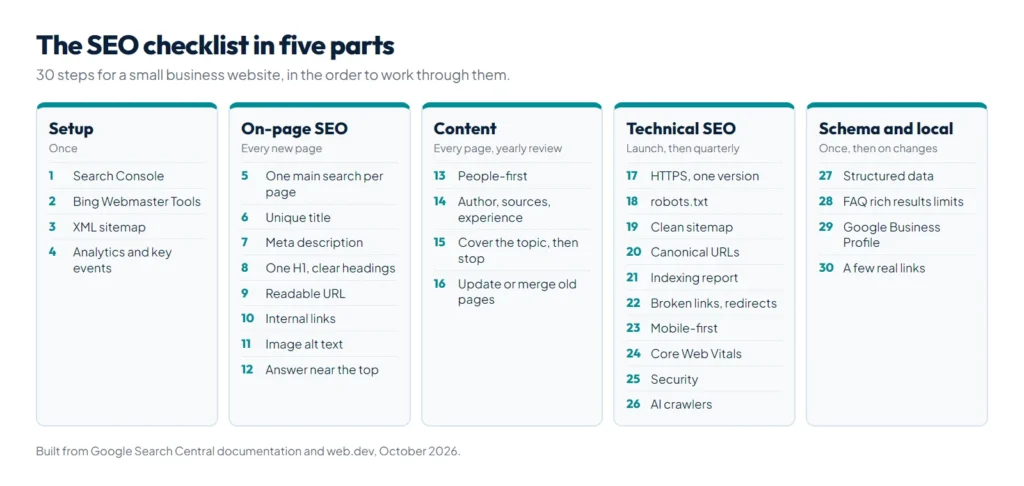
An SEO checklist covers three things: setup (Search Console, a sitemap and analytics), on-page SEO (titles, headings, content, links and images on each page) and technical SEO (crawling, indexing, speed, mobile and structured data). The 30 steps below cover all three for a typical small business site. Most need no paid tools, only Google Search Console and an afternoon.
Every step comes from Google’s own documentation, mainly the SEO Starter Guide on Google Search Central and the Core Web Vitals guidance on web.dev. We do SEO for small businesses in Pakistan and run this same list on our own site and on client sites.
SEO checklist at a glance
| Part | Steps | When |
|---|---|---|
| Setup | 1 to 4 | Once |
| On-page SEO | 5 to 12 | Every new page |
| Content | 13 to 16 | Every new page, reviewed yearly |
| Technical SEO | 17 to 26 | At launch, then every three months |
| Structured data and local SEO | 27 to 30 | Once, then when details change |
Setup (steps 1 to 4)
- Add your site to Google Search Console and verify it with a Domain property, so you see both the www and non-www versions and every subdomain. Search Console shows the searches you appear for, indexing problems and security issues.
- Add Bing Webmaster Tools. It can import your Search Console sites in a few clicks, and Bing results feed some AI assistants.
- Submit an XML sitemap in Search Console. WordPress makes one at /wp-sitemap.xml, and most SEO plugins make their own.
- Install analytics, such as Google Analytics 4, and mark your real goals, such as a WhatsApp click, a form or a call, as key events.
On-page SEO checklist (steps 5 to 12)
- Pick one main search for each page. Decide what a visitor types to find the page, and give each search one page. Two pages chasing the same search compete with each other.
- Write a unique, descriptive title for every page. Google’s title link guide asks for concise titles that describe the page, without repeated boilerplate or keyword stuffing. Put the main words near the start and keep it to about 50 to 60 characters so it is not cut off.
- Write a meta description that sums up the page in one or two sentences, about 140 to 155 characters. Google writes its own snippet when the page text matches the search better, but a good description is often used.
- Use one H1 that says what the page is, and H2 and H3 headings that break the content into sections a skimming reader can follow.
- Use short, readable URLs made of words, such as /services/website-development/, not random IDs.
- Link to related pages with descriptive link text. Each important page should get links from other pages on your site, and every blog post should link to the service or product it supports.
- Add alt text to images that says what the image shows, use descriptive file names, and put images near the text they relate to.
- Answer the question near the top. Put a direct, two or three sentence answer in the first paragraph. It helps readers, featured snippets and AI answers alike.
Content checklist (steps 13 to 16)
- Write for people first. Google asks for content that is helpful, reliable and people-first: written to answer the reader, not to fill a word count.
- Show who wrote it and why it can be trusted. Add the author, the date, the sources you used and your own experience, such as real prices, photos of your work or results from your own tests.
- Cover the topic fully, then stop. Answer the follow-up questions a reader will have. Google says there is no magic word count, minimum or maximum.
- Update or merge old pages instead of publishing near-copies. Refresh prices and dates once a year, and change the date only when the content really changed. For Urdu pages, our free Urdu word counter checks length and reading time before you publish.
Technical SEO checklist (steps 17 to 26)
- Use HTTPS everywhere and redirect all http and non-preferred versions (www or non-www) to one version with a 301 redirect.
- Check robots.txt. Make sure it does not block pages, CSS or JavaScript you want indexed. Google notes that robots.txt is not a way to keep a page out of search: use a noindex tag for that. Our free robots.txt generator builds a safe file, including rules for AI crawlers, and our guide to robots.txt for WordPress explains each rule.
- Keep the sitemap clean. List only pages you want indexed, which return 200 and are not redirected or noindexed. Google ignores the priority and changefreq values and uses lastmod only when it is accurate. One sitemap can hold up to 50,000 URLs.
- Set canonical URLs. Where the same content appears at several URLs, such as with tracking parameters or print versions, point a canonical tag at the main one. WordPress and SEO plugins do this for you, but check paginated pages and filters.
- Fix pages Google cannot index. In Search Console, open Indexing, then Pages, and look at the reasons pages are not indexed. Use the URL Inspection tool to test a page and request indexing after a fix.
- Fix broken links and redirect chains. Point old URLs straight to their new page with one 301 redirect, and update internal links so they skip the redirect.
- Make every page work on mobile. Google uses the mobile version of your pages for indexing and ranking, so the mobile page needs the same content, headings, images and structured data as the desktop page.
- Pass Core Web Vitals. web.dev counts a page as good when Largest Contentful Paint (LCP) is 2.5 seconds or less, Interaction to Next Paint (INP) is 200 milliseconds or less and Cumulative Layout Shift (CLS) is 0.1 or less, at the 75th percentile of visits. See your real scores in the Core Web Vitals report in Search Console. Our WordPress speed optimization guide shows how to fix slow pages.
- Keep the site secure. A hacked site can be flagged in search results or fill up with spam pages. Our WordPress security checklist covers the steps.
- Decide how AI crawlers may use your site. Allow search crawlers such as OAI-SearchBot if you want to appear in ChatGPT search answers, and consider an llms.txt file, which our free llms.txt generator builds; what llms.txt is explains what it can and cannot do. Our guide on how to rank in ChatGPT covers the rest.
Structured data and local SEO (steps 27 to 30)
- Add structured data that matches the page: Organization or LocalBusiness on the home page, Article on blog posts, Product on product pages and BreadcrumbList across the site. Test it with Google’s Rich Results Test.
- Do not count on FAQ rich results. Google now shows FAQ rich results only for well-known government and health websites. FAQ sections still help readers, and the questions still help search engines understand the page.
- Set up a Google Business Profile if you serve customers in a city, with the same name, address and phone number as your website. Our guide to Google Maps ranking factors explains what moves you up the map.
- Build a few real links. Links from local directories, suppliers, partners, news sites and industry associations still help Google find and trust your pages. Avoid buying links, which is against Google’s spam policies.
SEO myths you can skip
Google’s starter guide lists several things that do not matter as much as people think:
- Meta keywords. Google Search does not use the keywords meta tag.
- Keywords in the domain name. They have hardly any effect on ranking beyond appearing in breadcrumbs.
- A minimum word count. Length alone does not matter for ranking.
- A duplicate content penalty. The same content at several URLs is inefficient, but it does not cause a manual action. Copying other people’s content is a different matter.
- Heading order. Headings in order help screen readers, but Google says the order does not matter for search.
- E-E-A-T as a ranking factor. Google says it is not one. It describes the qualities of helpful content, which the content steps above aim for.
How long does SEO take to work?
New pages are often found within days, but rankings for competitive searches usually build over several months, as Google gathers signals about your pages. Technical fixes such as unblocking a page or fixing a redirect can show up within a few weeks once Google recrawls the page. If you want to budget for outside help, our guide to SEO cost in Pakistan lists typical prices.
Summary
Work through the SEO checklist in order: set up Search Console, a sitemap and analytics; give every page one main search, a unique title, a meta description, one H1, clean headings, internal links and image alt text; write helpful content that shows real experience; then make sure Google can crawl and index the site on mobile, with HTTPS, a correct robots.txt, canonical URLs and good Core Web Vitals. Add structured data and a Google Business Profile, and skip the myths. If you want it done for you, our SEO and AI search optimization team can run the checklist on your site.
References
- SEO Starter Guide, Google Search Central
- Influencing your title links, Google Search Central
- Meta descriptions and snippets, Google Search Central
- Build and submit a sitemap, Google Search Central
- Introduction to robots.txt, Google Search Central
- Mobile-first indexing best practices, Google Search Central
- FAQ structured data, Google Search Central
- Web Vitals, web.dev