On this page
- How does ChatGPT search choose which websites to cite?
- Step 1: Let AI search crawlers reach your site
- Step 2: Get indexed in Bing and Google
- Step 3: Write answers that can be quoted on their own
- Step 4: Make your business facts consistent everywhere
- Step 5: Get mentioned on the pages AI already cites
- Step 6: Measure your AI search visibility
- What we do on our own site
- SEO vs GEO: what is different?
- Do you need llms.txt or special schema for AI search?
- Common mistakes that keep sites out of AI answers
- Summary
To rank in ChatGPT search, your pages must be reachable by OpenAI’s search crawler, findable through the search engines ChatGPT uses, and written so that one paragraph answers a real question. In practice that means allowing OAI-SearchBot in robots.txt, getting indexed in both Bing and Google, and publishing specific, well-sourced answers that other websites confirm about you. The same work helps you appear in Google’s AI Overviews and in Perplexity.
This is often called generative engine optimization (GEO) or answer engine optimization (AEO). It is not a separate trick. It is SEO plus a few checks most websites skip. Below is the checklist we use on client sites and on our own, with the official source for each point.
How does ChatGPT search choose which websites to cite?
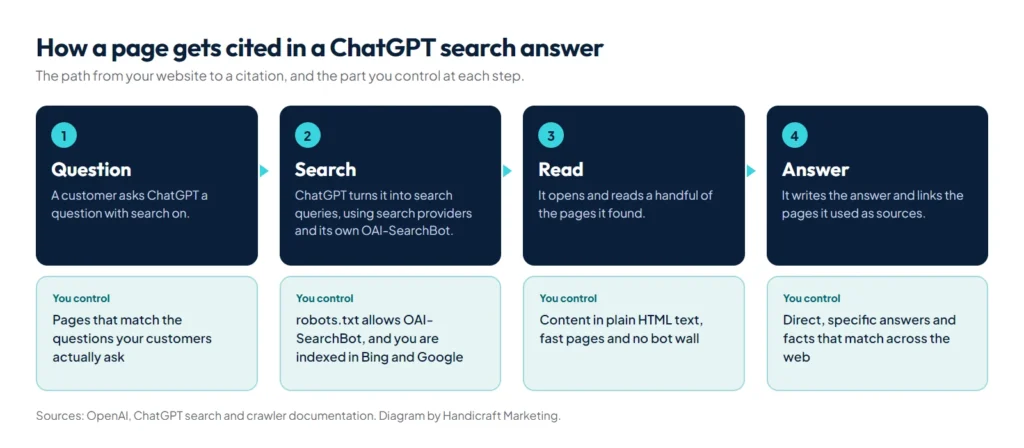
When ChatGPT searches the web, it turns your question into one or more search queries, reads a handful of the pages it finds and writes an answer with links to its sources. OpenAI says ChatGPT search uses third-party search providers as well as content from its partners, and Microsoft announced in 2023 that Bing would power search in ChatGPT. OpenAI also runs its own crawler, OAI-SearchBot, to surface websites in ChatGPT search.
So there are two ways in: being found through a search engine, and being crawled directly. Then comes the deciding step: whether your page answers the question better than the other pages ChatGPT read.
Step 1: Let AI search crawlers reach your site
OpenAI is explicit: “Sites that are opted out of OAI-SearchBot will not be shown in ChatGPT search answers” (OpenAI crawler documentation). Open yourdomain.com/robots.txt. If you want to appear in AI search, it should allow the search crawlers, for example:
User-agent: OAI-SearchBot
Allow: /

User-agent: PerplexityBot
Allow: /

User-agent: Claude-SearchBot
Allow: /

# Optional: opt out of AI model training only
User-agent: GPTBot
Disallow: /

User-agent: ClaudeBot
Disallow: /

User-agent: Google-Extended
Disallow: /
Which AI crawlers should you allow?
| Crawler | Company | Used for | If you block it |
|---|---|---|---|
| OAI-SearchBot | OpenAI | ChatGPT search | Your pages are not shown in ChatGPT search answers |
| GPTBot | OpenAI | Training future models | Your content is left out of training; search is not affected |
| ChatGPT-User | OpenAI | Pages a user asks ChatGPT to open | Not used for search; robots.txt may not apply because a person asked |
| PerplexityBot | Perplexity | Perplexity search results | Fewer chances to be linked in Perplexity answers |
| Perplexity-User | Perplexity | Pages fetched during a user question | Generally ignores robots.txt, because a person asked |
| Claude-SearchBot | Anthropic | Search inside Claude | Lower visibility in Claude search answers |
| Claude-User | Anthropic | Pages fetched for a Claude user | Claude cannot read your page when a user asks about it |
| ClaudeBot | Anthropic | Training | Future content is left out of training |
| Googlebot | Search, including AI Overviews and AI Mode | You disappear from Google Search, AI features included | |
| Google-Extended | A control token for Gemini training and grounding, not a separate crawler | Google says it does not affect inclusion or ranking in Google Search |
Sources: OpenAI, Perplexity, Anthropic and Google. To be cited everywhere but keep your content out of training, allow the search crawlers and disallow only GPTBot, ClaudeBot and Google-Extended.
Each OpenAI crawler is controlled separately. GPTBot collects data for training models, while OAI-SearchBot powers search, so you can block training and still be cited. OpenAI says robots.txt changes take about 24 hours to reach its systems. Perplexity works the same way: PerplexityBot surfaces sites in its search results and is not used to train models.
robots.txt is not the only gatekeeper. Firewalls and bot protection at your host or CDN can block crawlers even when robots.txt allows them. When we tested our own site with an automated browser, the host’s bot protection showed a check page before the real content. Look for OAI-SearchBot and PerplexityBot visits in your server logs, and if you use Cloudflare or a similar service, review its AI crawler settings.
Step 2: Get indexed in Bing and Google
- Bing: add your site to Bing Webmaster Tools (you can import it from Google Search Console in a few clicks), submit your XML sitemap and check that your key pages are indexed.
- Google: Google says there are “no additional requirements to appear in AI Overviews or AI Mode”. A page must be indexed and eligible to show with a snippet in normal Search (Google Search Central). So the usual work applies: a sitemap, internal links to every important page, and no accidental noindex or nosnippet tags.
- Faster discovery: Bing and several other search engines support IndexNow, which tells them the moment you publish or update a page. Many SEO plugins send these pings for you.
Step 3: Write answers that can be quoted on their own
AI answers are built from passages, not whole pages. A passage gets used when it answers the question directly, without needing the paragraph before it. Compare two ways a web developer could describe the same offer:
- Hard to quote: “We are passionate about digital excellence and deliver world-class solutions tailored to your needs.”
- Easy to quote: “Handicraft Marketing builds WordPress websites of up to 15 pages in 24 hours, matched to a design the client sends, and the client pays only after approving the site.”
The second names the business, the service, the scope, the timeline and the terms in one sentence. That is the target:
- Put the direct answer in the first two or three sentences of the page and of each section.
- Use headings that match real questions, such as “How much does a website cost in Lahore?”
- Give numbers, dates, places and names instead of adjectives.
- Use tables for comparisons and numbered steps for processes.
- Cite sources for facts, and keep pages up to date.
- Keep important content in the HTML text, not inside images, PDFs or sliders.
Step 4: Make your business facts consistent everywhere
AI systems cross-check what they read. If your website says one address, your Google Business Profile another and a directory lists an old phone number, it is harder for any system to be confident about you. Make these match across your website, Google Business Profile, LinkedIn, Facebook and directories:
- Business name, written the same way everywhere.
- Address, phone and WhatsApp number.
- Services, service areas, and prices or starting prices.
- Founder or team names and credentials.
Add Organization or LocalBusiness structured data to your website and make sure it matches the visible text. Google’s best practices for AI features include exactly that, along with keeping your Business Profile up to date. Our guide on how to rank on Google Maps covers the Business Profile side step by step.
Step 5: Get mentioned on the pages AI already cites
Ask ChatGPT, with search on, the questions your customers ask, such as “best accounting firm in Lahore for small businesses” or “who builds WordPress websites in Pakistan”. Then look at the sources it cites. You will usually see directories, review sites, comparison articles and forum threads, not only company websites. Those are the pages to get onto:
- Complete, accurate profiles on the directories and marketplaces that appear.
- Genuine reviews on Google and on the platforms your industry uses.
- Guest articles, interviews and case studies on sites in your field.
- Listings by suppliers, partners and associations that name their members.
This is the same work as earning backlinks, aimed at the sources AI answers lean on.
Step 6: Measure your AI search visibility
- List 10 to 20 buyer questions in the words your customers use, including your city or country.
- Ask them once a month in ChatGPT with search on, in Perplexity and in Google. Use a temporary or logged-out chat so your own history does not colour the answer.
- Record the result in a sheet: mentioned or not, linked or not, which competitors appear and which sources are cited.
- Check your analytics. ChatGPT often adds utm_source=chatgpt.com to the links it cites, and visits that keep their referrer show chatgpt.com as the source. Neither is guaranteed: OpenAI does not document the tag, and app and private-browsing visits often arrive with no referrer and land in Direct. Google counts AI Overviews and AI Mode traffic inside the Search Console Performance report, under the Web search type, with no separate filter.
Answers change from one run to the next, so judge the trend over several months, not a single result.
How do you see AI assistant traffic in Google Analytics 4?
By default GA4 mixes AI visits into Referral. A custom channel group puts them on one line:
- In GA4, go to Admin, then Data display, then Channel groups, and create a new group by copying the default one, so nothing else changes.
- Add a channel called “AI assistants” with the condition Source matches regex
chatgpt\.com|chat\.openai\.com|perplexity\.ai|gemini\.google\.com|copilot\.microsoft\.com|claude\.ai - Move it above Referral, because GA4 assigns each visit to the first channel it matches.
- Use the new group in the Traffic acquisition report and compare it month by month.
Expect it to undercount, for the referrer reasons above, and expect small numbers at first: for most small business sites, AI assistants still send a small share of visits compared with Google Search.
What we do on our own site
We run this checklist on handicraftm.com, so you can inspect every piece:
- Crawler access: our robots.txt lets the search crawlers in, and we test that the host’s bot protection does not block them.
- Instant indexing: each time we publish or update a page, the site notifies Bing and the other IndexNow search engines within seconds. That matters because ChatGPT search draws on Bing’s index among its sources.
- One fact sheet: a structured data graph on every page states who we are, what we offer and where, with the same name, address and phone number as our Google Business Profile.
- A plain-text summary: we publish llms.txt, knowing it is optional.
- Question-led pages: our guides open with a direct answer and then the detail, so a model can quote the first paragraph on its own.
- Measurement: a monthly question panel, plus Search Console and GA4 data reviewed together.
If you want this done for your business, see our SEO and AI search optimization service.
SEO vs GEO: what is different?
| Traditional SEO | GEO (AI search) | |
|---|---|---|
| Goal | Rank a page in the list of results | Be named or cited inside the answer |
| What wins | A whole page | A passage, fact or table on a page |
| Main signals | Relevance, links, page experience | The same, plus clear self-contained answers and consistent facts across the web |
| Where | Google, Bing | ChatGPT, Perplexity, Google AI Overviews and AI Mode, Copilot |
| How you measure | Rankings, clicks, Search Console | Prompt tracking, citations, referral traffic |
The overlap is large. A page that is crawlable, indexed, fast and genuinely useful is the starting point for both.
Do you need llms.txt or special schema for AI search?
No. Google says you “don’t need to create new machine readable files, AI text files, or markup” to appear in AI Overviews or AI Mode, and that there is no special schema for them. llms.txt is a proposed convention that gives AI tools a plain-text summary of a site, and no major search engine has said it uses it for ranking. It costs little to add, and we publish one on our own site, but treat it as optional and do the steps above first.
Common mistakes that keep sites out of AI answers
- Switching on a “block AI bots” option that also blocks OAI-SearchBot and PerplexityBot.
- Text that only appears after JavaScript runs, or that sits in images, PDFs and sliders, which crawlers may not read.
- Vague marketing copy with no prices, places or specifics.
- Different business names, addresses or phone numbers across the web.
- Never checking Bing. Many sites are well indexed in Google and barely in Bing.
- Thin pages written around a keyword instead of a question.
Most of these are fixed at the website level. If yours needs a rebuild, our website development service builds pages with the content in plain HTML from the start.
Summary
To rank in ChatGPT search, start with access: allow OAI-SearchBot, check your firewall and get indexed in Bing and Google. Then make your pages easy to quote, with direct answers, specific facts and question headings, and make your business details match everywhere. Track a fixed set of buyer questions every month. If you want this done for your business, our SEO and AI search optimization service covers technical SEO, Google Maps and AI visibility together.