On this page
- What decides your Google Maps ranking?
- The Google Business Profile checklist for 2026
- How to get more Google reviews without breaking the rules
- How does your website affect your Google Maps ranking?
- Why does my ranking change from street to street?
- What gets a Google Business Profile suspended or pushed down?
- How long does it take to rank higher on Google Maps?
- Summary
Google ranks businesses on Google Maps by three factors, relevance, distance and prominence, and this Google Business Profile checklist for 2026 covers all three. You cannot pay for a better position. You rank higher by verifying your Google Business Profile, choosing the right primary category, completing every field, collecting a steady stream of genuine reviews and replying to them, adding real photos, and making sure your website and other listings tell the same story.
This checklist is built on Google’s own documentation, which most “ranking hacks” ignore, and on our work setting up profiles for local businesses. It also covers details that trip up businesses in Pakistan, such as Ramadan hours and home-based service businesses.
What decides your Google Maps ranking?
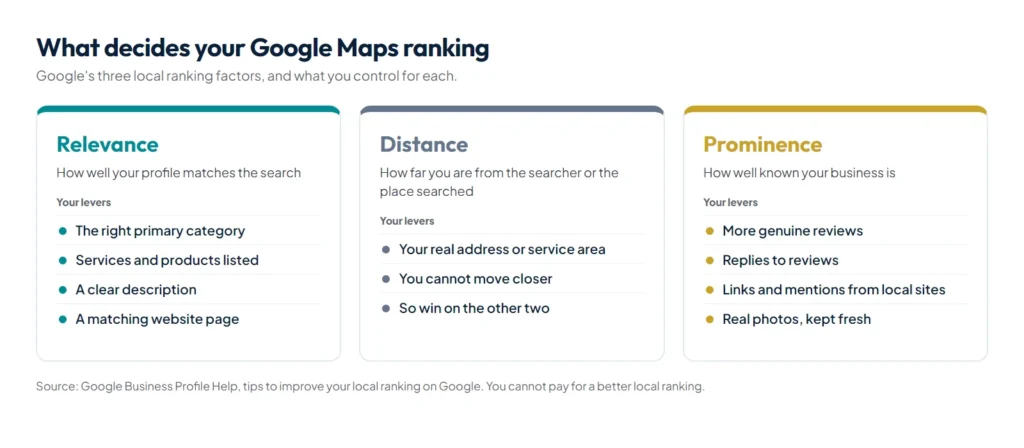
Google explains local ranking in its Business Profile help: results are mainly based on relevance, distance and prominence, and “there’s no way to request or pay for a better local ranking”. Here is what each factor means and what you control.
| Factor | What Google looks at | What you can do |
|---|---|---|
| Relevance | How well your profile matches the search | Choose the right primary category, list your services, write a clear description and link a website page that matches |
| Distance | How far you are from the searcher, or from the place named in the search | Use your real address or service area. You cannot move closer, so win on the other two |
| Prominence | How well known you are: reviews, links and mentions across the web | Earn more genuine reviews, reply to them, and get listed and linked by local websites |
The Google Business Profile checklist for 2026
- Claim and verify your profile. Google lists verification as the first step to improving local ranking. It may ask for a short video showing your signboard, premises and proof that you manage the business.
- Use your real business name. Google’s guidelines require the name you use in the real world, on your signboard and stationery, with no added keywords, locations or taglines. “Ali Dental Clinic” is fine. “Ali Dental Clinic Best Dentist Lahore” risks suspension.
- Pick the most specific primary category. Use Google’s test: the category should complete “this business IS a”, not “this business HAS a”. A tax consultancy that also does bookkeeping picks “Tax consultant” as primary and adds “Bookkeeping service” as secondary.
- Add only a few secondary categories. Google asks you to use as few as possible to describe your core business.
- Set your address or service area correctly. If customers visit you, show your address. If you travel to customers from home or an office they never visit, hide the address and set a service area. Google says it should not extend beyond about 2 hours of driving from your base.
- Keep hours accurate, including special hours. Update them for Ramadan, Eid and public holidays. Wrong hours cost you customers and invite bad reviews.
- Add a phone number that is answered, and link the website page that best matches your main service. For most single-location businesses that is the home page or a dedicated location page.
- List your services or products with short descriptions and, where you can, prices.
- Write a plain description: what you do, for whom and where, in the first sentence.
- Upload real photos and keep adding them: the signboard and entrance so people can find you, the inside, your team and your work. Google lists photos and videos among its tips for improving local ranking.
- Build a review routine (next section) and reply to reviews.
- Keep the profile active. Post updates, offers and events, and answer customer questions, so the profile stays accurate and useful.
How to get more Google reviews without breaking the rules
Reviews feed prominence, and Google is strict about how you ask for them. Its Maps content policy prohibits offering incentives “such as payment, discounts, free goods and/or services” for reviews, and prohibits businesses that “discourage or prohibit negative reviews, or selectively solicit positive reviews from customers”. So ask every customer, not only the happy ones, and never offer anything in return.
Google’s recommended way to ask is to share your review link or a QR code, both available in your Business Profile. Send it the same day, while the experience is fresh. For most businesses in Pakistan a WhatsApp message works best:
- English: “Thank you for choosing [Business]. If you have a minute, please share your honest experience on Google: [review link]. It helps other people find us.”
- Roman Urdu: “[Business] ko chunne ka shukriya. Agar aap ke paas ek minute ho to Google par apna honest tajurba zaroor likhein: [review link]. Is se doosre logon ko hamein dhoondne mein madad milti hai.”
Print the QR code at the counter or reception, add the link to invoices and email signatures, and make asking part of every handover. When you reply, Google suggests focusing on reviews where you can share a helpful update or answer a question, and addressing negative reviewers by name with a response to their specific point.
How does your website affect your Google Maps ranking?
Your website supports both relevance and prominence. Google names the number of websites that link to your business as one of the signals of prominence, and your site is where Google confirms what you do and where.
- Give each main service a clear page, with the city or area you serve in the text.
- Show the same business name, address and phone number as your profile, in text rather than only in an image.
- Add LocalBusiness structured data that matches those visible details.
- Embed a map and directions on your contact page.
- Make the site fast and easy to use on a phone.
- Earn links from local sources: associations, suppliers, chambers of commerce, local news and event pages.
The same consistency helps you appear in AI answers too. See how to rank in ChatGPT search for that side.
Why does my ranking change from street to street?
Because of distance. A profile can be first for “dentist” when you search from inside the clinic and fifth three kilometres away. That is normal. To see your real position, check from several locations around your area, or use a geo-grid rank tracker, which runs the same search from a grid of points on the map. As relevance and prominence improve, the area where you rank well grows.
What gets a Google Business Profile suspended or pushed down?
- Keywords, cities or taglines added to the business name.
- A virtual office, PO box or address where you do not actually serve customers. Google asks you to create your profile for your real-world location.
- Duplicate profiles for the same business at the same address.
- Buying reviews, swapping reviews with other businesses, or offering discounts for reviews.
- Service areas far beyond where you really work.
Google says it can suspend profiles that break its guidelines, and a suspension removes your visibility while it is reviewed. No shortcut is worth that risk.
How long does it take to rank higher on Google Maps?
Fixing the name, category, hours and services can change your visibility within days of Google accepting the edits. Prominence takes longer, because reviews and links build up over months. Businesses that add reviews every week, not every quarter, see the steadiest progress.
Summary
To rank on Google Maps, give Google what its own documentation asks for: a verified profile with your real name, the right category, accurate hours and services, real photos and a steady flow of honestly requested reviews, backed by a website that says the same thing. You cannot change distance, so win on relevance and prominence. If you want help, our SEO and local search service covers Google Maps, your website and AI search together, and we build sites for local businesses such as clinics and accounting firms.