On this page
- WhatsApp Business app vs WhatsApp Business API
- How much does the WhatsApp Business API cost in Pakistan?
- Worked example: a monthly WhatsApp bill for an online store in Pakistan
- How to get the WhatsApp Business API in Pakistan
- What can you automate with the WhatsApp Business API?
- Are WhatsApp bulk sender tools safe?
- Is the WhatsApp Business API worth it for a small business?
- Summary
The WhatsApp Business API, which Meta calls the WhatsApp Business Platform, lets a business send automated and bulk messages from one number, connect a chatbot or CRM, and have several staff reply from a shared inbox. With the WhatsApp Business API in Pakistan, you pay Meta per delivered message. From 1 October 2026, marketing templates cost about US$0.047 each and utility, authentication and service messages about US$0.015 each, with solution providers reporting the first 1,000 service messages per number each month as free. Setup needs a Meta business account, a phone number, and either Meta’s Cloud API or a solution provider.
The October 2026 change matters: until then, replying to customers inside the 24-hour window cost nothing. Below are the current rules, a worked monthly bill for a Pakistani online store, the setup steps and the automations worth building first.
WhatsApp Business app vs WhatsApp Business API
| WhatsApp Business app | WhatsApp Business API | |
|---|---|---|
| Cost | Free | Per delivered message, plus any provider fees |
| Who can reply | The owner, on a phone and a few linked devices | Many agents at once through an inbox tool |
| Bulk messages | Broadcast lists, received only by contacts who saved your number | Approved template messages to customers who opted in |
| Automation | Greeting and away messages, quick replies | Chatbots, triggers from your website, store or CRM, AI replies |
| Integrations | Catalogue and labels | WooCommerce, Shopify, CRMs, Google Sheets and custom software |
| Setup | Download and verify in minutes | Meta business account, number setup and template approval |
| Best for | Small shops and solo professionals | Businesses handling many chats, orders or reminders every day |
How much does the WhatsApp Business API cost in Pakistan?
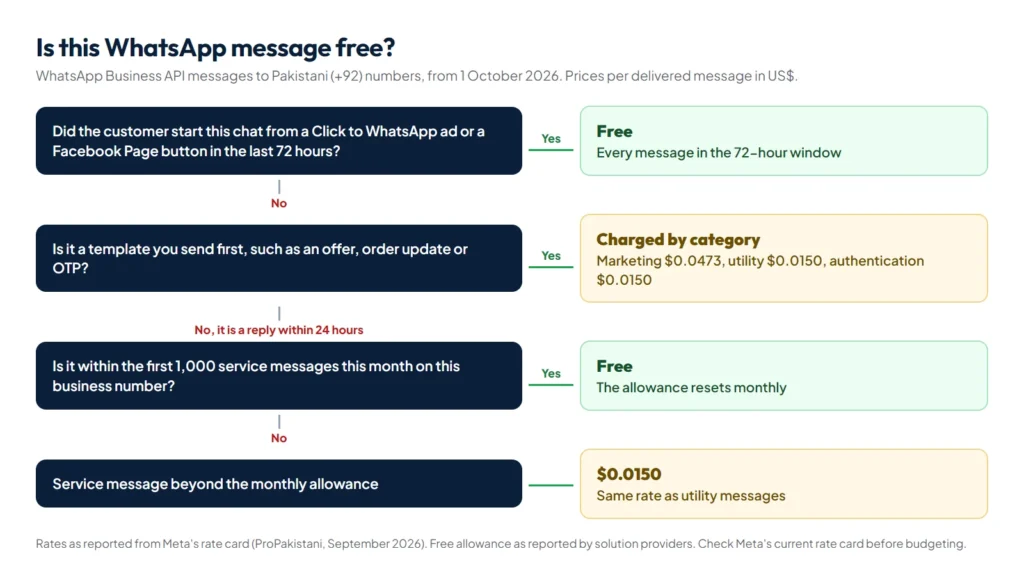
Meta charges per delivered message, based on the message category and the recipient’s country code. These are the rates for Pakistani (+92) numbers from 1 October 2026, as reported by ProPakistani from Meta’s rate card:
| Message type | Used for | Rate per delivered message (US$) | When it is free |
|---|---|---|---|
| Marketing template | Offers, new arrivals, abandoned carts, win-back messages | 0.0473 | Only inside a 72-hour free entry point window |
| Utility template | Order confirmations, delivery updates, payment reminders | 0.0150 | Inside a free entry point window. Lower rates at high monthly volume |
| Authentication template | One-time passwords and login codes | 0.0150 | Lower rates at high monthly volume |
| Service message | Free-form replies within 24 hours of a customer’s message | 0.0150 | The first 1,000 per business number each month, and inside a free entry point window |
Three rules decide most of your bill:
- Service replies are no longer unlimited. Meta’s pricing documentation confirms that from 1 October 2026 it charges for service messages and for utility templates sent inside an open 24-hour customer service window, and that service rates match the utility and authentication rates in each market. Solution providers such as 360dialog report an allowance of 1,000 free service messages per business phone number per month, which resets monthly and does not roll over.
- Chats from click-to-WhatsApp ads are free for 72 hours. When a customer messages you from a Click to WhatsApp ad or a Facebook Page button, your messages for the next 72 hours are free.
- You are billed in foreign currency. Meta bills in US dollars and a list of other currencies that does not include the Pakistani rupee, so budget for exchange rate changes and card charges.
Solution providers add their own monthly subscription or a markup per message on top of Meta’s fees, so compare the total cost, not just the headline plan price.
Worked example: a monthly WhatsApp bill for an online store in Pakistan
Take a store that sends the following in one month:
| Messages | Count | Calculation | Meta fee (US$) |
|---|---|---|---|
| Marketing templates: a sale announcement to opted-in customers | 2,000 | 2,000 x 0.0473 | 94.60 |
| Utility templates: order confirmations and dispatch updates | 3,000 | 3,000 x 0.0150 | 45.00 |
| Service replies to customer questions | 2,500 | (2,500 – 1,000 free) x 0.0150 | 22.50 |
| Messages in chats started from click-to-WhatsApp ads, first 72 hours | 1,200 | Free entry point window | 0.00 |
| Total | 8,700 | 162.10 |
That is about US$162 for the month before provider fees. Marketing messages are the biggest cost at roughly three times the price of the others. Two easy savings: send marketing templates to engaged segments instead of your whole list, and use click-to-WhatsApp ads, whose conversations are free for 72 hours.
How to get the WhatsApp Business API in Pakistan
- Create a Meta business portfolio (formerly Business Manager) and complete business verification with your company registration documents.
- Choose a phone number. It can be a new number or your existing business number. If the number is on the WhatsApp Business app today, ask your provider whether to move it to the API or use it on both.
- Decide how you connect: Meta’s Cloud API directly, which needs a developer to build the integration, or a Business Solution Provider that supplies an inbox, chatbot builder and support for a monthly fee.
- Set your display name and profile. Meta reviews the display name, so it should match your business.
- Add a payment method before you go live, because chargeable messages are not delivered without one.
- Create message templates for anything you send first, such as order updates, reminders and offers, and submit them for approval in the right category.
- Collect opt-in. WhatsApp’s business rules require customers’ permission before you message them, so add a clear checkbox at checkout and in your forms.
- Connect your systems: your website, store, CRM or booking software, so messages go out automatically.
What can you automate with the WhatsApp Business API?
- Cash on delivery confirmation: ask the customer to confirm a COD order with one tap before it goes to the courier, which cuts fake and refused orders.
- Order and delivery updates: confirmation, dispatch with the tracking number, and delivery.
- Appointment reminders for clinics, salons and academies, with confirm and reschedule buttons.
- Payment and instalment reminders, for example for Umrah packages or course fees.
- Lead qualification: a few questions for people who message from ads, then a handover to a salesperson with the answers attached.
- FAQ answers outside working hours, with a clear route to a human.
- CRM sync: every chat and order saved against the right customer automatically.
We build these flows as part of our AI automation service and connect them to lead generation funnels and online stores. Store owners will find the full setup on our e-commerce page.
Are WhatsApp bulk sender tools safe?
No. Unofficial “bulk sender” and “WhatsApp marketing” software automates a normal WhatsApp account, which breaks WhatsApp’s terms. Numbers used this way get banned, and you lose the number and its chats with it. If you need to message many customers, send approved templates through the official API to customers who opted in.
Is the WhatsApp Business API worth it for a small business?
Stay on the free WhatsApp Business app if one or two people handle all the chats and you do not need automatic messages from your website or store. Move to the API when:
- More than one or two people need to answer the same number.
- Order updates, reminders or one-time passwords should go out automatically.
- You run click-to-WhatsApp ads and need to qualify and track every lead.
- You want chats saved in a CRM instead of on one phone.
With the October 2026 pricing, include service replies in your budget. As the example shows, a few thousand messages a month comes to roughly US$160 in Meta fees.
Summary
The WhatsApp Business API in Pakistan is priced per delivered message: about US$0.047 for marketing and US$0.015 for utility, authentication and, from October 2026, service replies beyond the free monthly allowance. Use it when you need several agents, automatic order and reminder messages, or CRM and ad tracking, and keep the free app if you do not. Budget in dollars, collect opt-in, and let automation handle the repetitive messages. Meta updates its rates regularly, so check the current rate card before you commit to a monthly plan.