
On this page
- What is llms.txt used for?
- Who created llms.txt, and is it a standard?
- What goes in an llms.txt file?
- An example llms.txt for a small business
- How is llms.txt different from robots.txt and sitemap.xml?
- Do ChatGPT, Claude and Google actually use llms.txt?
- Should a small business add llms.txt?
- How to add llms.txt to a WordPress site
- Summary
- References
llms.txt is a Markdown file at the root of a website, such as example.com/llms.txt, that gives AI tools a short summary of the site and a curated list of links to its most useful pages. It was proposed by Jeremy Howard in September 2024 and is a community convention, not an official web standard. Google says Google Search ignores it, so treat llms.txt as an optional guide for AI agents, not a way to rank.
We do SEO and AI search work for businesses in Pakistan, publish an llms.txt on our own site (handicraftm.com/llms.txt) and built a free llms.txt generator. This guide is based on the proposal itself and on what Google, OpenAI, Anthropic and independent log data show, checked in October 2026.
What is llms.txt used for?
The llms.txt proposal starts from a practical problem. Web pages are built for people, so their useful text is wrapped in navigation, ads and scripts, and most websites are far too big to fit into an AI model’s context window. An llms.txt file collects the essentials in one small, predictable place: what the site is, its key facts, and links to the pages worth reading.
The intended reader is an AI agent working on someone’s request, for example a coding assistant looking up a library’s documentation or a chat assistant reading about a product. The proposal says the file is meant for this kind of on-demand use rather than for training models. It is used most heavily for software documentation, and the proposal notes that the same structure suits a business describing its services and policies.
Who created llms.txt, and is it a standard?
Jeremy Howard published the proposal on 3 September 2024 at llmstxt.org. Its source lives in the AnswerDotAI repository on GitHub, where anyone can comment. It is not a standard from a body such as the IETF or W3C. Version 2, published in August 2026, made four changes based on two years of use:
- A page can point to its Markdown version with
rel="alternate" type="text/markdown"and to the llms.txt that covers it withrel="describedby", either in HTML or in an HTTPLinkheader. - Markdown copies of pages may use either
page.html.mdorpage.md. - A file in a subfolder, such as
/docs/llms.txt, covers the pages under that folder, and the most specific file applies. - Agents are expected to read or search the file and then follow its links. The old context-building tool was dropped, and the “Optional” section became a naming convention rather than an instruction to software.
What goes in an llms.txt file?
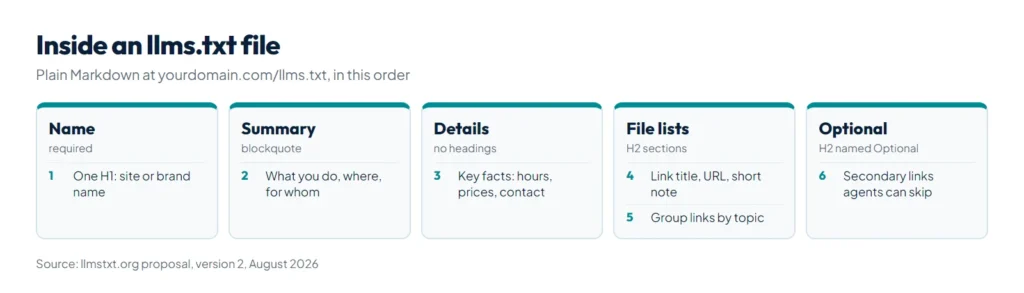
The file is plain Markdown, with its parts in this order:
| Part | Markdown | Required? |
|---|---|---|
| Site or project name | One H1: # Name | Yes, the only required part |
| Short summary | A blockquote: > One or two sentences | No |
| Details | Paragraphs or lists, with no headings | No |
| File lists | H2 sections of links: - [Title](URL): note | No |
| Optional | An H2 named Optional for links an agent can skip | No |
The proposal’s own advice: use concise, clear language, give each link a short description, avoid unexplained jargon, and test the file by giving an AI assistant only your llms.txt and asking it questions about your business.
What about llms-full.txt?
You will also see llms-full.txt. It is not part of the llmstxt.org proposal. Documentation platforms such as Mintlify publish it as a companion file that holds the full text of every page in one file, while llms.txt stays an index of links. For a small business site, a short llms.txt is enough.
An example llms.txt for a small business
Here is a complete file for a fictional dental clinic. Replace the details and links with your own.
# Sample Dental Care

> Sample Dental Care is a family dental clinic in Gulberg, Lahore, Pakistan. We treat adults and children by appointment, Monday to Saturday.

Key facts:

- Services: checkups, fillings, root canal treatment, braces and teeth whitening
- Location: Gulberg III, Lahore (full address and map on the contact page)
- Appointments: online booking form or WhatsApp
- Fees: published on the fees page and reviewed every January

## Services

- [Root canal treatment](https://example.com/root-canal/): What happens, number of visits, aftercare
- [Braces and aligners](https://example.com/braces/): Options, treatment time and fees
- [Teeth whitening](https://example.com/whitening/): In-clinic and take-home options

## Clinic

- [Fees](https://example.com/fees/): Current fees for common treatments
- [Our dentists](https://example.com/dentists/): Qualifications and registration details
- [Book an appointment](https://example.com/book/): Timings, booking form and cancellation policy
- [Contact](https://example.com/contact/): Address, map, phone and WhatsApp

## Optional

- [Blog](https://example.com/blog/): Dental care articles for patients
Why it is written this way: the summary states facts an assistant can repeat (what, where, for whom), the links point to pages that answer real questions such as fees and booking, and the blog sits under Optional because it is secondary. Keep the file short, and update it when prices, services or key pages change.
How is llms.txt different from robots.txt and sitemap.xml?
| File | What it does | Controls crawling? |
|---|---|---|
| robots.txt | Tells crawlers which parts of the site they may access | Yes |
| sitemap.xml | Lists the pages you want search engines to index | No |
| llms.txt | Summarizes the site and lists its key pages for AI agents | No |
They work together. If you want AI search tools to reach your pages at all, robots.txt has to allow their crawlers; our robots.txt generator builds the file, and our guide to robots.txt for WordPress explains the rules. llms.txt cannot block or allow anything.
Do ChatGPT, Claude and Google actually use llms.txt?
This is where many articles overstate things. Here is what is on record as of October 2026.
| Who | What they have said or shown |
|---|---|
| Google Search | Google’s guide to generative AI features in Search, updated in July 2026, says you do not need AI text files or Markdown to appear in Search, including its AI features, “as Google Search itself doesn’t use them”. Creating one “will neither harm nor help” your rankings. |
| Chrome Lighthouse | A Lighthouse audit in its agentic browsing checks flags a server error when fetching llms.txt, marks a missing file as not applicable and calls the file optional. |
| OpenAI, Anthropic and Google Gemini | All three publish llms.txt files for their own developer documentation. But OpenAI’s crawler documentation and Anthropic’s crawler help article explain robots.txt controls and do not mention llms.txt. We found no statement from either company that ChatGPT or Claude use business websites’ llms.txt files to choose answers. |
| Independent log data | Ahrefs studied 137,210 domains in May 2026: 28% published llms.txt, and 97% of those files received no requests at all. Of the requests that did arrive, 96% came from bots, and among named AI tools GPTBot fetched the most, with Claude Code second. |
The honest reading: coding agents do fetch llms.txt files, mostly on documentation sites, which matches what the proposal describes. Nobody has shown that an llms.txt file makes ChatGPT, Claude, Gemini or Google mention a business more often, and Ahrefs concluded that for AI search visibility the file is “largely decoration”.
Should a small business add llms.txt?
Add one if your basics are already in place, because it takes little time, does no harm in Google and may help an AI agent that is already reading your site find the right page. Do not add it expecting more traffic or AI citations, since nothing on record supports that. Do these first:
- Make sure your important pages are crawlable and indexed, and that robots.txt allows the AI search crawlers you want, such as OpenAI’s OAI-SearchBot.
- Answer real questions in plain text on your pages: prices, areas served, timings and policies.
- Keep your name, address and phone number the same on your site, your Google Business Profile and directories.
- Then add llms.txt as a tidy summary of those pages.
Our guide on how to rank in ChatGPT covers the steps that matter more.
How to add llms.txt to a WordPress site
- Write the file. Our free llms.txt generator builds it from your name, a one-line summary and a pasted sitemap (up to 150 links, grouped by folder), and it can check an existing file. Nothing is fetched from your site; you paste the text yourself.
- Upload it to the website root, the folder that holds
wp-config.php, using your host’s file manager or SFTP, so it opens at yourdomain.com/llms.txt. Two WordPress SEO plugins, Yoast SEO and AIOSEO, can also generate one; use one method, not both. - Open the address in a browser and confirm it loads as plain text. A server error is what Lighthouse flags.
- Review it whenever services, prices or important pages change. It is public, so never include private links or data.
Summary
llms.txt is a short Markdown file at your site’s root with an H1 name, a blockquote summary, optional details and H2 lists of key links. Jeremy Howard proposed it in 2024 and updated it to version 2 in August 2026. Google Search ignores it, AI companies publish it for their own documentation but have not said their assistants rely on it for business sites, and Ahrefs found that 97% of published files got no requests in May 2026. Add one if it is quick and your basics are done, using our llms.txt generator, and put most of your effort into the pages themselves, which is what our SEO and AI search optimization service focuses on.
References
- llmstxt.org: The /llms.txt file, v2 (Jeremy Howard)
- Google Search Central: Guide to optimizing for generative AI features on Google Search
- Chrome for Developers: Lighthouse llms.txt audit
- OpenAI: Overview of OpenAI crawlers
- Ahrefs: We analyzed 137K sites, 97% of llms.txt files never get read
- Mintlify documentation: llms.txt and llms-full.txt