
On this page
- Which pages does a school website need?
- What should each page of a school website contain?
- How do parents decide, and where does the website fit?
- How should a school plan admission season?
- How should the admission inquiry flow work?
- What are Google’s rules for schools on Google Maps?
- How should each campus handle its Google profile and reviews?
- What do fee regulators expect from your fee page?
- What do current parents need from the website?
- What content helps a school website rank?
- Which schema markup should a school use?
- Common school website mistakes
- How do you make a school website easy for every parent to use?
- How should a school handle student photos and data?
- What does Pakistani law say about student data?
- What does a school website cost?
- Summary
- References
This guide shows how to build a school website in Pakistan that brings in admissions. A school website serves two audiences: parents choosing a school and parents already enrolled. For admissions, it needs a clear admissions page with dates, age criteria, the test or interview process and an easy inquiry route such as WhatsApp, plus the fee structure, campus details, facilities and real photos. For current parents, it needs announcements, the academic calendar, uniform and book lists, and contact details for each campus.
Many parents compare several schools on their phones before visiting any of them. The school that answers their questions quickly and honestly online gets the campus visit.
Which pages does a school website need?
- Admissions: classes with open seats, dates, age criteria, documents, the test or interview process, and an inquiry button.
- Fee structure: admission, tuition and other charges, and the payment schedule.
- Campuses: one page per campus with address, map, classes offered and phone number.
- Academics: curriculum (for example Matric and Intermediate, or Cambridge O and A Levels), subjects and results.
- Facilities and activities, with real photos.
- Faculty and leadership.
- News, events and the academic calendar.
- Downloads: uniform list, book lists, forms and the prospectus.
- Careers for teaching and staff jobs, and contact.
What should each page of a school website contain?
Use this as a build checklist. Each page has one job: answer the parent’s question so they take the next step.
| Page | Must contain | Often missing |
|---|---|---|
| Admissions | Classes with open seats, age cut-off for each class, test or interview syllabus and date, documents list, steps from inquiry to enrolment, inquiry button | The date of the next test |
| Fee structure | Admission fee, security deposit and whether it is refundable, monthly tuition by class, annual and other charges, payment schedule, sibling concessions | The session the fees apply to |
| Campus page | Address, map, landmark directions, classes offered, school timings, phone and WhatsApp for that campus, photos of that campus | A named contact at the campus |
| Academics | Curriculum and examining board, subjects at each level, how students are assessed, recent results | Which year the results are from |
| Downloads | Uniform, book and stationery lists, prospectus, forms | A version that reads well on a phone, not only a PDF |
| Privacy and photo policy | What you collect from parents, who can see it, how photo consent works and how to withdraw it | A named contact for data questions |
Example sitemap for a two-campus school
/home/admissions/with/admissions/test-syllabus/and/admissions/documents//fee-structure//campuses/campus-name/one page per campus/academics/with a page for each level, such as primary, middle and O Level/faculty/,/facilities/,/news/and/calendar//downloads/,/careers/,/contact/and/privacy-policy/
How do parents decide, and where does the website fit?
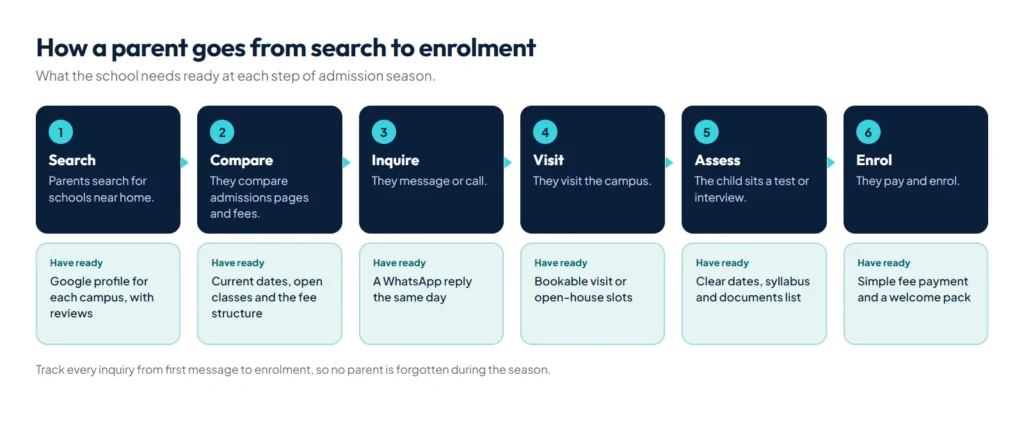
Each step needs something ready: a Google profile and reviews for the search, a current admissions page for the comparison, a quick reply on WhatsApp for the inquiry, a booking slot for the campus visit, and a clear message about the test and documents. Losing a parent at any step loses the admission.
How should a school plan admission season?
- Update the admissions page with the new session’s dates and open classes before the season starts.
- Build a dedicated admissions landing page for ads; our guide to landing pages vs websites explains why.
- Make inquiries one tap: a WhatsApp button with a pre-filled message and a short form.
- Follow up every inquiry within a day, and track each one from inquiry to enrolment. Our guide to choosing a CRM shows simple ways to do that.
- Offer open-house or campus-visit slots that parents can book online.
How should the admission inquiry flow work?
- Give every campus its own WhatsApp link. WhatsApp’s click to chat format is
https://wa.me/number?text=message, with the number in international format and no plus sign, leading zero or dashes: 03XX XXXXXXX becomes 923XXXXXXXXX. - Pre-fill the class and campus in the message, for example “Admission inquiry for Class 6, Main Campus”, so the admission office can reply with the right fee and test date straight away.
- Keep the form to four fields: parent name, phone, class applying for and campus.
- Reply with the essentials: a link to the fee page, the next test date and a campus visit slot.
- Collect documents only at admission, through the office or a secure upload, not in the open inquiry form. The child’s B-Form, previous results and parents’ CNIC copies do not belong in a general inbox.
- Record where each inquiry came from, such as the website, Google profile, Facebook or a banner, so next season’s budget goes to what worked.
What are Google’s rules for schools on Google Maps?
Schools follow most of the usual Business Profile rules, with one notable difference: Google’s guidelines list “schools and universities” among the businesses that should not provide hours, because their hours vary. Each campus should have its own profile at its real address, and departments within universities may have their own profiles with distinct names. For categories, photos and reviews, see our guide on how to rank on Google Maps.
How should each campus handle its Google profile and reviews?
- Name: use the school’s real-world name and campus. Google’s guidelines do not allow marketing taglines or unnecessary information, so “Best School in Nowshera” cannot be part of the name.
- Categories: the fewest that describe the school, as specific as possible.
- One profile per campus, and never two profiles for the same location.
- Reviews: Google’s review policy bans offering payment, discounts or free services for reviews, asking only satisfied parents, and pressuring people to review while they are on the premises. So no fee discount for a five-star review, and no review drive at the parent-teacher meeting. Ask every parent the same way, for example in the end-of-term message.
- Replies: never name a student or discuss a child’s results, behaviour or fees in a public reply. Invite the parent to contact the campus.
What do fee regulators expect from your fee page?
Fee rules differ by region, and the fee page is where parents and regulators check them. Two examples from official and press sources:
- Islamabad: PEIRA’s 2021 fee policy, reported by Dawn, limits yearly increases to 5 percent unless the school applies and justifies more, bars increases during an ongoing session, and requires schools to disclose their full schedule of charges before admission and not charge anything outside it.
- Khyber Pakhtunkhwa: according to the KP Elementary and Secondary Education Department, PSRA approval is needed for an annual fee increase above 10 percent, with one increase per academic year.
Check the current rules with your own regulator before each session. A fee page that lists every charge, the session and the payment schedule meets both expectations.
What do current parents need from the website?
- Announcements and closures, posted the same day.
- The academic calendar, exam schedules and holidays.
- Uniform, book and stationery lists for each class.
- Fee payment instructions and deadlines.
- Direct contacts for each campus and department.
Many schools also send notices on WhatsApp. For hundreds of parents, the official API is the reliable way to do it; our guide to the WhatsApp Business API in Pakistan covers costs and setup.
What content helps a school website rank?
Parents search for things like “school near Gulberg”, “O Level school fee in Lahore” or “admission test for class 6”. Campus pages that name the area, a fee page that states the fees, and short guides on the admission test, the documents needed and the difference between your curriculum options answer those searches directly. Results, achievements and event reports, published regularly, show that the school is active and give local news sites something to link to.
Which schema markup should a school use?
Schema.org lists School under EducationalOrganization, with more specific types for Preschool, ElementarySchool, MiddleSchool, HighSchool and CollegeOrUniversity. Use the most specific type that fits each campus, and EducationalOrganization for an academy or training institute.
- Mark up each campus on its own campus page, with name, address, telephone and url.
- Mark up only what parents can see. Google’s structured data guidelines say markup must be a true representation of the page.
- Do not add star ratings from testimonials you collect yourself; Google does not show review stars for an organization’s reviews of itself.
- Do not expect FAQ rich results. Google stopped showing them from 7 May 2026, but FAQs on the admissions page still help parents and AI assistants.
Common school website mistakes
- An admissions page still showing last year’s dates.
- Fees only available “on request”, so parents call three other schools first.
- One page for all campuses, with no address or map for each.
- The prospectus and forms only as large PDFs that are hard to read on a phone.
- A gallery of hundreds of uncompressed photos that makes every page slow.
- Inquiry forms that go to an inbox nobody checks during the season.
How do you make a school website easy for every parent to use?
Parents read on phones of every size, often in a hurry. WCAG 2.2, the W3C accessibility standard, gives measurable targets:
- Text contrast of at least 4.5:1 against its background, or 3:1 for large text.
- Buttons and links at least 24 by 24 CSS pixels, with the WhatsApp and call buttons much larger.
- A visible label on every form field.
- Alt text on meaningful images, and fees, dates and timings as real text, not inside banner images.
- Admission notices and fee tables as web pages, with the PDF as an optional download.
How should a school handle student photos and data?
Publish student photos only with parents’ consent, which many schools collect in the admission form, and avoid pairing photos with full names, classes and sections. Keep results, attendance and fee records behind a secure login, never on public pages.
What does Pakistani law say about student data?
As of October 2026, Pakistan does not have a general data protection law in force. The Personal Data Protection Bill, 2023 is still a draft that has not been passed by both houses of Parliament, according to the Chambers 2026 guide. That does not make student data a free-for-all. A simple consent setup protects the school today:
- A separate photo consent tick box on the admission form, not bundled into the fee terms.
- A clear way for parents to withdraw consent, and a promise to remove photos when they do.
- Staff access to student records limited to those who need them.
- A stated period after which inquiry forms from parents who did not enrol are deleted.
This is general guidance, not legal advice.
What does a school website cost?
These ranges use the market prices in our guide to the website price in Pakistan, and assume a WordPress site on shared hosting with the school supplying text and photos.
| Setup | Typical cost |
|---|---|
| School site of 5 to 15 pages with admissions, fees and campus pages | PKR 25,000 to 100,000 in the first year, domain and hosting included |
| Parent portal, online fee payment or a result system | Custom build, usually from around PKR 200,000 |
| Running costs from year two | About PKR 7,000 to 12,500 a year for domain and hosting, plus licences and maintenance |
Our guide on how to choose a website developer lists what to ask before you sign.
If your school or college reports results as a CGPA, link our free CGPA to percentage calculator, which uses the widely used 2018 HEC conversion formula, so parents can convert grades themselves.
Summary
A school website in Pakistan should make admissions, fees and campuses easy to find for new parents, keep current parents informed, follow Google’s rules for schools, and turn every inquiry into a quick, tracked follow-up during admission season. We build school and academy websites as part of our work in education and training; for costs, see our guide to the website price in Pakistan.
References
- Guidelines for representing your business on Google, Google Business Profile Help
- EducationalOrganization, Schema.org
- Peira directs private schools not to increase fees by more than 5pc, Dawn
- Private Schools Regulatory Authority (PSRA), Elementary and Secondary Education Department, Khyber Pakhtunkhwa