On this page
- Do you need a CRM yet?
- Spreadsheet vs free CRM vs paid CRM vs custom CRM
- How do popular CRMs compare on price and free plans?
- Worked example: what does a CRM cost for a team of five?
- How does WhatsApp connect to a CRM in practice?
- How to choose a CRM in one afternoon
- Which CRM features matter most for a small business?
- How to set up a CRM in a week
- When does a custom CRM make sense?
- Common CRM mistakes
- What should you do if a CRM still does not fit?
- Summary
- References
A CRM, or customer relationship management system, keeps every lead, customer, conversation and follow-up in one place, so nothing slips through the cracks. For a small business, match the tool to your volume: a well-structured spreadsheet for a handful of leads a week, a free CRM such as HubSpot (free for up to two users) or Zoho CRM (free for up to three users) once several people follow up, and a paid or custom CRM when you need automation, WhatsApp integration or your own workflow.
The worst CRM is the one nobody updates, so the simplest tool your team will actually use beats the most powerful one. Here is how the four options compare and how to choose.
Do you need a CRM yet?
- Leads get lost in WhatsApp chats, call logs and inboxes.
- Follow-ups depend on someone remembering.
- You do not know which ads, pages or referrals bring paying customers.
- More than one person handles the same customers.
- Repeat customers are not contacted again at the right time.
If two or more of these sound familiar, you have outgrown memory and sticky notes.
Spreadsheet vs free CRM vs paid CRM vs custom CRM
| Spreadsheet | Free CRM | Paid CRM | Custom CRM | |
|---|---|---|---|---|
| Cost | Free | Free for small teams | Per user, per month | One-time build, then hosting and upkeep |
| Users | Anyone with the link | Limited: 2 on HubSpot, 3 on Zoho | As many as you pay for | Unlimited, no per-user fee |
| Follow-up reminders | Manual | Yes | Yes, with automation | Built to your rules |
| No | Limited | Often through integrations | Built in, if you need it | |
| Fits your process | Loosely | Standard pipeline | Configurable | Exactly |
| Best for | Solo owners with few leads | Small teams starting out | Growing sales teams | Unusual workflows, large teams, own software |
HubSpot says its free CRM covers “up to two users” and is “100% free, with no expiration date” (HubSpot). Zoho’s free edition “can support up to 3 users” with up to 5,000 records and 1 GB of file storage (Zoho CRM).
How do popular CRMs compare on price and free plans?
These are the limits and starting prices listed on each vendor’s site in October 2026. Prices are in US dollars, exclude tax, and change often, so check before you sign up.
| CRM | Free option | Entry paid plan | Native WhatsApp |
|---|---|---|---|
| HubSpot | Free CRM for up to 2 users and 1,000 contacts, no expiry | Starter: list price $20 per seat a month; new customers are sometimes offered a lower introductory price | Needs Marketing Hub or Service Hub on Professional or Enterprise |
| Zoho CRM | Free for up to 3 users | Standard: $14 per user a month billed annually | Included on the free trial and all paid editions |
| Pipedrive | 14-day free trial | Lite: $14 per seat a month billed annually; Growth $39 | Check current plans and add-ons |
| Bitrix24 | Free for 1 to 2 users, 5 GB storage | Basic: $49 a month billed annually ($69 monthly) for 5 users in total | Check current plans and add-ons |
The WhatsApp column matters in Pakistan, the Gulf and anywhere sales happen in chat. On HubSpot the built-in WhatsApp channel needs a Professional tier of Marketing Hub or Service Hub, which is a big step up from Starter. On Zoho CRM it works from the cheapest paid edition.
Worked example: what does a CRM cost for a team of five?
Assume five people handle leads, everyone needs a login, and you pay yearly. Using the prices above:
| Option | Calculation | Per year |
|---|---|---|
| HubSpot free or Zoho free | Not enough seats: 2 and 3 users | Not possible |
| Bitrix24 Basic | $49 x 12 months, 5 users included | $588 |
| Zoho CRM Standard | $14 x 5 users x 12 months | $840 |
| Pipedrive Lite | $14 x 5 seats x 12 months | $840 |
| HubSpot Starter | $20 x 5 seats x 12 months at list price | $1,200 |
For many small teams the yearly difference between these is a few hundred dollars, so the deciding factors should be WhatsApp support, how easy your staff find the mobile app, and what the price becomes after any introductory offer ends. Two practical tips: give logins only to people who update leads, since owners who just read reports can often use shared dashboards, and if you are a three-person team, Zoho’s free edition may cover you for now.
How does WhatsApp connect to a CRM in practice?
Through the WhatsApp Business API, not the free phone app. Zoho’s setup guide lists what you need before connecting: a Facebook Business Manager account, a verified business, a WhatsApp Business account and a registered phone number that meets Meta’s requirements. Once connected, chats are saved on the customer’s record and staff reply from the CRM.
On cost, Meta now charges per delivered template message (the pre-approved messages you send first, such as reminders or offers). Ordinary replies inside the customer service window that opens when the customer messages you are free. So a team that mostly answers incoming inquiries pays little for WhatsApp itself; a team that sends many reminders or promotions pays more. Our guide to the WhatsApp Business API in Pakistan covers providers and setup.
How to choose a CRM in one afternoon
- Count your users who will update leads every day. This decides whether a free plan is even possible.
- List where leads come from: website forms, WhatsApp, Facebook and Instagram, calls, walk-ins. Rule out any CRM that cannot capture your top two sources.
- Shortlist two CRMs from the table and start free plans or trials of both.
- Load 20 real leads into each and have two staff members work them for a few days on their phones.
- Check the exit: export your contacts to a CSV file and make sure every field comes out.
- Price year two, not just the first month, at the number of users you expect to have.
- Pick the one your team actually used, then follow the one-week setup below.
Which CRM features matter most for a small business?
- A simple pipeline with five or six stages that match how you actually sell.
- Follow-up reminders, so every lead has a next action and a date.
- Lead source tracking, so you know which ads and pages pay for themselves.
- WhatsApp and email integration, so conversations are saved against the customer.
- A good mobile app for staff who are out of the office.
- Easy import and export, so your data is never trapped.
How to set up a CRM in a week
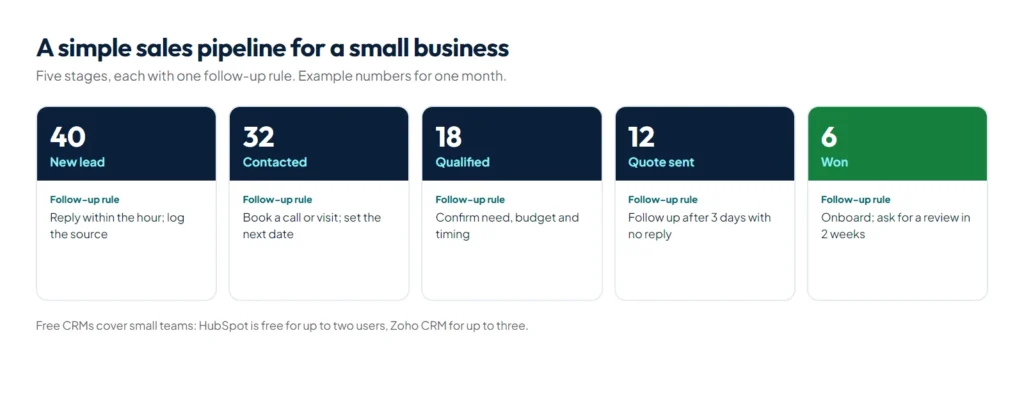
- Define your pipeline stages, for example New lead, Contacted, Qualified, Quote sent, Won or Lost.
- Keep the fields few: name, phone, source, service wanted, value, next action, next date.
- Import your existing contacts from sheets and phones.
- Connect your website forms and, if possible, WhatsApp, so new leads arrive automatically.
- Set follow-up rules, such as a reminder if a quote has had no reply for three days.
- Review the pipeline weekly with your team.
Steps four and five are where automation helps most; our guide to AI automation for small businesses shows workflows such as instant lead replies that feed a CRM.
When does a custom CRM make sense?
When your work does not fit a standard pipeline. Travel agencies are a good example: they manage groups, passports, visas, packages and supplier payments, not just deals. That is why we built Safar Studio as a dedicated system for travel and Umrah agencies instead of bending a general CRM to fit. A custom CRM is also worth considering when per-user fees grow with your team, when it must connect deeply to your own software, or when it has to work offline.
Common CRM mistakes
- Too many fields, so nobody fills them in.
- No owner for each lead.
- Leaving WhatsApp conversations outside the CRM.
- Buying an enterprise system for a five-person team.
- Never reviewing the pipeline, so it slowly goes out of date.
What should you do if a CRM still does not fit?
Before paying for a custom build, try automation first. Many gaps, such as sending new WhatsApp leads into the CRM, reminding staff about stale quotes or posting a daily pipeline summary, can be filled with a workflow on top of a standard CRM; our guide to AI automation for small businesses shows how. If the core of your process still does not fit, a custom system starts to make sense, and our custom software development team can scope it feature by feature so you can compare the build cost with several years of per-user fees.
Summary
The right CRM for a small business is the simplest one your team will use every day. Start with a spreadsheet or a free CRM such as HubSpot or Zoho, move to a paid plan when you need automation and more users, and consider a custom CRM when your workflow is unusual or per-user fees add up. If you need one built around your process, see our custom software development service.
References
- HubSpot Starter Customer Platform pricing, HubSpot
- WhatsApp CRM integration, HubSpot
- Zoho CRM edition pricing, Zoho
- Business messaging using WhatsApp for Business, Zoho CRM Help