On this page
- What is AI automation, and how is it different from ordinary automation?
- 10 AI automation workflows for small businesses
- Which tools do you need?
- What do the tools cost?
- Worked example: what does an instant lead reply cost to run?
- How do you choose which workflow to automate first?
- Does this work for a WhatsApp-first business in Pakistan?
- Common mistakes to avoid
- How to start without breaking anything
- What are the risks, and how do you manage them?
- Should you build it yourself or hire someone?
- Summary
- References
AI automation examples for small businesses show how connecting the tools you already use, such as website forms, WhatsApp, email, Google Sheets, your CRM and accounting software, so routine work happens on its own, with an AI model handling the parts that need reading or writing, like sorting inquiries or drafting replies. Start with one repetitive, high-volume task, keep a person approving anything that reaches a customer or moves money, and measure the hours saved before adding the next workflow.
The ten workflows below are practical starting points for service businesses, online stores and agencies, from instant lead replies to the Monday morning report.
What is AI automation, and how is it different from ordinary automation?
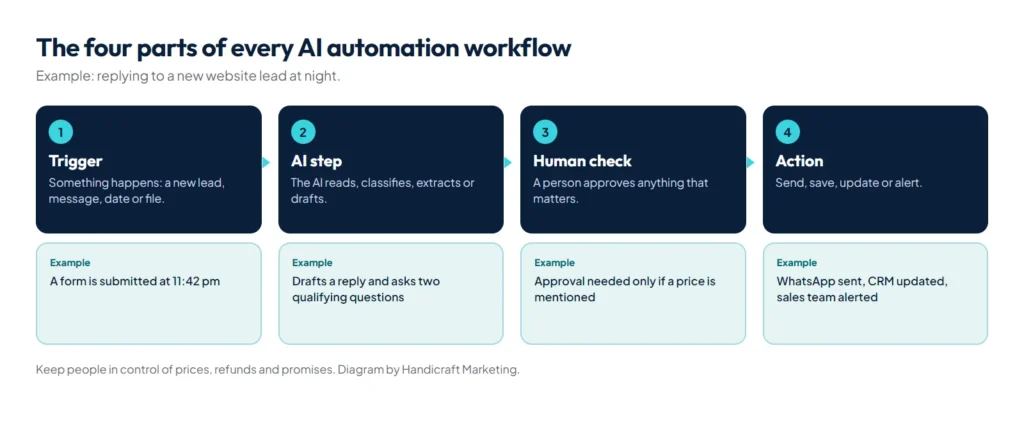
Ordinary automation follows fixed rules: when a form is submitted, add a row to a sheet and send an email. AI automation adds a step that can understand text: read an inquiry and decide what it is about, pull the amount and due date out of an invoice, or draft a reply in your tone. Every workflow has the same shape:
| Trigger | AI step | Human check | Action |
|---|---|---|---|
| Something happens: a new lead, a message, a date, a file | Read, classify, extract or draft | Approve when it matters: prices, refunds, sensitive replies | Send, save, update or alert |
10 AI automation workflows for small businesses
| Workflow | Trigger | What the AI does | Result |
|---|---|---|---|
| 1. Instant lead reply | Website form or ad lead | Writes a personal reply and asks qualifying questions | Leads answered in a minute, sorted by quality |
| 2. WhatsApp FAQ assistant | Incoming WhatsApp message | Answers from your price list and FAQs | Common questions answered day and night, with a handover to staff |
| 3. Missed-call follow-up | A missed call | Sends a WhatsApp message with a booking link | Fewer lost callers |
| 4. Quote drafts | An inquiry with requirements | Drafts a quote from your templates | Quotes ready for approval in minutes |
| 5. Payment reminders | An invoice due date | Sends polite, escalating reminders | Faster payments, less awkward chasing |
| 6. Document data entry | A supplier invoice or receipt by email | Extracts supplier, amount, date and items | Data in your sheet or accounting software |
| 7. Review requests | A job marked complete | Sends your Google review link to every customer | A steady flow of genuine reviews |
| 8. Social post drafts | A new blog post or offer | Drafts posts for LinkedIn and Facebook | Consistent posting after a quick approval |
| 9. Weekly report | Every Monday morning | Summarises sales, leads and ad results | One clear message instead of five dashboards |
| 10. Support triage | A support email or ticket | Tags urgency and topic, routes it | Urgent issues seen first |
Review requests should go to every customer, not only the happy ones; Google’s rules on asking for reviews are covered in our guide on how to rank on Google Maps. For anything on WhatsApp, see our guide to the WhatsApp Business API in Pakistan for costs and setup.
Which tools do you need?
- An automation platform to connect your apps: hosted services such as Zapier or Make, or n8n, which you can also run on your own server; its documentation notes you can “self-host n8n on your own infrastructure, on-premises, or in a private cloud” (n8n docs).
- An AI model from a provider such as OpenAI, Anthropic or Google, connected through its API and billed by usage. Our AI models comparison sets out the price and strengths of each model, from Claude Haiku 5.5 to GPT-6 Astra.
- Your existing tools: forms, Google Sheets, a CRM, email, WhatsApp Business API, accounting software.
What do the tools cost?
Most small businesses can start on a free or entry plan. The prices below were checked on each vendor’s own pricing page in October 2026; they change often, so confirm before you buy.
| Tool | Free option | Entry paid plan | How usage is counted |
|---|---|---|---|
| Zapier | 100 tasks a month, two-step Zaps only | Professional from $19.99 a month billed annually ($29.99 monthly) for 750 tasks | Tasks: each action a Zap completes |
| Make | 1,000 credits a month, 2 active scenarios | Paid plans sold by credit volume | Credits: each module action in a scenario |
| n8n | Community edition, self-hosted (you pay for the server) | Cloud Starter from 20 euros a month billed annually for 2,500 executions | Executions: each full workflow run |
| Claude API (Anthropic) | None, pay as you go | Haiku 5.5: $0.10 per million input tokens, $0.50 per million output tokens (prompts up to 100,000 tokens). Sonnet 5.5: $2 and $10 | Tokens: the text sent to and written by the model |
Two points matter more than the headline price. Zapier’s free plan only runs two-step Zaps, so a trigger plus an AI step plus a reply already needs a paid plan. And n8n counts a whole workflow run as one execution, while Zapier and Make count each step, which makes n8n cheaper for long workflows with many steps.
Worked example: what does an instant lead reply cost to run?
Here is the monthly running cost of workflow 1 for a business that gets 300 leads a month. The assumptions are ours, for illustration:
- Each lead runs four steps: the form trigger, an AI step, a WhatsApp or email reply, and a row added to your sheet or CRM.
- The AI step reads about 1,500 tokens (the inquiry plus your service notes and price list) and writes about 300 tokens.
- Answering a lead by hand takes a staff member about 5 minutes.
| Cost item | Calculation | Per month |
|---|---|---|
| AI model, Claude Sonnet 5.5 | 450,000 input tokens at $2 per million plus 90,000 output tokens at $10 per million | About $1.80 |
| AI model, Claude Haiku 5.5 | 450,000 at $0.10 per million plus 90,000 at $0.50 per million | About $0.09 |
| Zapier | 3 actions x 300 leads = 900 tasks, above the 750-task entry tier | A Professional tier above $19.99 |
| Make | About 4 credits x 300 leads = 1,200 credits, above the free 1,000 | An entry paid plan |
| n8n self-hosted | A small server, for example a 2 GB DigitalOcean Droplet | $12 |
| Staff time saved | 300 leads x 5 minutes | About 25 hours |
The lesson: the AI itself is the cheapest part. The platform plan, the build and the time someone spends checking the output are where the money goes, so judge a workflow by hours saved and leads won, not by token prices. Replies on WhatsApp add little: Meta charges per delivered template message, and normal replies sent within the customer service window, which opens when the customer messages you, are free (Meta for Developers).
To run the same sums for your own workflow and model, use our free AI token cost calculator.
How do you choose which workflow to automate first?
Score each candidate task from 1 to 5 on four questions and start with the highest total:
- Volume: how many times a week does it happen?
- Time: how many minutes does each one take by hand?
- Cost of delay: do you lose money or customers when it is slow, as with unanswered leads?
- Easy to check: can someone see at a glance whether the result is right?
Lead replies and payment reminders usually score high on all four. Tasks that are rare, slow to check or involve judgement on money, such as approving refunds, should wait.
Does this work for a WhatsApp-first business in Pakistan?
Yes, and that is often where the biggest gain is, because most inquiries arrive on WhatsApp outside office hours. A few practical points:
- Use the WhatsApp Business API, not the phone app, for any automation. The API needs a verified business on Meta and a registered number; our guide to the WhatsApp Business API in Pakistan covers setup and providers.
- Test with your real chats. Customers write in English, Urdu and Roman Urdu, often in one message. Run the AI on 50 past conversations before it answers anyone live, and keep a person on anything it gets wrong.
- Budget in dollars. Zapier, Make, n8n Cloud and AI providers bill in US dollars or euros, so pay with a card that allows international online payments and expect the PKR cost to move with the exchange rate.
- Keep prices in one place the AI reads from, such as a Google Sheet, so a price change does not leave old figures in replies.
Common mistakes to avoid
- Automating a messy process: if the manual steps are unclear, the automation repeats the confusion faster.
- Letting the AI quote prices or delivery dates from memory instead of your own price list.
- No owner: every workflow needs one person who gets the error alerts and fixes them.
- Building five workflows at once, so none is measured or trusted.
- Forgetting the exit: customers must always be able to reach a person with one message.
How to start without breaking anything
- Pick one task that is repetitive, frequent and easy to check, such as replying to new leads.
- Write down how it is done today, step by step, including the exceptions.
- Decide what the AI may do alone and what needs approval.
- Build it on test data, then run it alongside the manual process for two weeks.
- Measure time saved, response speed and errors, then switch over.
- Add alerts, so someone knows within minutes if a step fails.
What are the risks, and how do you manage them?
- Wrong answers: limit the AI to your own approved information and keep approvals on prices, refunds and promises.
- Privacy: send only the data a step needs, avoid identity documents and sensitive personal data, and check your AI provider’s data terms.
- Costs creeping up: set usage limits and monthly alerts with the AI provider and automation platform.
- Silent failures: apps change; monitoring and error alerts catch broken steps before customers do.
- Customer trust: be open when customers are talking to an assistant, and make reaching a person easy.
Should you build it yourself or hire someone?
Two-step workflows between popular apps are easy to build yourself with no-code tools. When a workflow spans several systems, touches payments or customer data, or has to run reliably every day, it is worth having it built with proper error handling, logs and alerts. Our AI automation service builds workflows that run on cloud servers, with alerts and approvals on your phone, and our lead generation funnels connect them to your ads and website.
Summary
AI automation for small businesses works best one workflow at a time: a clear trigger, an AI step that reads or writes, a human check where it matters, and an action. Start with instant lead replies or payment reminders, measure the time saved, and keep people in control of anything involving money or promises.
References
- Zapier plans and pricing, Zapier
- n8n pricing, n8n
- Claude API pricing, Anthropic
- WhatsApp Business Platform pricing, Meta for Developers