
On this page
- What did we build?
- Step 1: Write the rules down first
- Step 2: Build the theme in reviewable pieces, with WordPress’s own security rules
- Step 3: Treat content as code
- Step 4: Give Claude ways to check its work
- Step 5: Use design skills for the craft
- Step 6: Deploy carefully, and expect hosting surprises
- What is Claude Code great at in WordPress work?
- Where do we still step in?
- Prompts we actually use
- Summary
- References
We use Claude Code to build custom WordPress websites end to end: the theme’s PHP, CSS and JavaScript without a page builder, rerunnable scripts that create every page, menu, SEO field and blog post, automated browser checks at phone and desktop sizes, and deploys with backups and checksum verification. Claude does most of the typing. We set the rules, provide the real content, review every change, and give Claude ways to check its own work. This website, handicraftm.com, was built exactly this way.
Here is the actual workflow, with the code patterns that made the biggest difference, the hosting surprises we hit, and the places where a human still has to decide.
What did we build?
A custom WordPress theme for this site: custom post types for services, industries and products; a built-in SEO layer with structured data, FAQ markup and an llms.txt file; a blog pipeline; mobile-first templates; and animated 3D hero sections that load only after the visitor interacts, so mobile performance stays in the 94 to 100 range in Lighthouse.
Step 1: Write the rules down first
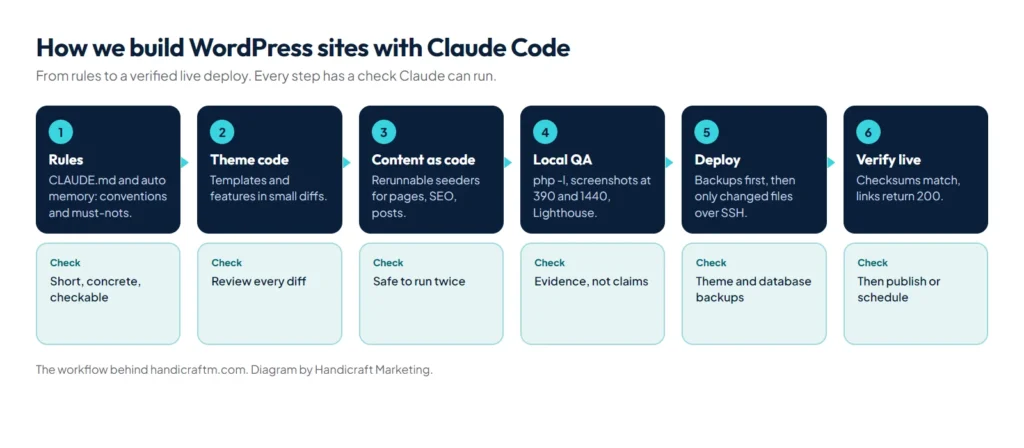
Before any code, Claude gets the rules: in CLAUDE.md for the project, and in its auto memory for preferences we correct once. Ours include no page builders, escape every output, check every change at 390 and 1440 pixels wide, never use em dashes in copy, add every new page to the header, mobile menu and footer, and save local backups to a separate drive. Short, concrete, checkable rules get followed; see our CLAUDE.md guide for how to write them, or start from the WordPress preset in our free CLAUDE.md generator.
Step 2: Build the theme in reviewable pieces, with WordPress’s own security rules
We ask for one template or feature at a time: the service page template, the FAQ schema, the mobile menu. Each change is small enough to review as a diff, and larger features are planned first. Every piece follows the same security rules from the WordPress escaping guide, which we keep in CLAUDE.md so Claude applies them without being asked:
| Output goes into | Escape with |
|---|---|
| HTML text | esc_html() |
| An attribute | esc_attr() |
| A link or image URL | esc_url() |
| Rich content with allowed tags | wp_kses_post() or wp_kses() |
Forms get a nonce, a honeypot and a rate limit, input is sanitized on the way in, and every PHP file Claude touches gets php -l before we look at it.
Step 3: Treat content as code
This was the biggest win. Instead of clicking pages together in the admin, Claude writes rerunnable PHP scripts that load WordPress and create or update content by slug. The core pattern fits in a few lines:
require $site . '/wp-load.php';

$existing = get_page_by_path('passport-extractor', OBJECT, 'hm_product');
$post = [
    'post_type'   => 'hm_product',
    'post_name'   => 'passport-extractor',
    'post_title'  => 'Passport Extractor',
    'post_status' => 'publish',
];
if ($existing) {
    $post['ID'] = $existing->ID;
}
$id = $existing ? wp_update_post($post, true) : wp_insert_post($post, true);
update_post_meta($id, 'hm_seo_title', 'Passport Extractor: Offline Passport OCR to Excel');
Run it twice and it updates rather than duplicates, so the local and live sites always match. Blog posts follow the same idea: written in a source file, converted to block markup such as <!-- wp:paragraph --> so they stay editable in the block editor, then seeded with their images, FAQs and SEO fields. To schedule a post, the script sets the status to future with both post_date and post_date_gmt, and WordPress’s own cron publishes it on time.
Step 4: Give Claude ways to check its work
- Syntax:
php -lon every PHP file Claude edits. - Visual: headless Chrome screenshots of each page at phone and desktop widths, compared before and after a change.
- Mobile behaviour: scripts that emulate touch, check tap targets and look for horizontal scrolling.
- Performance: Lighthouse runs on key templates after anything that could slow a page.
- Links: every internal link checked for a 200 response on the live site before posts publish.
Anthropic calls verification the single biggest lever, and in our experience that is right: the checks catch what reading a diff misses. More in our Claude Code best practices.
Step 5: Use design skills for the craft
For layout and polish, we run Claude with design skills: UI UX Pro Max for UX rules and design systems, taste-skill for avoiding generic layouts, and Anthropic’s frontend-design plugin. The concrete fixes our mobile-first pass produced are in our guide to UI UX Pro Max.
Step 6: Deploy carefully, and expect hosting surprises
- Back up the live database and theme files before every deploy.
- Push only the files that changed, over SSH.
- Verify each deployed file against the local copy by checksum.
- Run the seeders on the live site where content changed.
- Check the live pages, then schedule or publish posts.
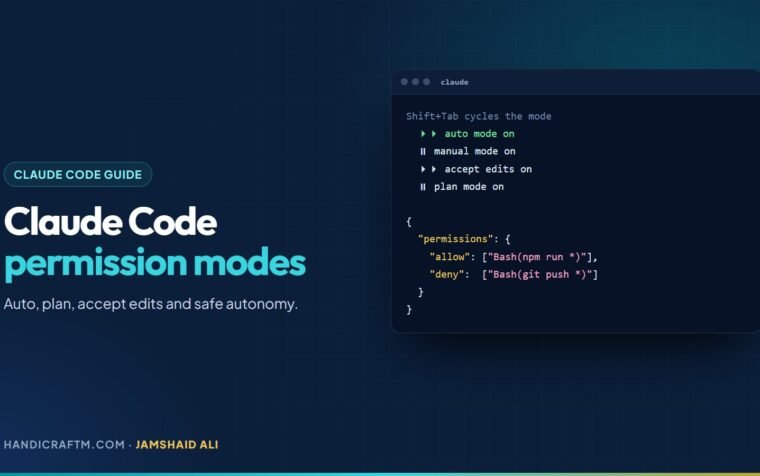
Shared hosting adds its own rules, and Claude is good at working around them once it sees the error. Two we hit on this site: wp db export failed because the host disables PHP’s proc_open, so backups now call mysqldump directly with the credentials read from wp config get; and a file list written on Windows carried CRLF line endings that broke a tar command on the Linux server until they were stripped. Publishing and deploy steps only run when we explicitly ask for them, and Claude Code’s permission modes enforce that boundary.
What is Claude Code great at in WordPress work?
- Writing and refactoring templates, functions and styles consistently across a whole theme.
- Generating seeders, migration scripts and QA tooling you would never find time to write by hand.
- Applying a rule everywhere at once, such as escaping output or fixing tap targets on every template.
- Explaining unfamiliar code in an old theme or plugin before you change it.
Where do we still step in?
- Facts: every price, statistic and claim on a page is checked against a primary source. We have caught and removed claims that sounded right but couldn’t be backed up.
- Brand and taste: what the client’s business should feel like is a human decision.
- Security review of anything that handles input, payments or personal data.
- Client approvals before anything goes live.
Prompts we actually use
- “Read the theme’s templates and list every place output isn’t escaped. Don’t change anything yet.”
- “Add an FAQ section to the service template using the existing hm_faqs field, with FAQPage schema. Match the style of the product template.”
- “Take screenshots of the home, services and contact pages at 390 and 1440 wide and list every layout problem you see.”
- “Write a seeder that creates these 15 pages by slug and is safe to run twice.”
Summary
Claude Code builds WordPress sites well when you give it rules, real content, small reviewable tasks and checks it can run, and when content lives in rerunnable scripts instead of clicks. Keep facts, brand, security and approvals in human hands. If you want a fast, custom WordPress site built this way, see our website development service; to compare build approaches, read Elementor vs Gutenberg vs a custom theme and our guide to WordPress speed optimization.
References
- Escaping data, WordPress Developer Resources
- Security, WordPress Developer Resources
- Theme Handbook, WordPress Developer Resources
- Block Editor Handbook, WordPress Developer Resources
- WP-CLI commands, WordPress Developer Resources
- Lighthouse overview, Chrome for Developers