
On this page
- How does headless mode work?
- Why use –bare in CI?
- How do you control permissions in unattended runs?
- Three headless scripts worth stealing
- How do you set up Claude Code GitHub Actions?
- Interactive or automation mode?
- Workflow 1: answer @claude in issues and pull requests
- Workflow 2: review every pull request
- Workflow 3: a daily report on a schedule
- How do you authenticate without storing a key?
- Which gotchas catch people out?
- How do you keep CI runs safe and affordable?
- Summary
- References
Claude Code can run without anyone at the keyboard in two ways. In any script or pipeline, claude -p "prompt" runs it non-interactively, with text, JSON or streaming JSON output and exact tool allowlists. In GitHub, the official anthropics/claude-code-action@v1 answers @claude mentions in issues and pull requests, reviews pull requests, and runs prompts on any event or schedule. Set either up with an API key, a subscription token or keyless workload identity federation, the narrowest permissions that work, and caps on turns and time.
This is where Claude Code stops being a chat in your terminal and becomes part of your delivery pipeline. The commands and workflows below come from the official headless mode and GitHub Actions documentation.
How does headless mode work?
# Ask a question and print the answer
claude -p "What does the auth module do?"

# Pipe data in, write the answer out
cat build-error.txt | claude -p "concisely explain the root cause of this build error" > output.txt

# Structured output for scripts, parsed with jq
claude -p "Summarize this project" --output-format json | jq -r '.result'

# Output that must match a JSON schema
claude -p "Extract the main function names from auth.py" \
  --output-format json \
  --json-schema '{"type":"object","properties":{"functions":{"type":"array","items":{"type":"string"}}},"required":["functions"]}'

# Continue the most recent conversation
claude -p "Now focus on the database queries" --continue
Claude Code exits with 0 on success and non-zero on failure, so scripts can branch on the result. JSON output includes total_cost_usd, an estimate you can log per run. Piped input is capped at 10MB; for anything bigger, write it to a file and reference the path.
Why use –bare in CI?
Without it, claude -p loads everything an interactive session would, including hooks in a project’s .claude/settings.json and servers in its .mcp.json, even in a folder nobody has trusted. --bare skips hooks, skills, plugins, MCP servers, auto memory and CLAUDE.md, so every run behaves the same. Pass what you need explicitly with --settings, --mcp-config, --agents or --plugin-dir. Bare mode needs ANTHROPIC_API_KEY.
How do you control permissions in unattended runs?
- Exact allowlists:
--allowedTools "Bash(git diff *),Bash(git commit *)". The space before*matters. - A baseline mode:
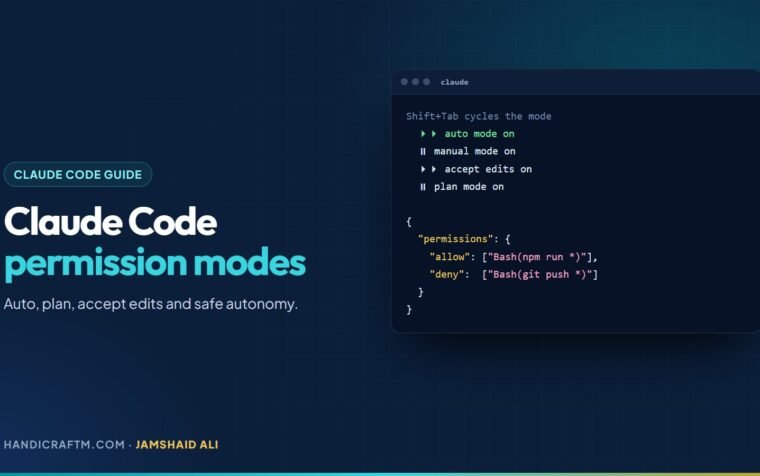
--permission-mode dontAskdenies anything not allowed;acceptEditslets file edits through;autohas a classifier review each action. - No waiting for a human:
--permission-prompts nonedenies anything that would prompt and tells Claude not to retry. - Spend caps:
--max-turnsand--max-budget-usdstop runaway runs.
Three headless scripts worth stealing
# 1. A typo linter in package.json
"lint:claude": "git diff main | claude -p \"you are a typo linter. for each typo in this diff, report filename:line on one line and the issue on the next. return nothing else.\""

# 2. A commit from staged changes, with only git allowed
claude -p "Look at my staged changes and create an appropriate commit" \
  --allowedTools "Bash(git diff *),Bash(git log *),Bash(git status *),Bash(git commit *)"

# 3. A security review of a pull request
gh pr diff "$1" | claude -p \
  --append-system-prompt "You are a security engineer. Review for vulnerabilities." \
  --output-format json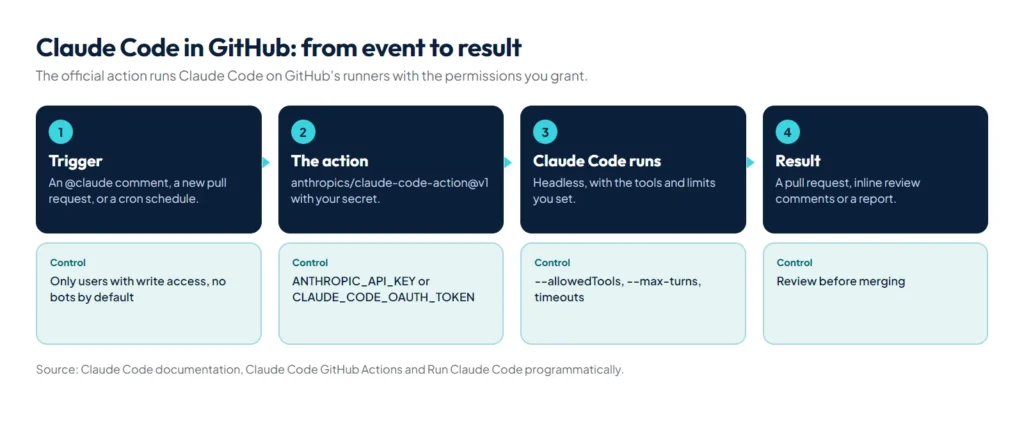
How do you set up Claude Code GitHub Actions?
Quick setup: install and log in to the GitHub CLI (gh auth login), open claude in the repository and run /install-github-app. It installs the Claude GitHub App, saves a secret and opens a pull request with the workflow files. You need admin access to the repository, and it works only with github.com repositories.
Manual setup: install the Claude GitHub App on the repository, add ANTHROPIC_API_KEY (from the Claude Console) or CLAUDE_CODE_OAUTH_TOKEN (created with claude setup-token) as a secret, and copy a workflow file into .github/workflows/.
Interactive or automation mode?
The action picks its mode from your workflow. With no prompt input it runs in interactive mode: it waits for the trigger phrase, @claude by default, in an issue or pull request comment, a review, or a new issue’s title or body, and replies on that thread. With a prompt input it runs in automation mode on whatever event triggered the workflow, and by default writes its results to the run log rather than a comment.
Workflow 1: answer @claude in issues and pull requests
name: Claude Code
on:
  issue_comment:
    types: [created]
  pull_request_review_comment:
    types: [created]
jobs:
  claude:
    if: contains(github.event.comment.body, '@claude')
    runs-on: ubuntu-latest
    permissions:
      contents: write
      pull-requests: write
      issues: write
      id-token: write
      actions: read
    steps:
      - uses: actions/checkout@v6
        with:
          fetch-depth: 1
      - uses: anthropics/claude-code-action@v1
        with:
          anthropic_api_key: ${{ secrets.ANTHROPIC_API_KEY }}
id-token: write is needed for the action’s default GitHub App authentication, and actions: read lets Claude read CI results on pull requests.
Workflow 2: review every pull request
name: Code Review
on:
  pull_request:
    types: [opened, synchronize, ready_for_review, reopened]
jobs:
  review:
    runs-on: ubuntu-latest
    permissions:
      contents: read
      pull-requests: read
      issues: read
      id-token: write
    steps:
      - uses: actions/checkout@v6
        with:
          fetch-depth: 1
      - uses: anthropics/claude-code-action@v1
        with:
          anthropic_api_key: ${{ secrets.ANTHROPIC_API_KEY }}
          plugin_marketplaces: "https://github.com/anthropics/claude-code.git"
          plugins: "code-review@claude-code-plugins"
          prompt: "/code-review:code-review --comment ${{ github.repository }}/pull/${{ github.event.pull_request.number }}"
          claude_args: '--allowedTools "mcp__github_inline_comment__create_inline_comment"'
With --comment, Claude posts inline comments on each issue it finds, or one summary comment when it finds none. Keep the claude_args line: the action only starts the inline-comment server when --allowedTools names it. If you would rather not maintain a workflow at all, Anthropic’s separate Code Review product reviews every pull request automatically through the same GitHub App.
Workflow 3: a daily report on a schedule
name: Daily Report
on:
  schedule:
    - cron: "0 9 * * *"
jobs:
  report:
    runs-on: ubuntu-latest
    permissions:
      contents: read
      issues: read
      id-token: write
    steps:
      - uses: anthropics/claude-code-action@v1
        with:
          anthropic_api_key: ${{ secrets.ANTHROPIC_API_KEY }}
          prompt: "Generate a summary of yesterday's commits and open issues"
          claude_args: |
            --allowedTools "mcp__github__list_commits,mcp__github__list_issues"
How do you authenticate without storing a key?
Use workload identity federation. The action exchanges the workflow’s GitHub OIDC token for Claude API access through a Claude Console service account, so no long-lived secret sits in the repository. Set anthropic_federation_rule_id (an fdrl_... ID) and anthropic_organization_id, optionally anthropic_service_account_id and anthropic_workspace_id, and grant id-token: write. To run inference through your own cloud account instead, set use_bedrock, use_vertex or use_foundry to "true"; all three also authenticate with OIDC.
Rolling out across an organisation? Install the Claude GitHub App once at organisation level, store the credential as an organisation-level secret, preferably an API key rather than a personal subscription token, and define the job once as a reusable workflow that each repository calls.
Which gotchas catch people out?
- CI does not run on Claude’s commits: GitHub never triggers workflows on commits made with the default
GITHUB_TOKEN. Drop agithub_token: ${{ secrets.GITHUB_TOKEN }}input so the action uses the Claude GitHub App, or pass a custom app token. - Who can trigger: only users with write access, and bot accounts are rejected unless listed in
allowed_bots. Scheduled runs count as the user who last edited the cron line; if that was a bot, list it. - Forks on public repositories: GitHub withholds secrets from runs triggered by pull requests from forks, so reviews run only on branches in the same repository.
- Schedules: GitHub runs scheduled workflows only from the default branch, and disables them in public repositories after 60 days without activity.
- App permissions are all or nothing: the Claude GitHub App’s permission set covers several Claude features. If policy requires the minimum, create a custom GitHub App with Contents, Issues and Pull requests only.
- Old workflows: moving from
@betato@v1means removingmode, renamingdirect_prompttoprompt, and moving options such asmax_turnsandmodelintoclaude_args.
How do you keep CI runs safe and affordable?
- Secrets: never commit keys; reference them as
${{ secrets.NAME }}. - Least privilege: grant only the workflow permissions each job needs.
- Caps:
--max-turnsinclaude_args, workflow timeouts and concurrency limits. - Context: keep CLAUDE.md concise, because every run reads it, and use issue templates so requests arrive with context.
- Review: treat Claude’s pull requests like any contributor’s and review before merging.
Not on GitHub? Claude Code also has a GitLab CI/CD integration, and claude -p works in any other pipeline.
Summary
Use claude -p with --bare, exact allowlists and JSON output for scripts and pipelines, and anthropics/claude-code-action@v1 for @claude mentions, pull request reviews and scheduled jobs in GitHub. Prefer keyless federation for organisations, keep permissions tight and runs capped, and remember that commits made with the default GITHUB_TOKEN never trigger CI. Before automating, get comfortable with permission modes and the habits in our Claude Code best practices; review workflows install plugins, covered in our guide to Claude Code plugins.
References
- Run Claude Code programmatically, Claude Code documentation
- Claude Code GitHub Actions, Claude Code documentation
- anthropics/claude-code-action, the action’s repository and setup guide
- Claude Code Action security documentation
- Use GITHUB_TOKEN for authentication in workflows, GitHub Docs
- Claude Code GitLab CI/CD, Claude Code documentation