On this page
- What can a plugin contain?
- Which marketplaces does Anthropic run?
- How do you install a plugin?
- Which install scope should you choose?
- What does an enabled plugin cost you?
- How do you build your own plugin?
- Which plugin.json fields matter?
- How do you ask users for settings and secrets?
- Where should a plugin keep its files and state?
- Which mistakes stop a plugin loading?
- How do you turn an existing .claude setup into a plugin?
- How do you share a plugin?
- Which Claude Code plugins are worth installing?
- Are plugins safe to install?
- How do plugins stay up to date?
- Summary
- References
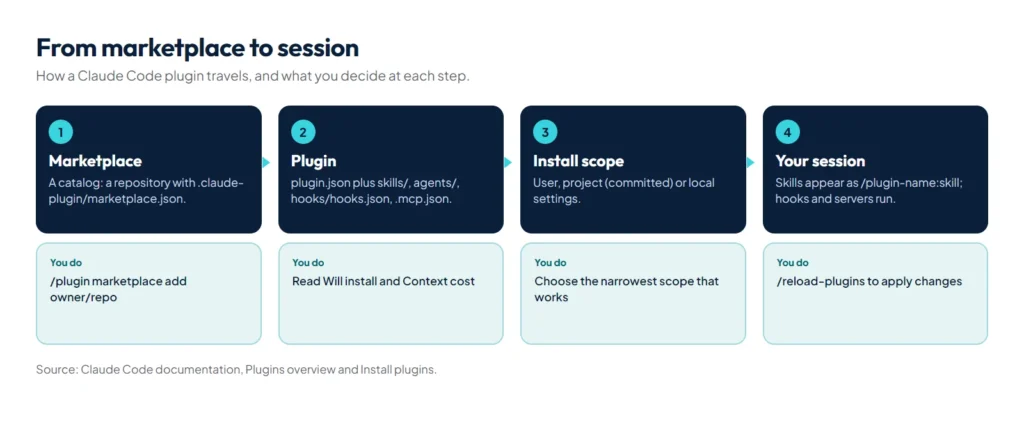
Claude Code plugins are directories of skills, subagents, hooks, MCP servers and other components that install and load as one unit. Most plugins come from a marketplace, a catalog with a .claude-plugin/marketplace.json file. Claude Code adds Anthropic’s official marketplace, claude-plugins-official, the first time you start an interactive session, so you can run /plugin and install something straight away. You can also build your own plugin from a folder with an optional plugin.json manifest and share it through your own marketplace.
Plugins are how a good setup travels: from one repository to the next, from one developer to a team, or from an author to thousands of users. This guide covers both sides, using the official plugin documentation and manifest reference.
What can a plugin contain?
| Component | Location in the plugin | What you get |
|---|---|---|
| Manifest | .claude-plugin/plugin.json | Name, version, metadata, user settings; optional |
| Skills | skills/<name>/SKILL.md | Commands such as /my-plugin:review, or knowledge Claude loads when relevant |
| Subagents | agents/<name>.md | Specialised workers Claude can delegate to |
| Hooks | hooks/hooks.json | Scripts that run at events such as after every edit |
| MCP servers | .mcp.json | Tools that connect Claude to external systems |
| Language servers | .lsp.json | Type errors and go-to-definition for a language |
| Executables | bin/ | Commands on the Bash tool’s PATH while the plugin is enabled |
| Commands | commands/ | The older, flat form of skills |
Plugin skills and agents are prefixed with the plugin’s name, so two plugins can each have a review skill without colliding.
Which marketplaces does Anthropic run?
| Official | Community | Demo | |
|---|---|---|---|
| Name you install from | claude-plugins-official | claude-community | claude-code-plugins |
| Repository | anthropics/claude-plugins-official | anthropics/claude-plugins-community | anthropics/claude-code |
| Contents | Anthropic’s plugins plus partners’ and other authors’ | Third-party plugins submitted to Anthropic | A few examples of what a plugin can contain |
| How you get it | Added automatically | /plugin marketplace add anthropics/claude-plugins-community | /plugin marketplace add anthropics/claude-code |
Many popular plugins live in their authors’ own marketplaces on GitHub. You can browse the official catalog in the Discover tab of /plugin or on Claude Marketplace at claude.com.
How do you install a plugin?
# Inside a Claude Code session
/plugin                                              # browse the Discover tab
/plugin install commit-commands@claude-plugins-official

# Add a third-party marketplace first, then install from it
/plugin marketplace add owner/repo
/plugin install some-plugin@marketplace-name

# Or both in one step (recent versions)
/plugin install deploy-helper --marketplace your-org/plugins

# From your shell, for setup scripts
claude plugin install formatter@your-org --scope project
In a session, /plugin install opens the plugin’s details first. Read the Will install list, which shows the commands, agents, skills, hooks and servers it adds, and for official plugins the Context cost estimate, before you choose a scope. If the summary says a reload is needed, run /reload-plugins.
Which install scope should you choose?
| Scope | Who gets it | Written to |
|---|---|---|
| User | You, in every project on this machine | ~/.claude/settings.json |
| Project | Everyone who works in the repository | .claude/settings.json (committed) |
| Local | You, in this repository only | .claude/settings.local.json |
Project scope turns the plugin on for collaborators but doesn’t download it for them: each person runs claude plugin install <name>@<marketplace> --scope project once. When the same plugin is set at several scopes, local overrides project, which overrides user.
What does an enabled plugin cost you?
An enabled plugin is part of every session, not just the ones where you use it. The names and descriptions of its skills and agents are in Claude’s context on every turn, its MCP servers run alongside each session, and its hooks fire at their events. To keep your setup lean:
- Run
claude plugin details <name>: the Always-on line shows the tokens it adds to every session. - Check the Not used recently group in the Installed tab of
/plugin. - Install tools you need in one project, such as design skills, at project scope rather than user scope.
- Disable rather than uninstall plugins you only need sometimes:
claude plugin disable <name>.
How do you build your own plugin?
mkdir -p my-plugin/.claude-plugin my-plugin/skills/helloSave the manifest as my-plugin/.claude-plugin/plugin.json:
{
  "name": "my-plugin",
  "description": "Our team's shared Claude Code setup",
  "version": "1.0.0",
  "author": { "name": "Your Name" }
}
Add a skill at my-plugin/skills/hello/SKILL.md, then validate and load it for one session:
claude plugin validate ./my-plugin
claude --plugin-dir ./my-plugin
# inside the session
/my-plugin:hello
To scaffold a plugin that loads in every session without installing it, run claude plugin init my-tool. For help designing a bigger one, install Anthropic’s plugin-dev plugin and run /plugin-dev:create-plugin.
Which plugin.json fields matter?
Only name is required. These are the fields that change behaviour:
| Field | What it does |
|---|---|
name | Kebab-case identifier. Every component is namespaced under it, so agent reviewer in deploy-tools becomes deploy-tools:reviewer |
displayName | Name shown in the interface; may contain spaces |
version | Keeps users on that version until you change it, so bump it with every release |
defaultEnabled | Whether the plugin starts enabled when the user hasn’t chosen; defaults to true |
dependencies | Plugins that must be enabled too, as "name", "name@marketplace" or an object with a version |
userConfig | Values Claude Code asks the user for when the plugin is enabled |
hooks, mcpServers, lspServers | Inline configuration or paths to JSON files, merged with the default files |
settings | Defaults applied while enabled; only agent and subagentStatusLine take effect |
How do you ask users for settings and secrets?
Declare them in userConfig instead of telling users to edit settings files. Each option has a type (string, number, boolean, directory or file), a title and a description. Mark tokens sensitive: the input is masked and the value goes to the system’s secure credential store instead of settings.json.
{
  "userConfig": {
    "api_endpoint": {
      "type": "string",
      "title": "API endpoint",
      "description": "Your team's API endpoint"
    },
    "api_token": {
      "type": "string",
      "title": "API token",
      "description": "API authentication token",
      "sensitive": true
    }
  }
}
Reference a saved value as ${user_config.api_endpoint} in MCP and LSP server configs, exec-form hook arguments and skill content (sensitive values are never written into skill or agent text), or read it inside a hook as the environment variable CLAUDE_PLUGIN_OPTION_API_ENDPOINT. Shell-form hook commands reject ${user_config.*} outright, because a shell would re-parse the substituted value.
Where should a plugin keep its files and state?
| Variable | Points to | Use it for |
|---|---|---|
${CLAUDE_PLUGIN_ROOT} | The installed version of the plugin; changes with every update | Bundled scripts, binaries and config. Never write state here |
${CLAUDE_PLUGIN_DATA} | ~/.claude/plugins/data/<id>/, kept across updates | Installed dependencies, caches, generated files |
${CLAUDE_PROJECT_DIR} | The user’s project root | Project-local scripts and config |
The data folder is deleted when the plugin is uninstalled from the last place it is installed, unless the user passes --keep-data. These variables aren’t set inside commands Claude runs through the Bash tool, so write ${CLAUDE_PLUGIN_ROOT} in the skill or agent text itself and Claude Code substitutes the real path when it loads the file.
Which mistakes stop a plugin loading?
- Files in the wrong folder: only
plugin.jsongoes inside.claude-plugin/; skills, agents and hooks sit at the plugin root. - Paths without
./: every component path must start with./, and a path that escapes the plugin root, such as one containing.., is rejected. - Replacing a default folder by accident: setting
commands,agentsoroutputStylesin the manifest replaces the default folder scan;skillsadds to it;hooks,mcpServersandlspServersmerge with their default files. - Unknown keys in strict objects: an unknown top-level field is only stripped with a warning, but an unknown key inside a
userConfigoption or anlspServersconfig stops the plugin loading. - A reserved name: names starting with
claude-,anthropic-orcc-plugin-, and names such asclaude-code, fail validation because they pass as Anthropic’s own.
Run claude plugin validate ./my-plugin before every release, and add --strict in CI to turn warnings into failures.
How do you turn an existing .claude setup into a plugin?
- Create the plugin folder and manifest as above.
- Copy
.claude/skills,.claude/agentsand.claude/commandsto the plugin root. - Move the
hooksobject from your settings file intohooks/hooks.json, wrapped in a top-level"hooks"key. - Test with
--plugin-dir, then delete the originals. Until you do, hooks would run twice.
How do you share a plugin?
- Directly: send the folder or a zip, loaded with
--plugin-dir. - Through your own marketplace: a repository with a
marketplace.jsonlisting your plugins. Teammates add it once and receive your updates. - Through Anthropic’s directory: submit it for review to reach users on claude.ai and in Claude Code.
Which Claude Code plugins are worth installing?
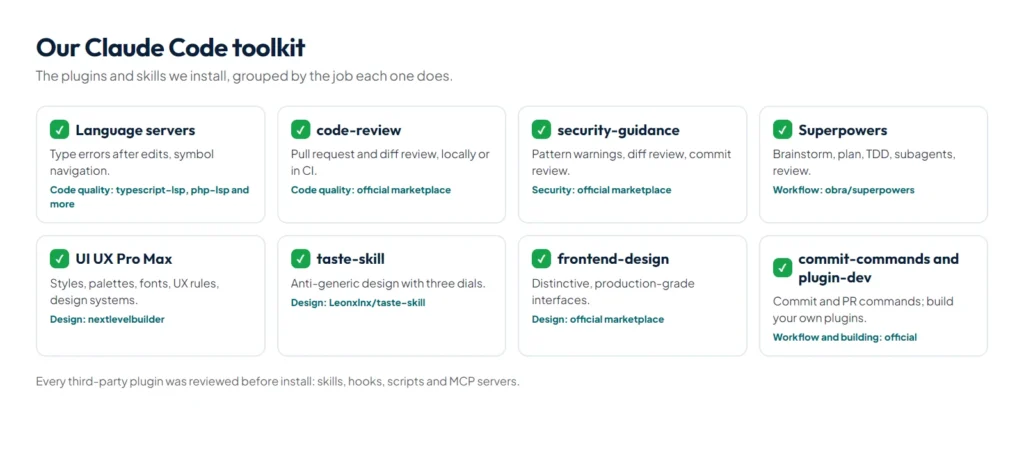
Start with a language server plugin for your main language, which gives Claude type errors after every edit, then add Superpowers for workflow discipline, frontend-design for interfaces, and security-guidance and code-review for quality. Skills-only libraries such as UI UX Pro Max, taste-skill and the platform skills from WordPress, Cloudflare or Supabase are covered in our list of the best Claude Code skills.
The shortlist
| Plugin or skill | Job | Install |
|---|---|---|
| Language server plugins | Type errors after edits, go-to-definition | /plugin install typescript-lsp@claude-plugins-official (or your language) |
| Superpowers | Brainstorm, plan, TDD, subagent development, review | /plugin install superpowers@claude-plugins-official |
| UI UX Pro Max | Design knowledge base and design-system generator | /plugin install ui-ux-pro-max@ui-ux-pro-max-skill after adding its marketplace |
| taste-skill | Anti-generic frontend design with adjustable dials | /plugin install taste-skill@taste-skill after adding its marketplace |
| frontend-design | Distinctive, production-grade interfaces | /plugin install frontend-design@claude-plugins-official |
| security-guidance | Security warnings and reviews while Claude writes code | /plugin install security-guidance@claude-plugins-official |
| code-review | Pull request review, locally or in GitHub Actions | /plugin install code-review@claude-plugins-official |
| commit-commands | Commands for committing, pushing and opening PRs | /plugin install commit-commands@claude-plugins-official |
| plugin-dev | Writing and validating your own plugins | /plugin install plugin-dev@claude-plugins-official |
Which starter set fits you?
| You build | Start with |
|---|---|
| WordPress and PHP sites | php-lsp, frontend-design, security-guidance, UI UX Pro Max at project scope |
| JavaScript or TypeScript products | typescript-lsp, Superpowers, code-review, commit-commands |
| Python services and data tools | pyright-lsp, Superpowers, security-guidance |
| Landing pages and marketing sites | frontend-design, taste-skill, UI UX Pro Max |
| Plugins for your team | plugin-dev, then package your own skills |
Language server plugins: the quiet upgrade
A code intelligence plugin connects Claude Code to a language server, so Claude sees the type errors, missing imports and syntax errors its own edits introduce, without running a compiler, and gets a read-only LSP tool to find definitions and references by symbol instead of by text search. Anthropic’s official marketplace covers:
| Language | Plugin | Install this binary first |
|---|---|---|
| TypeScript and JavaScript | typescript-lsp | typescript-language-server |
| Python | pyright-lsp | pyright-langserver |
| PHP | php-lsp | intelephense |
| Go | gopls-lsp | gopls |
| Rust | rust-analyzer-lsp | rust-analyzer |
| Java, Kotlin | jdtls-lsp, kotlin-lsp | jdtls, kotlin-lsp |
| C and C++, C# | clangd-lsp, csharp-lsp | clangd, csharp-ls |
| Ruby, Swift, Lua | ruby-lsp, swift-lsp, lua-lsp | ruby-lsp, sourcekit-lsp, lua-language-server |
| Liquid (Shopify) | liquid-lsp, maintained by Shopify | the Shopify CLI |
To confirm it works, ask Claude to introduce and then fix a type error; a Found N new diagnostic issues line under the edit means the server started. If a language server is already on your PATH, Claude Code offers the matching plugin itself the first time it edits such a file. Language servers do not start in cloud sessions.
frontend-design: Anthropic’s own design plugin
From the official marketplace, it “generates distinctive, production-grade frontend interfaces that avoid generic AI aesthetics”: a clear aesthetic direction, deliberate typography and colour, and attention to detail. It pairs well with UI UX Pro Max, which supplies the rules while frontend-design supplies the point of view.
security-guidance: security review as you go
This official plugin works in three layers: instant warnings when Claude writes around 25 known-dangerous patterns, such as raw innerHTML or hardcoded secrets; an LLM review of the diff when Claude finishes a turn, feeding high-severity findings back so Claude fixes them first; and an agentic review on git commit that traces data flow across files to catch issues like IDOR and auth bypass. It covers injection, XSS, SSRF, secrets, unsafe deserialisation and path traversal, among others.
code-review, commit-commands and plugin-dev
- code-review reviews pull requests and powers the review workflow in Claude Code GitHub Actions. Claude Code also has a bundled
/code-reviewskill for local diffs. - commit-commands adds commands for committing, pushing and opening pull requests, such as
/commit-commands:commit. - plugin-dev helps you write skills, hooks and MCP components and validate a finished plugin; start with
/plugin-dev:create-plugin.
Are plugins safe to install?
Whatever a plugin runs, it runs as you: its hooks, MCP servers, language servers and bin/ executables all start with your user privileges. Claude Code accepts official marketplace names only for marketplaces sourced from Anthropic’s GitHub organisation, and every other marketplace is third-party and unreviewed by Anthropic. Before installing, read the Will install list, then the hooks and MCP servers the plugin starts.
How do plugins stay up to date?
Plugins from the official marketplace update automatically; third-party and community marketplaces have auto-update off by default, which you can switch on per marketplace in /plugin. When an author sets version, you stay on that version until they publish a new one. To update now, use Update now in the Installed tab or run claude plugin update <plugin>@<marketplace>.
Summary
Plugins package skills, agents, hooks and MCP servers so a setup installs in one command. Install with /plugin, pick the narrowest scope that works and watch each plugin’s always-on cost. When you build one, keep the manifest small, ask for settings through userConfig, store state in ${CLAUDE_PLUGIN_DATA} and validate with --strict before you publish. Start from skills, then package them; new to the tool? Read what is Claude Code first.
References
- anthropics/claude-plugins-official, the official marketplace repository
- Code intelligence plugins, Claude Code documentation
- Plugins overview, Claude Code documentation
- Plugin manifest reference, Claude Code documentation
- Anthropic’s marketplaces, Claude Code documentation
- anthropics/claude-plugins-official, the official marketplace repository
- anthropics/claude-plugins-community, the community marketplace repository