On this page
- The best Claude Code skills in 2026
- How do you install a skill from GitHub?
- Workflow and engineering skills
- Design and frontend skills
- Anthropic’s official skills
- Official skills for the platforms you build on
- Security and science skills
- Where to find more skills
- Our checklist before installing any skill
- How do skills load?
- What happens to a skill after it loads?
- Where do skills live, and which one wins?
- What goes in SKILL.md?
- Write your first skill: release notes from git
- How do you write a description that triggers?
- How do you control skills you didn’t write?
- Are skills portable to other AI tools?
- Summary
- References
A Claude Code skill is a folder containing a SKILL.md file: instructions, knowledge or a workflow that Claude loads when it is relevant to your task, or when you type /skill-name. The best Claude Code skills to install in 2026 are Superpowers (a disciplined plan, test and review workflow), Anthropic’s own skills (documents, skill-creator, frontend-design, MCP builder), Matt Pocock’s engineering skills, UI UX Pro Max and taste-skill for interface design, Trail of Bits for security review, and the official skills that platform makers now publish for WordPress, Cloudflare, Supabase, Vercel, Google and others. Each one is listed below with its GitHub repository, licence and install command.
We checked every repository on GitHub on 16 October 2026 (stars, licence, recent activity) and use several of them daily on client websites and software. After the list, the second half of this guide explains how skills load and stay loaded, how to control skills you didn’t write, and how to write your own.
The best Claude Code skills in 2026
| Skill (GitHub) | By | Stars | Licence | Best for |
|---|---|---|---|---|
| obra/superpowers | Jesse Vincent, Prime Radiant | 300k | MIT | Brainstorm, plan, test-driven development, debugging, review |
| mattpocock/skills | Matt Pocock | 293k | MIT | Small, composable engineering skills for real projects |
| anthropics/skills | Anthropic | 181k | Per skill | Word, PDF, PowerPoint and Excel files, skill-creator, frontend-design, MCP builder, web app testing |
| nextlevelbuilder/ui-ux-pro-max-skill | nextlevelbuilder | 136k | MIT | Design systems, palettes, fonts and UX rules per industry |
| Leonxlnx/taste-skill | Leonxlnx | 98k | MIT | Art direction and anti-generic frontend design |
| K-Dense-AI/scientific-agent-skills | K-Dense | 51k | MIT | 177 science skills: biology, chemistry, medicine, data |
| vercel-labs/agent-skills | Vercel | 33k | See repo | React best practices, web design guidelines, Vercel deploys |
| google/skills | 21k | Apache-2.0 | Google Ads, Analytics, Cloud and developer products | |
| huggingface/skills | Hugging Face | 11k | Apache-2.0 | Datasets, model training, Spaces, local models |
| trailofbits/skills | Trail of Bits | 7.6k | CC-BY-SA-4.0 | Security review, static analysis, Semgrep rules, supply-chain audits |
| remotion-dev/skills | Remotion | 5.2k | See repo | Making videos in React with Remotion |
| microsoft/skills | Microsoft | 3.1k | MIT | Grounding agents in Microsoft and Azure SDKs |
| cloudflare/skills | Cloudflare | 3.1k | Apache-2.0 | Workers, Durable Objects, Wrangler, web performance |
| expo/skills | Expo | 2.9k | MIT | React Native apps with Expo and EAS |
| supabase/agent-skills | Supabase | 2.8k | MIT | Supabase and Postgres best practices |
| WordPress/agent-skills | WordPress | 2.2k | See repo | Blocks, block themes, plugins, REST API, WP-CLI, performance |
| getsentry/skills | Sentry | 1.1k | Apache-2.0 | Code review, finding bugs, pull request writing, security review |
Stars are rounded and were read from GitHub on 16 October 2026. “See repo” means the repository has no single licence file; check each skill before you redistribute it.
How do you install a skill from GitHub?
There are three routes, and most repositories support more than one:
# 1. As a Claude Code plugin (updates itself)
/plugin install superpowers@claude-plugins-official
/plugin marketplace add anthropics/skills
/plugin install document-skills@anthropic-agent-skills

# 2. With the open skills CLI (copies editable files)
npx skills add WordPress/agent-skills --skill wp-plugin-development
npx skills add vercel-labs/agent-skills

# 3. By hand: copy one skill folder
~/.claude/skills/<skill-name>/SKILL.md      # every project on this computer
.claude/skills/<skill-name>/SKILL.md        # this repository only
Pick one route per repository: installing the same skills as a plugin and with the CLI gives you every skill twice. The skills CLI is open source and works with Claude Code, Codex, Cursor and other agents that follow the Agent Skills standard.
Workflow and engineering skills
Superpowers: make Claude plan, test and debug like a senior engineer
Superpowers is the most-starred skills library in this list. Its README calls it “a complete software development methodology for your coding agents, built on top of a set of composable skills”, and Jesse Vincent introduced it in October 2025 in a post about how he works with coding agents. A bootstrap skill loads at session start and the rest trigger on their own: brainstorming when you describe something new, systematic debugging when a test fails, verification before Claude says it is done.
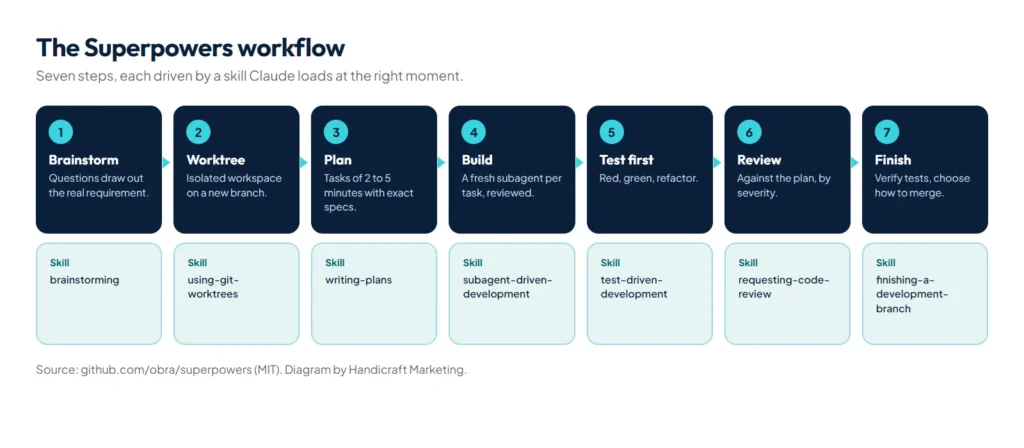
- Brainstorming: Claude asks what you want and why, then plays its understanding back for you to correct.
- Git worktree: work moves to an isolated branch, and the tests must pass before anything changes.
- Planning: tasks of two to five minutes, each with exact file paths, code and checks.
- Execution: a fresh subagent per task with a review after each one, or inline work with one final review.
- Test-driven development: failing test first, minimal code, passing test, commit.
- Code review: the work is checked against the plan; critical issues block progress.
- Finishing: merge, open a pull request, keep or discard, and clean up the worktree.
Three skills carry most of the discipline, each with an “iron law” in its SKILL.md:
| Skill | Iron law |
|---|---|
test-driven-development | “NO PRODUCTION CODE WITHOUT A FAILING TEST FIRST” |
systematic-debugging | “NO FIXES WITHOUT ROOT CAUSE INVESTIGATION FIRST” (after three failed fixes, Claude stops and questions the architecture) |
verification-before-completion | “NO COMPLETION CLAIMS WITHOUT FRESH VERIFICATION EVIDENCE” |
Use it for features that touch several files, unfamiliar codebases and bugs whose cause you don’t know. Skip it for a typo or a one-line change: if you can describe the diff in one sentence, a plan is overkill.
Matt Pocock’s skills: small and composable
The second most-starred skills repository takes the opposite approach to all-in-one frameworks. Its README says the skills are “designed to be small, easy to adapt, and composable” and that they “work with any model”. Install with claude plugin install mattpocock-skills@claude-plugins-official, or copy individual skills and edit them to fit your team.
Sentry’s skills: the ones a real engineering team uses
Sentry publishes the skills its own developers use, including code-review, find-bugs, security-review, commit, pr-writer, iterate-pr, gha-security-review for GitHub Actions and skill-scanner for checking other skills before you install them. They are a good model of how a team turns its conventions into skills.
Design and frontend skills
UI UX Pro Max: design intelligence instead of generic defaults
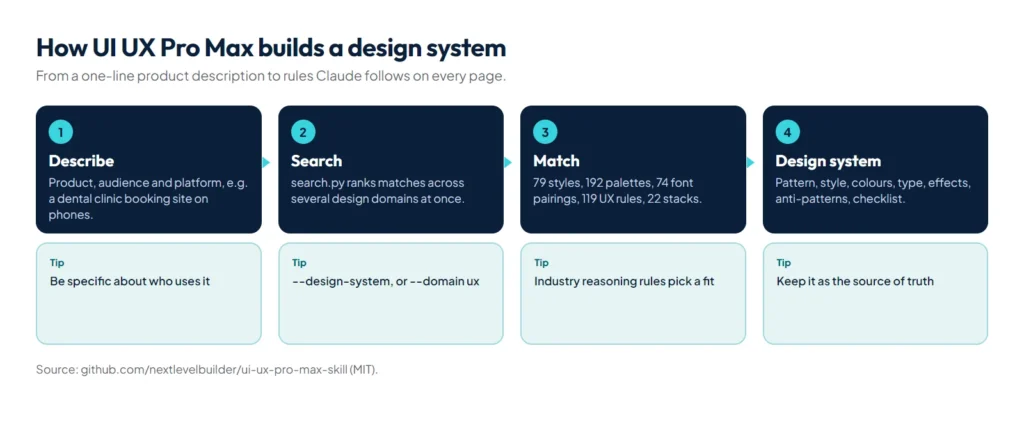
UI UX Pro Max gives Claude a searchable design knowledge base and a generator that turns a product description into a design system. Its repository lists 192 industry reasoning rules, 192 colour palettes, 79 UI styles, 74 font pairings, 119 UX guidelines, 25 chart types and 22 stack guides. Each industry rule also lists what to avoid, for example “AI purple/pink gradients” for banking, which is exactly the default that makes AI-built sites look the same.
/plugin marketplace add nextlevelbuilder/ui-ux-pro-max-skill
/plugin install ui-ux-pro-max@ui-ux-pro-max-skill

# Save a design system once, then every page follows it
python3 .claude/skills/ui-ux-pro-max/scripts/search.py "SaaS dashboard" --design-system --persist -p "MyApp"
--persist writes a MASTER.md of global rules, and --page adds page files that override it; Claude reads them before building each page, which keeps page ten looking like page one. We used it for the mobile-first redesign of this website, including its accessibility thresholds: text contrast of at least 4.5:1 (WCAG 2.2, 1.4.3) and 44 by 44 pixel touch targets.
taste-skill: art direction for coding agents
taste-skill describes itself as “agent skills that give coding agents taste: art direction, reference images and a browser check instead of generic AI pages”. Its default skill, design-taste-frontend, sets a design direction before any code is written and checks the result in a browser; stricter and older dial-driven variants are still included, along with skills for redesigning existing projects. Install with /plugin marketplace add Leonxlnx/taste-skill and /plugin install taste-skill@taste-skill, or one skill with npx skills add https://github.com/Leonxlnx/taste-skill --skill "design-taste-frontend". We lean on its redesign skill when improving existing sites.
frontend-design and Vercel’s guidelines
Anthropic’s frontend-design skill, in anthropics/skills and the official plugin marketplace, pushes Claude towards “distinctive, production-grade frontend interfaces that avoid generic AI aesthetics”. Vercel’s web-design-guidelines and react-best-practices skills add concrete interface and React rules. Our working pair: UI UX Pro Max supplies the rules, frontend-design or taste-skill supplies the point of view.
Anthropic’s official skills
The anthropics/skills repository is the reference implementation of the standard. The skills worth knowing:
| Skill | What it does |
|---|---|
docx, pdf, pptx, xlsx | Create, read and edit Word, PDF, PowerPoint and Excel files properly, not as plain text |
skill-creator | Interviews you, writes a skill and tests whether it triggers |
mcp-builder | Guides you through building a quality MCP server |
webapp-testing | Tests local web apps in a real browser with Playwright |
frontend-design, canvas-design, theme-factory | Interfaces, visual designs and consistent themes |
doc-coauthoring, internal-comms, brand-guidelines | Writing with a structure, company updates, applying a brand |
claude-api | Building apps on the Claude API with current models and SDKs |
Install the document skills with /plugin marketplace add anthropics/skills, then /plugin install document-skills@anthropic-agent-skills; the rest come with example-skills@anthropic-agent-skills.
Official skills for the platforms you build on
The biggest change in 2026 is that platform makers now ship their own skills, so Claude follows the vendor’s current best practice instead of whatever was in its training data:
- WordPress (
WordPress/agent-skills):wp-block-development,wp-block-themes,wp-plugin-development,wp-rest-api,wp-wpcli-and-ops,wp-performance,wp-phpstan,wp-playgroundand the plugin directory guidelines. Its README notes that without guidance, agents “miss critical security considerations in plugin development”. Install one withnpx skills add WordPress/agent-skills --skill wp-plugin-development. - Cloudflare (
cloudflare/skills): Workers best practices, Durable Objects, Wrangler, the Agents SDK and web performance. - Supabase (
supabase/agent-skills): Supabase usage and Postgres best practices. - Vercel (
vercel-labs/agent-skills): React and React Native rules, view transitions, deploying to Vercel. - Google (
google/skills): skills for Google Ads, Analytics, Cloud and developer products. - Hugging Face, Microsoft, Expo and Remotion publish skills for their ecosystems too.
Install only the platforms you actually use, at project scope, so their descriptions don’t sit in every session.
Security and science skills
Trail of Bits, the security firm, publishes over 40 skills for security research and audits, including static-analysis, semgrep-rule-creator, variant-analysis, supply-chain-risk-auditor, insecure-defaults, differential-review and property-based-testing. They suit code you are about to ship or inherit. K-Dense‘s scientific skills cover 177 workflows and 100+ scientific databases for biology, chemistry and medicine.
Where to find more skills
- anthropics/claude-plugins-official: Anthropic’s managed directory of plugins, many of which bundle skills.
- hesreallyhim/awesome-claude-code (56k stars) and ComposioHQ/awesome-claude-skills (77k stars): hand-picked lists.
- wshobson/agents: a large plugin marketplace of agents and skills that also works with Codex, Cursor and others.
Our checklist before installing any skill
- Read SKILL.md and every supporting file for hidden or surprising instructions.
- Read every script; look for network calls and file access outside the project.
- Check
allowed-tools: a project skill can pre-approve its own tool access, even in a repository you just cloned. - Check the licence, the maintainer and recent activity.
- Pin a version or tag for anything your team depends on.
- Install at project scope when only one project needs it.
How do skills load?
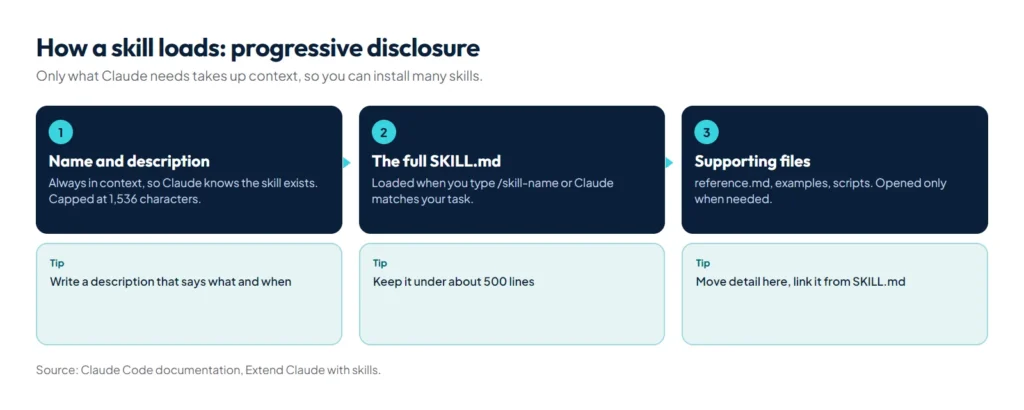
- Always: the name and description, plus the optional
when_to_usetext, truncated together at 1,536 characters. This is how Claude knows the skill exists. - When used: the full body of SKILL.md, when you invoke it or Claude matches your task to the description.
- When needed: supporting files such as
reference.mdorexamples.md, only when Claude decides to open them.
Anthropic calls this progressive disclosure. Its engineering write-up on Agent Skills compares it to “a well-organized manual that starts with a table of contents, then specific chapters, and finally a detailed appendix.” It is why you can install dozens of skills without filling the context window.
What happens to a skill after it loads?
- It stays. The rendered SKILL.md enters the conversation as one message and remains there on later turns.
- Compaction keeps a budget. Claude Code re-attaches the first 5,000 tokens of each invoked skill, up to 25,000 tokens for all skills together, most recent first. In a long session with many skills, the oldest can drop out.
- Edits apply live. A changed SKILL.md takes effect in the current session. If the skills folder didn’t exist when the session started, run
/reload-skills.
The practical rule: keep each skill’s essential instructions inside its first 5,000 tokens and move detail into supporting files.
Where do skills live, and which one wins?
| Location | Path | Available in |
|---|---|---|
| Personal | ~/.claude/skills/<name>/SKILL.md | All your projects on this machine |
| Project | .claude/skills/<name>/SKILL.md | This repository, shared through git |
| Nested | <subdir>/.claude/skills/<name>/SKILL.md | That part of a monorepo |
| Plugin | <plugin>/skills/<name>/SKILL.md | Wherever the plugin is enabled, as /plugin:skill |
| Enterprise | Managed settings directory | Everyone in the organisation |
With the same name at different levels, enterprise beats personal and personal beats project. Your skill replaces a bundled skill or a .claude/commands/ file with the same name. Plugin skills are namespaced, so they never collide with yours.
What goes in SKILL.md?
| Field | What it does |
|---|---|
name | The command name; defaults to the folder name |
description | What the skill does and when to use it. Claude reads this to decide whether to load it |
disable-model-invocation | true means only you can run it. Use it for deploys, commits and anything with side effects |
user-invocable | false hides it from the / menu, for background knowledge only Claude should use |
allowed-tools | Pre-approves tools, such as Bash(git log *), for the turn that invokes the skill |
arguments, argument-hint | Named arguments and the hint shown while typing |
context: fork and agent | Run the skill in an isolated subagent, such as Explore |
paths | Glob patterns that limit when the skill loads automatically |
model, effort | Override the model or effort level while the skill is active |
Write your first skill: release notes from git
Create .claude/skills/release-notes/SKILL.md:
---
name: release-notes
description: Draft customer-facing release notes from recent commits. Use when the user asks for release notes or a changelog entry.
argument-hint: [version]
allowed-tools: Bash(git log *)
---

## Recent commits
!`git log --oneline -30`

Write release notes for version $ARGUMENTS:
- Group changes under Added, Changed and Fixed
- One line per change, written for customers, not developers
- Skip merge commits and internal refactors
- If nothing user-facing changed, say so
Type /release-notes 2.4.0. The !`git log` line runs before Claude sees the skill and its output replaces the line; $ARGUMENTS becomes 2.4.0; allowed-tools lets the git command run without a prompt for that turn; and ${CLAUDE_SKILL_DIR} points at the skill’s folder for bundled scripts. To have Claude write and test skills for you, use Anthropic’s skill-creator or Superpowers’ writing-skills.
How do you write a description that triggers?
- Say what the skill does and when to use it, in that order.
- Use the words people actually type: “release notes”, “changelog”, “deploy to staging”.
- Keep it distinct from your other skills. Overlapping descriptions make Claude load the wrong one or none.
- Keep SKILL.md under about 500 lines and move detail into supporting files.
How do you control skills you didn’t write?
A plugin may install skills you rarely need. Instead of editing its files, set each one with skillOverrides: on, name-only (Claude sees just the name), user-invocable-only (only you can run it) or off.
{
  "skillOverrides": {
    "legacy-context": "name-only",
    "deploy": "off"
  }
}
Administrators can also set disableSkillShellExecution in managed settings to block every !`command` injection outside bundled and managed skills.
Are skills portable to other AI tools?
Largely, yes. Claude Code skills follow the Agent Skills open standard, which Anthropic published in December 2025, and most repositories above list installs for Codex, Cursor, Gemini CLI and GitHub Copilot as well. The portable frontmatter fields are name, description, license, compatibility, metadata and allowed-tools; Claude Code extras such as context, paths and hooks may be ignored elsewhere.
Summary
Start with Superpowers for workflow discipline, Anthropic’s skills for documents and skill-creator, one design skill such as UI UX Pro Max or taste-skill, and the official skills for the platforms you build on. Install each through one route, at project scope when only one project needs it, and read every third-party skill before it runs. Then turn your own repeated prompts into skills: keep the essentials in the first 5,000 tokens, guard side effects with disable-model-invocation and write descriptions that say exactly when to use them. For plugins worth installing, such as language servers and security review, see our guide to Claude Code plugins; for always-on rules, use CLAUDE.md; and for the bigger picture, start with what is Claude Code. If you want this kind of setup applied to your own software, see our custom software development service.
References
- Extend Claude with skills, Claude Code documentation
- Equipping agents for the real world with Agent Skills, Anthropic Engineering, October 2025
- Agent Skills, the open standard’s specification site
- anthropics/skills and anthropics/claude-plugins-official, Anthropic on GitHub
- obra/superpowers and Superpowers: How I’m using coding agents in October 2025, Jesse Vincent
- vercel-labs/skills, the open skills CLI
- Repository statistics: GitHub REST API, read on 16 October 2026