On this page
- Where do CLAUDE.md files live?
- How do you create a CLAUDE.md?
- What should you put in it, and what should you leave out?
- A CLAUDE.md template for a client WordPress project
- How do imports work?
- How do path-scoped rules work?
- How do you share rules across several projects?
- How do organisations and monorepos manage CLAUDE.md?
- What happens to CLAUDE.md when the context is compacted?
- What is auto memory?
- Does Claude Code read AGENTS.md?
- Why is Claude ignoring my CLAUDE.md?
- Summary
- References
CLAUDE.md is a Markdown file that Claude Code reads at the start of every session. It holds what you would otherwise re-explain each time: build and test commands, coding conventions, project layout and “always do X” rules. Files can live at organisation, user, project and personal level, and they all load together. Keep each one short, under about 200 lines, because Claude treats CLAUDE.md as context rather than enforced configuration; for rules that must hold every time, use a hook or a permission rule.
A good CLAUDE.md is the cheapest quality upgrade in Claude Code. Ours started at a few lines and grew only when Claude made the same mistake twice, which is exactly the trigger Anthropic recommends.
Where do CLAUDE.md files live?
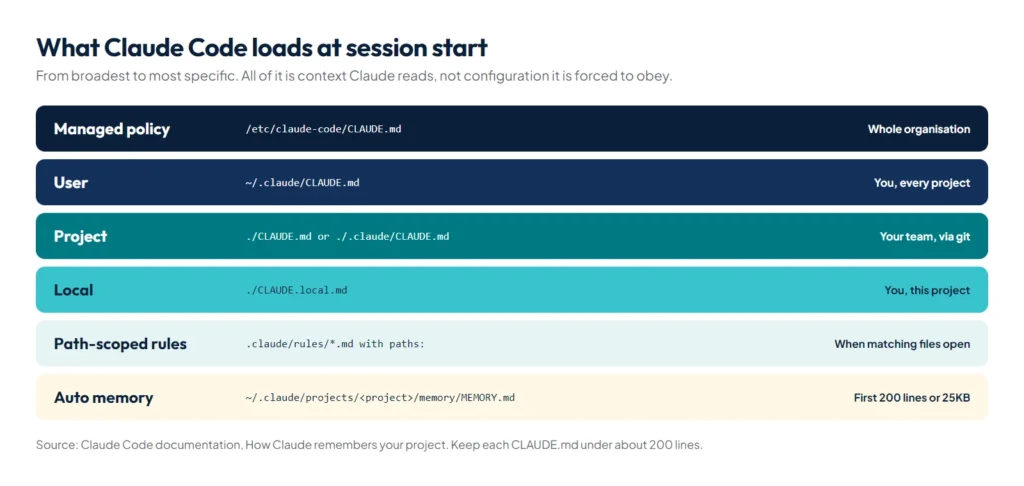
The memory documentation lists four scopes, loaded from broadest to most specific:
| Scope | Location | Shared with |
|---|---|---|
| Managed policy | /Library/Application Support/ClaudeCode/CLAUDE.md (macOS), /etc/claude-code/CLAUDE.md (Linux, WSL), C:\Program Files\ClaudeCode\CLAUDE.md (Windows) | Everyone in the organisation |
| User | ~/.claude/CLAUDE.md | Only you, in every project |
| Project | ./CLAUDE.md or ./.claude/CLAUDE.md | Your team, through version control |
| Local | ./CLAUDE.local.md (add to .gitignore) | Only you, in this project |
Files in the directories above your working directory load at launch. A CLAUDE.md inside a subdirectory loads when Claude starts working with files there.
How do you create a CLAUDE.md?
Run /init in a session. Claude analyses the codebase and writes a starter file with the build commands, test instructions and conventions it finds; if a CLAUDE.md already exists, it suggests improvements instead of overwriting it. Set the environment variable CLAUDE_CODE_NEW_INIT=1 first for an interactive flow that can also set up skills and hooks.
What should you put in it, and what should you leave out?
| Include | Leave out |
|---|---|
| Commands Claude can’t guess (build, test, deploy, seed) | Anything Claude can work out by reading the code |
| Style rules that differ from the defaults | Standard conventions it already knows |
| How to test and which runner to use | Long API documentation (link to it, or use a skill) |
| Branch and pull request conventions | Information that changes every week |
| Architecture decisions specific to the project | File-by-file descriptions of the codebase |
| Environment quirks and common gotchas | Generic advice such as “write clean code” |
For every line, Anthropic suggests one test: would removing it cause Claude to make mistakes? If not, cut it. Write rules concretely enough to check: “Use 2-space indentation”, not “Format code properly”. Need a note for human maintainers? Block-level HTML comments such as <!-- why this rule exists --> are stripped before the file reaches Claude, so they cost no context.
A CLAUDE.md template for a client WordPress project
This is close to what we use for custom theme work. It is short, concrete and lists the commands Claude can’t guess:
# Client WordPress theme

## Commands
- Local site: http://localhost/clientsite (XAMPP)
- PHP CLI: C:\xampp\php\php.exe
- Seed pages and SEO meta: php tools/seed-content.php "C:\xampp\htdocs\clientsite"
- Before finishing: run php -l on every PHP file you changed

## Conventions
- Vanilla PHP, CSS and JS. No page builder, no jQuery
- Escape all output: esc_html, esc_attr, esc_url
- Mobile first: check every change at 390px and 1440px wide

## Content rules
- Never use em dashes in copy
- Every new page also goes into the header menu, mobile menu and footer

## Never
- Edit files in wp-content/uploads
- Deploy without a fresh backup
How do imports work?
A CLAUDE.md can pull in other files with @path/to/file, for example See @README for an overview and @docs/git-instructions.md for our git workflow. Paths resolve relative to the file that contains the import, imports can nest up to four levels deep, and a path with spaces needs a backslash before each space. Imports help you organise a long file, but they don’t reduce its context cost, because the imported files load too. The first time a project imports a file from outside the working directory, Claude Code asks you to approve it.
How do path-scoped rules work?
For larger projects, split instructions into topic files in .claude/rules/. Add paths frontmatter and a rule loads only when Claude reads or edits a matching file:
---
paths:
  - "src/api/**/*.ts"
---

# API rules
- Every endpoint validates its input
- Use the standard error response format
Rules without paths load every session, like CLAUDE.md. Path-scoped rules keep the main file short while still giving Claude detailed guidance where it matters.
How do you share rules across several projects?
- User-level rules: files in
~/.claude/rules/apply to every project on your machine. They load before project rules, and neither set overrides the other, so if they conflict Claude may follow either; keep them consistent. - Symlinks:
.claude/rules/follows symlinks, so a team can keep one standards folder and link it into each repository, for exampleln -s ~/company-standards/security.md .claude/rules/security.md. A link pointing outside the working directory counts as an external import and needs your approval once per project. - Not over the network: a CLAUDE.md or rules symlink that points at a network share is not followed, because looking up such a path can contact the host it names.
How do organisations and monorepos manage CLAUDE.md?
An organisation can deploy a managed CLAUDE.md to the policy paths in the table above with MDM, Group Policy or Ansible, or put the text straight into managed settings with the claudeMd key. It loads before user and project files, and individuals can’t exclude it. The docs draw a clear line between the two layers:
| Concern | Put it in |
|---|---|
| Blocking tools, commands or file paths | Managed settings: permissions.deny |
| Enforcing sandbox isolation | Managed settings: sandbox.enabled |
| Code style and quality guidelines | Managed CLAUDE.md |
| Data handling and compliance reminders | Managed CLAUDE.md |
In a large monorepo, ancestor CLAUDE.md files from other teams can load into your sessions. Skip them with claudeMdExcludes, usually in your .claude/settings.local.json; patterns are globs matched against absolute paths, and arrays merge across settings layers:
{
  "claudeMdExcludes": [
    "**/monorepo/CLAUDE.md",
    "/home/user/monorepo/other-team/.claude/rules/**"
  ]
}
The reverse case, a shared configuration folder you attach with --add-dir, doesn’t load its CLAUDE.md by default. Start with CLAUDE_CODE_ADDITIONAL_DIRECTORIES_CLAUDE_MD=1 to include it.
What happens to CLAUDE.md when the context is compacted?
The project-root CLAUDE.md survives: after /compact, Claude re-reads it from disk and injects it again. Nested CLAUDE.md files and path-scoped rules come back on demand, the next time Claude touches a matching file. What disappears is anything you said only in the conversation. If an instruction seems lost after compaction, it belongs in CLAUDE.md.
What is auto memory?
Auto memory is Claude’s own notebook. As it works, Claude saves notes it thinks will help in future sessions, in four types: user (your role and preferences), feedback (corrections and approaches you confirmed), project (ongoing work and decisions) and reference (where to find things). It skips anything it can derive from the code or that your CLAUDE.md already says.
The notes live in ~/.claude/projects/<project>/memory/, with a MEMORY.md index whose first 200 lines or 25KB load into every session. Toggle it with /memory or the autoMemoryEnabled setting. Our own auto memory holds notes such as “save local backups to the D drive” and “never use em dashes in client copy”: corrections we gave once that Claude now applies in every session.
Does Claude Code read AGENTS.md?
Yes. If a repository has an AGENTS.md and no CLAUDE.md, recent versions of Claude Code read AGENTS.md as the project instructions, so a repo set up for other coding agents works straight away. If you have both, Claude reads CLAUDE.md, which can import AGENTS.md with @AGENTS.md.
Why is Claude ignoring my CLAUDE.md?
- The file is too long and the rule is lost in the noise. Prune it.
- Two rules contradict each other, so Claude picks one. Run
/doctor prompt-audit: it checks your CLAUDE.md, CLAUDE.local.md, AGENTS.md, rules, skills and subagents for outdated, missing or conflicting instructions and proposes edits without changing anything until you ask. - The rule is vague. Make it specific and checkable.
- The file didn’t load. Run
/contextto confirm it’s there, and check that aclaudeMdExcludespattern isn’t skipping it. - It must never be broken. Then it belongs in a hook or a deny rule, not in prose. If one rule keeps slipping, marking that single line “IMPORTANT” can help; marking many lines that way helps none of them.
Summary
CLAUDE.md is where your project’s rules and commands live: short, concrete, committed and reviewed like code. Use .claude/rules/ for rules that apply to part of the codebase, ~/.claude/rules/ or symlinks to share standards, claudeMdExcludes in monorepos, skills for procedures and hooks for anything that must always happen, and let auto memory capture your corrections. New to the tool? Start with our overview, what is Claude Code.
References
- How Claude remembers your project, Claude Code documentation
- Best practices for Claude Code, Claude Code documentation
- Explore the context window, Claude Code documentation
- Settings files and precedence, Claude Code documentation
- AGENTS.md, the open format for coding agent instructions