On this page
- What does each permission mode allow?
- How do you switch modes?
- How does plan mode work?
- How does auto mode decide?
- How do allow, ask and deny rules really match?
- How do file, web, MCP and subagent rules work?
- Which paths are always protected?
- Which settings win?
- What does the sandbox add?
- Which setup should you use?
- Summary
- References
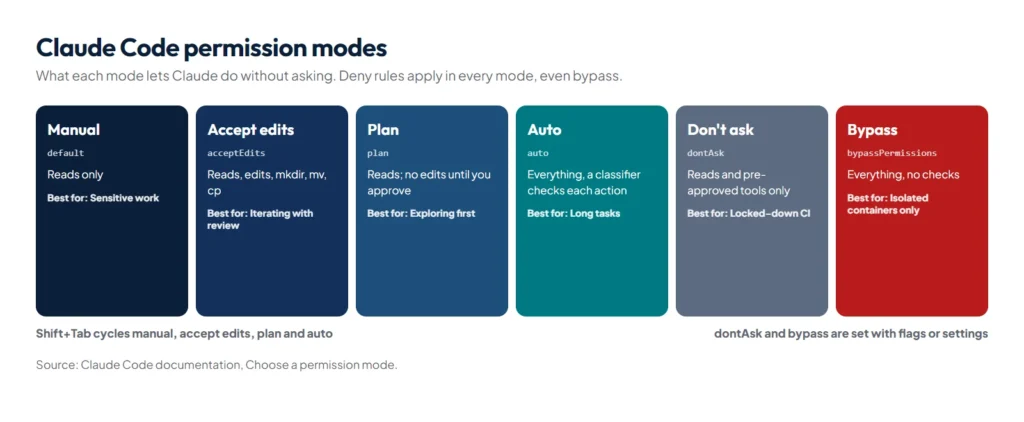
A permission mode sets which actions Claude Code can take without asking you first. There are six: Manual (config value default) asks before almost everything except reads; acceptEdits also lets file edits run; plan keeps Claude read-only while it researches; auto lets a classifier model approve routine actions and block risky ones; dontAsk denies anything not pre-approved; and bypassPermissions runs everything, for isolated containers only. Press Shift+Tab to switch modes, and layer allow, ask and deny rules on top, where deny always wins.
Getting permissions right is the difference between babysitting every command and letting Claude work while you do something else, without giving it the keys to everything. The details below come from the official permission modes guide and permissions reference.
What does each permission mode allow?
| Mode | Runs without asking | Best for |
|---|---|---|
Manual (default) | Reads only | Sensitive work, reviewing every action |
acceptEdits | Reads, file edits and common filesystem commands such as mkdir, mv, cp | Iterating on code you’re reviewing |
plan | Reads, plus classifier-approved commands where auto mode is available | Exploring a codebase before changing it |
auto | Everything, with background safety checks | Long tasks, fewer prompts |
dontAsk | Reads in your working directories and pre-approved tools; everything else is denied | Locked-down CI and scripts |
bypassPermissions | Everything | Isolated containers and VMs only |
How do you switch modes?
- During a session: press
Shift+Tab. The cycle runs Manual, accept edits, plan, and back; the status bar shows the active mode. - For one session: start with a flag, for example
claude --permission-mode plan. - As a default: set
permissions.defaultModein a settings file. A project’s settings can’t start sessions inautoorbypassPermissions; those belong in your user or managed settings.
How does plan mode work?
In plan mode Claude reads files and answers questions but doesn’t change anything. Describe the change, let Claude research and write a plan, then press Ctrl+G to edit the plan in your own editor before approving it. Approving the plan, or pressing Shift+Tab, lets Claude implement.
How does auto mode decide?
In auto mode, a second model, the classifier, reviews actions instead of you. Anthropic’s write-up on how it built auto mode explains the reasoning: users approved 93% of permission prompts anyway, so most prompts were friction rather than protection. The classifier runs a fast single-token filter first and reasons in more depth only when something is flagged. Crucially, it sees only your messages and Claude’s tool calls; Claude’s own explanations and tool outputs are stripped, so neither the agent nor text injected into a web page can talk it into approving something. Anthropic reports a 0.4% false-positive rate on real traffic and a 17% miss rate on real overeager actions, which is why auto mode is a safety net, not a guarantee.
By default the classifier trusts your working directory and the git remotes configured when the session started, and blocks things such as:
- Downloading and executing code, like
curl | bash, and sending sensitive data to external endpoints - Production deploys and migrations, mass deletion on cloud storage, granting IAM or repository permissions
- Force pushes, and commands that would discard uncommitted work, such as
git reset --hardorgit clean -fd - Irreversibly destroying files that existed before the session
Boundaries you state in the chat count too. Tell Claude “don’t push” and the classifier blocks pushes until you lift it. We have seen this work in practice: in a session where we had asked Claude only to prepare blog drafts, auto mode stopped a step that would have published them, even on a local copy of the site, because nobody had asked for publishing. One caveat from the docs: such boundaries are re-read from the transcript, so compaction can drop them. For a hard guarantee, write a deny rule.
If the classifier blocks actions 3 times in a row or 20 times in a session, auto mode pauses and Claude Code falls back to asking you. Blocked actions appear under Recently denied in /permissions, where you can retry one with a manual approval.
How do allow, ask and deny rules really match?
Rules live in the permissions block of a settings file, or you manage them with /permissions. This setup runs npm scripts and git commits without asking but refuses pushes:
{
  "permissions": {
    "allow": [
      "Bash(npm run *)",
      "Bash(git commit *)"
    ],
    "deny": [
      "Bash(git push *)",
      "Read(./.env)",
      "Read(./secrets/**)"
    ]
  }
}- Order: deny, then ask, then allow; the first match decides.
- The space before
*matters:Bash(ls *)matchesls -labut notlsof. - Compound commands are split:
Bash(safe-cmd *)does not approvesafe-cmd && other-cmd; each part must match on its own, while a deny or ask rule fires if any part matches. - Wrappers are stripped:
timeout,time,nice,nohupand similar are removed before matching, soBash(npm test *)also coverstimeout 30 npm test. Runners such asnpxordocker execare not stripped, so write rules that include them. - Read-only commands never prompt: a built-in set including
ls,cat,grep,find,diffand read-onlygitruns in every mode; add an ask or deny rule if you want one of them gated. - A Bash rule is not a security boundary:
Bash(curl *)stopscurl https://...but not/usr/bin/curlorsh -c 'curl ...'. That is what the sandbox and hooks are for. Our free Claude Code hooks generator builds the hook configuration for you.
How do file, web, MCP and subagent rules work?
| Rule | Matches |
|---|---|
Read(//Users/alice/secrets/**) | An absolute path (note the double slash) |
Read(~/Documents/*.pdf) | A path under your home folder |
Edit(/src/**/*.ts) | A path relative to where the settings file lives |
WebFetch(domain:example.com) | Fetches to that host only; add domain:*.example.com for subdomains |
mcp__github | Every tool from the github MCP server |
Agent(Explore) | The built-in Explore subagent, typically in a deny list |
A Read deny also blocks edits and writes to the same path. File rules apply to Claude’s own file tools and to recognised Bash commands such as cat and redirects, not to a script that opens files itself.
Which paths are always protected?
Some writes are never auto-approved, whatever your allow rules say: .git, .vscode, .idea, .husky, most of .claude, and files such as .bashrc, .zshrc, .npmrc, .gitconfig, .mcp.json and .pre-commit-config.yaml. They prompt in Manual and acceptEdits modes, go to the classifier in auto mode and are denied in dontAsk. Separately, rm or rmdir aimed at a critical path, such as the filesystem root, your home folder or your working directory, can never be approved by an allow rule or a hook. Both exist to stop one bad command from corrupting your repository, your shell or your machine.
Which settings win?
Managed settings sit on top and nothing overrides them, not even command-line flags. Below that, a deny at any level blocks a tool that another level allows: a user-level deny beats a project-level allow and the reverse. Allow rules in a repository’s .claude/settings.json only take effect after you accept the workspace trust dialog for that folder, because they grant capability; deny and ask rules apply immediately because they only restrict.
What does the sandbox add?
Run /sandbox to wrap every shell command Claude runs, and the processes it starts, in an operating-system boundary: Seatbelt on macOS, bubblewrap on Linux and WSL2. Native Windows runs commands unsandboxed, so use WSL2 there. By default sandboxed commands can write only to the working directory and a temp folder, and reach the network only through a proxy that checks each host against an allowlist that starts empty. Reads are wide by default, including ~/.ssh, so add denyRead entries for credentials.
Anthropic’s engineering post on sandboxing reports that it cut permission prompts by 84% in internal use, and explains why both halves matter: without network isolation, a compromised agent could send out your SSH keys; without filesystem isolation, it could escape and gain network access. Know what stays outside the sandbox: Claude’s own file and web tools, hooks, MCP servers and commands you type yourself after !. If a command fails inside the sandbox, Claude may ask to retry it unsandboxed; set allowUnsandboxedCommands to false for a strict sandbox with no such escape hatch.
Which setup should you use?
| Situation | Setup |
|---|---|
| Sensitive code, unfamiliar repository | Manual mode: claude --permission-mode default |
| Iterating locally with fewer prompts, no classifier | Manual mode plus /sandbox in auto-allow mode |
| Understanding code before changing it | claude --permission-mode plan |
| Long, hands-off tasks | Auto mode, ideally inside the sandbox or a container |
| CI with an exact allowlist | claude -p "run the test suite" --permission-mode dontAsk --allowedTools "Bash(npm test)" "Read" |
Summary
Choose the mode for the job: plan for research, accept edits or auto for building, dontAsk for CI, and bypass only in throwaway containers. Write allow rules for commands you trust, deny rules for the ones you never want, remember that rules match command text rather than intent, and let the sandbox enforce what text matching cannot. For custom guardrails, see our guide to Claude Code hooks; remember that CLAUDE.md shapes behaviour but never grants or removes access.
References
- Choose a permission mode, Claude Code documentation
- Configure permissions, Claude Code documentation
- Configure the sandboxed Bash tool, Claude Code documentation
- How we built Claude Code auto mode, Anthropic Engineering, March 2026
- Making Claude Code more secure and autonomous with sandboxing, Anthropic Engineering, October 2025
- anthropics/sandbox-runtime, the open-source sandbox Claude Code uses