On this page
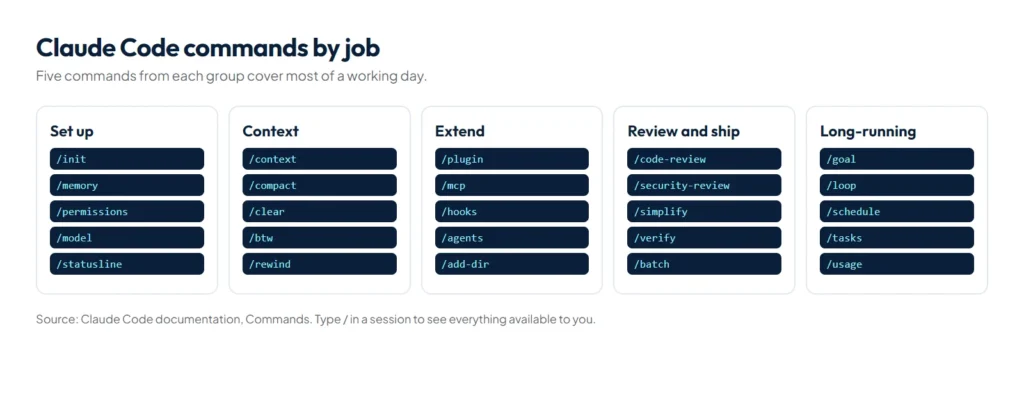
Slash commands control Claude Code from inside a session: type / at the start of a message to see them. There are four kinds: built-in commands such as /init, /context, /compact, /rewind and /permissions; bundled skills such as /code-review, /verify and /loop; your own skills; and prompts from connected MCP servers. A handful cover most of a working day, and two of them, /goal and /loop, change how long Claude can work without you.
The descriptions below follow the official commands reference, grouped by the job you’re doing rather than alphabetically, with the long-running commands explained in depth at the end.
Commands for setting up a project
| Command | What it does |
|---|---|
/init | Creates a CLAUDE.md guide for the project |
/memory | Edits CLAUDE.md files, toggles auto memory and shows its entries |
/permissions | Manages allow, ask and deny rules for tools |
/model, /effort | Switches the model and its effort level |
/config | Opens settings, or sets one with key=value |
/statusline | Configures the status line, for example to show context usage |
/terminal-setup | Installs a Shift+Enter shortcut for new lines in supported terminals |
/install-github-app | Sets up the Claude GitHub App and GitHub Actions workflows |
Commands for managing context and sessions
| Command | What it does |
|---|---|
/context | Shows context usage as a coloured grid, with suggestions |
/compact [instructions] | Summarises the conversation to free space, optionally with a focus |
/clear | Starts a new conversation with empty context (and clears any active goal) |
/btw [question] | Asks a side question without adding it to the conversation |
/rewind | Restores conversation and code to an earlier point (also /checkpoint, /undo) |
/resume, /rename, /branch | Reopens a past session, names the current one, or forks it into a new session |
/export | Exports the conversation as plain text |
/usage | Shows session cost, plan usage limits and activity (also /cost) |
Commands for extensions
| Command | What it does |
|---|---|
/plugin, /reload-plugins | Browses, installs and toggles plugins; applies plugin changes without restarting |
/reload-skills | Picks up a skills folder created after the session started |
/mcp | Manages MCP server connections and logins |
/hooks | Shows configured hooks by event |
/agents, /subtask | Manages subagents; starts a fork that inherits the conversation |
/add-dir | Adds another working directory to the session |
/sandbox | Toggles sandbox mode where supported |
Commands for reviewing and shipping
| Command | What it does |
|---|---|
/code-review | Reviews the current diff, a PR, a branch or a path for correctness; options include an effort level, --fix and --comment |
/security-review | Analyses your branch’s changes for vulnerabilities such as injection and auth issues |
/simplify | Reviews changed code for clean-up and applies fixes, with four review agents in parallel |
/verify | Builds and runs your app to confirm a change actually works |
/batch | Splits a large change into 5 to 30 units and runs them in parallel |
/debug | Turns on debug logging and troubleshoots from the session log |
/doctor | Checks your installation, settings, extensions and CLAUDE.md, and proposes fixes |
How does /goal decide when you’re done?
/goal sets a completion condition, and Claude keeps working turn after turn without you prompting each step. Under the hood it is a session-scoped, prompt-based Stop hook: after every turn, Claude Code sends the condition and the conversation to a small fast model, which returns one of three verdicts with a short reason.
- Not yet met: Claude starts another turn and uses the reason as guidance.
- Met: the goal clears and an achieved entry is recorded.
- Impossible: the goal clears with the reason recorded, so you don’t loop forever.
/goal all tests in test/auth pass and the lint step is clean
/goal                 # status: condition, run time, turns, tokens, last reason
/goal clear           # also: stop, off, reset, none, cancel
The evaluator doesn’t run commands or read files itself; it judges only what Claude has shown in the conversation. So write conditions Claude’s own output can prove: one measurable end state, a stated check such as “npm test exits 0″, and any constraints, such as “no other test file is modified”. Conditions can be up to 4,000 characters, and a clause like “or stop after 20 turns” bounds the run. A goal also clears on errors you have to fix, such as a failed login, an exhausted credit balance or a context overflow compaction couldn’t clear.
/goal doesn’t change your permission mode. In Manual mode Claude still asks before tools you haven’t allowed, so long unattended goals pair with auto mode: auto mode removes per-tool prompts and /goal removes per-turn prompts. It works with claude -p too, running the whole loop in one invocation.
How does /loop work?
/loop re-runs a prompt on a schedule while the session is open. What you pass decides how it behaves:
| You type | What happens |
|---|---|
/loop 5m check the deploy | Runs on a fixed interval; units are s, m, h and d, rounded to whole-minute cron steps |
/loop check whether CI passed | Claude picks the delay after each run, between one minute and one hour, based on what it saw |
/loop | Runs a built-in maintenance prompt: continue unfinished work, tend the branch’s pull request, then clean-up passes |
Details worth knowing:
- Your own default prompt: a
.claude/loop.md(or~/.claude/loop.md) replaces the maintenance prompt for a bare/loop; content past 25,000 bytes is truncated. - Limits: recurring tasks expire seven days after creation, and a session holds up to 50 scheduled tasks.
- Timing: tasks fire between your turns, never mid-response, and recurring tasks are deliberately shifted by a small delay so many sessions don’t hit the API at once.
- Skills in loops:
/loop 20m /review-pr 1234re-runs a skill, but only one Claude may invoke itself; skills withdisable-model-invocation: truearrive as plain text. - Stopping: press
Escto cancel a self-paced loop, or ask Claude to cancel a fixed one.
Which scheduler should you use?
Cloud routines (/schedule) | Desktop scheduled tasks | /loop | |
|---|---|---|---|
| Runs on | Anthropic’s cloud | Your machine | Your machine |
| Needs your machine on | No | Yes | Yes |
| Needs an open session | No | No | Yes |
| Access to local files | No, a fresh clone | Yes | Yes |
| Minimum interval | 1 hour | 1 minute | 1 minute |
Use cloud routines for work that must run reliably without your computer, desktop tasks when you need local files and tools, and /loop for quick polling during a session. For CI-driven schedules, GitHub Actions is the fourth option.
How do you make your own commands?
Any skill is a command: a folder with a SKILL.md in .claude/skills/ becomes /folder-name, and a plugin’s skills appear as /plugin-name:skill-name. The older single-file format in .claude/commands/ still works. Our guide to Claude Code skills covers arguments, injected command output, pre-approved tools and who may run a skill.
Tips for using commands
- Commands queue: if you send one while Claude is responding, it runs after the turn finishes. A few, such as
/status,/tasksand/usage, run immediately. - Chain skills: up to six skills at the start of one message, with the rest of the text passed to each.
- Use
/compactwith a focus:/compact Focus on the API changeskeeps what matters when you summarise. - Put the commands you always run in CLAUDE.md, so Claude knows them too; see our CLAUDE.md guide.
Custom commands are skills now, so our free Claude Code skill generator builds them too: fill in the name, description and steps, and copy the SKILL.md it writes.
Summary
Learn a small core first: /init, /context, /compact, /clear, /rewind, /permissions, /plugin and /code-review. When you start leaving Claude to work, use /goal with a condition its output can prove, /loop for polling inside a session and cloud routines for anything that must run without you. For the hook that powers /goal, see our guide to Claude Code hooks.
References
- Commands, Claude Code documentation
- Keep Claude working toward a goal, Claude Code documentation
- Run prompts on a schedule, Claude Code documentation
- Extend Claude with skills, Claude Code documentation