On this page
- Which subagents come built in?
- When should you use a subagent?
- What does a subagent know when it starts?
- How do you create a custom subagent?
- Which frontmatter fields are worth knowing?
- What is a fork, and when is it better?
- Do subagents run in the foreground or background?
- How does subagent memory work?
- How does worktree isolation work?
- Can subagents start their own subagents?
- How does Claude choose a subagent, and how do you force one?
- Which subagent patterns save the most?
- What does multi-agent work really cost?
- Subagents, skills or workflows?
- Summary
- References
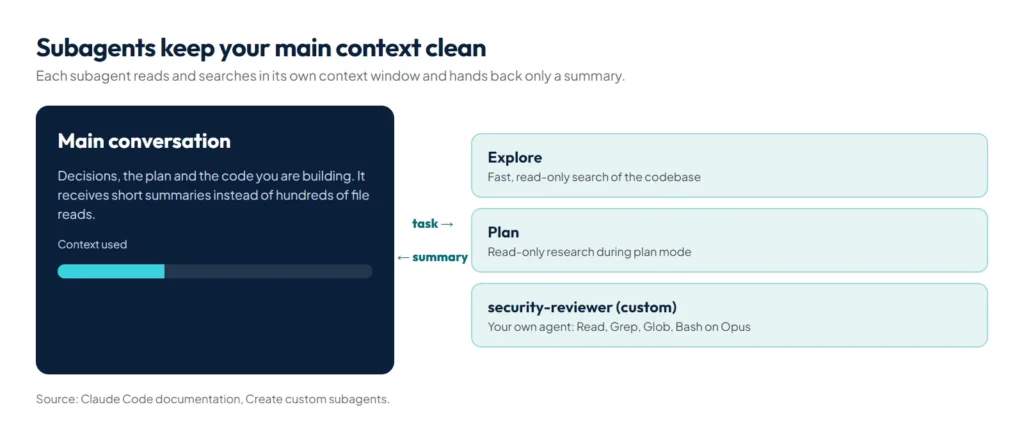
A subagent is a specialised assistant that Claude Code runs in its own context window, with its own instructions, tool permissions and model. In the words of the official docs, use one “when a side task would flood your main conversation with search results, logs, or file contents you won’t reference again: the subagent does that work in its own context and returns only the summary.” Claude Code ships with built-in subagents such as Explore, Plan and general-purpose, and you can write your own as Markdown files in .claude/agents/.
Because context is the scarcest resource in a Claude Code session, subagents are one of the most effective tools you have. Used well, they keep the main conversation focused on decisions and code instead of on the hundred files read along the way.
Which subagents come built in?
| Subagent | What it does | Tools |
|---|---|---|
| Explore | Fast, read-only search and analysis of a codebase | Read-only; no Write or Edit |
| Plan | Research used during plan mode, before Claude presents a plan | Read-only; no Write or Edit |
| general-purpose | Complex, multi-step tasks that need exploration and action | Every tool available to subagents |
There are also helper agents, such as one that answers questions about Claude Code itself and one that configures your status line.
When should you use a subagent?
- Research that reads many files: “Use a subagent to find how authentication handles token refresh and whether we already have OAuth helpers.”
- A fresh-eyes review: a reviewer that sees only the diff and the requirements isn’t biased by the reasoning that produced the change.
- Independent tasks in parallel: several investigations at once, each in its own context.
- Cheaper bulk work: route simple, repetitive tasks to a faster model.
Skip a subagent when the task depends on the conversation so far, or when it is small enough that the overhead isn’t worth it.
What does a subagent know when it starts?
A custom subagent does not get Claude Code’s main system prompt or your conversation. It starts with:
- Its own system prompt, the body of its agent file, plus environment details.
- The task message Claude writes when it delegates. This is the only bridge from your conversation, so a vague delegation produces a vague result.
- Every level of CLAUDE.md the main session loads, including AGENTS.md and managed policy files.
- A snapshot of git status.
- The full content of any skills listed in its
skillsfield.
The built-in Explore and Plan agents skip CLAUDE.md and the git snapshot to stay fast. Set omitClaudeMd: true in your own agent to do the same; managed policy files still load. Output styles, the main session’s auto memory and its context window size never reach a subagent.
How do you create a custom subagent?
Save a Markdown file with YAML frontmatter. This one, from Anthropic’s best practices, lives at .claude/agents/security-reviewer.md:
---
name: security-reviewer
description: Reviews code for security vulnerabilities
tools: Read, Grep, Glob, Bash
model: opus
---
You are a senior security engineer. Review code for:
- Injection vulnerabilities (SQL, XSS, command injection)
- Authentication and authorization flaws
- Secrets or credentials in code
- Insecure data handling

Provide specific line references and suggested fixes.
Files in .claude/agents/ belong to the project and can be committed for the team; files in ~/.claude/agents/ are yours in every project.
Which frontmatter fields are worth knowing?
| Field | What it does |
|---|---|
name, description | Required. The description tells Claude when to delegate, so make it specific |
tools, disallowedTools | Limit what the agent can do, for example read-only reviewers |
model | sonnet, opus, haiku or a full model ID |
permissionMode | Its own permission mode, such as plan or acceptEdits |
maxTurns | Stop after a set number of steps |
skills | Skills preloaded in full when the agent starts |
mcpServers, hooks | Servers and hooks that exist only while this agent runs |
memory | A persistent memory folder at user, project or local scope |
isolation: worktree | Run in its own git worktree so edits don’t collide |
background, omitClaudeMd | Prefer running in the background; start without your CLAUDE.md files |
What is a fork, and when is it better?
A fork is a subagent that inherits the whole conversation instead of starting fresh. Start one with /subtask, for example /subtask draft unit tests for the parser changes so far (Claude Code v2.1.212 or later). It runs in the background while you keep working, its tool calls stay out of your conversation, and only its final result comes back.
| Fork | Regular subagent | |
|---|---|---|
| Context | The full conversation so far | Fresh: its prompt, CLAUDE.md and the task |
| System prompt and tools | Same as the main session | From the agent file |
| Model | Same as the main session | From its model field |
| Prompt cache | Shared with the main session, so cheaper | Separate |
Use a fork when the side task needs everything you have already explained; use a regular subagent when a clean, focused context is the point. A fork can’t spawn further forks.
Do subagents run in the foreground or background?
A foreground subagent blocks the main conversation until it finishes, and its permission prompts reach you immediately. A background subagent runs while you keep working; when it needs permission, the prompt appears in your main session naming the subagent, and pressing Esc denies that one call without stopping it. Background subagents get a smaller tool set, keeping the core file, search, shell and web tools. In interactive sessions fork mode is on by default, so most subagents run in the background; set CLAUDE_CODE_DISABLE_BACKGROUND_TASKS=1 to keep them in the foreground.
How does subagent memory work?
Add memory to an agent’s frontmatter and it gets a folder that persists across conversations:
| Scope | Folder | Use when |
|---|---|---|
user | ~/.claude/agent-memory/<agent>/ | Learnings apply across all your projects |
project | .claude/agent-memory/<agent>/ | Knowledge is project-specific and shared through git (the recommended default) |
local | .claude/agent-memory-local/<agent>/ | Project-specific but kept out of version control |
The agent’s prompt then includes the first 200 lines or 25KB of the folder’s MEMORY.md, and Read, Write and Edit are enabled so it can maintain its own notes. A code reviewer with project memory gradually learns your codebase’s recurring problems; tell it in its prompt to check memory before starting and update it after finishing.
How does worktree isolation work?
With isolation: worktree, the subagent works in a temporary git worktree branched from your default branch, not from your current HEAD. Its shell commands run inside that worktree; a command that resolves to your main checkout fails, and Claude Code blocks git commands it can’t verify stay inside the worktree. If the subagent makes no changes, the worktree is cleaned up automatically. This is what makes parallel subagents that edit files safe.
Can subagents start their own subagents?
Yes. By default a subagent can delegate up to three layers below the main conversation, so a reviewer can dispatch a verifier per finding. Only the top-level summary returns to you. Set CLAUDE_CODE_MAX_SUBAGENT_SPAWN_DEPTH in your settings’ env block to change the limit, or to 1 to turn nesting off. To stop one agent delegating, add Agent to its disallowedTools. To block specific agent types everywhere, add rules such as Agent(Explore) to permissions.deny.
How does Claude choose a subagent, and how do you force one?
Claude reads each agent’s description to decide when to delegate. Keep descriptions short and distinct; Claude Code warns at startup when your custom agents’ descriptions add up to more than 15,000 tokens. To choose explicitly:
- Name it: “Use the security-reviewer subagent on the payment changes.”
- @-mention it: type
@and pick the agent, which guarantees that agent runs. - Make it the whole session: start with
claude --agent security-reviewer, or set"agent"in settings.
Which subagent patterns save the most?
- Research, then implement: one subagent maps the code and returns a short brief; the main session builds from the brief.
- Adversarial review: before calling work done, a reviewer subagent checks the diff against the plan. Tell it to report only gaps that affect correctness or the requirements, or it will invent nitpicks.
- Writer and reviewer: one context writes tests, another writes code to pass them.
- Parallel fan-out: independent investigations run at the same time, each in its own worktree if they edit files.
What does multi-agent work really cost?
Anthropic’s write-up on its multi-agent research system gives useful numbers. Agents typically used about 4 times more tokens than chat, and multi-agent systems about 15 times more. In return, a lead agent on Claude Opus 4 with Claude Sonnet 4 subagents outperformed a single Opus 4 agent by 90.2% on Anthropic’s internal research evaluation. The same post warns that “most coding tasks involve fewer truly parallelizable tasks than research”, and that tasks needing shared context are a poor fit.
The lesson for coding: use subagents first for isolation, keeping noise out of the main context, and only then for parallel speed. Fan out when the pieces are truly independent, and route simple workers to a cheaper model. Our AI models comparison shows how far apart the prices are: Claude Haiku 5.5 costs a fortieth of Opus 5.5 per input token.
Subagents, skills or workflows?
| Skill | Subagent | Dynamic workflow | |
|---|---|---|---|
| What it is | Reusable instructions | An isolated worker | A script Claude writes to run many subagents |
| Context | Adds to your main window | Separate window, returns a summary | Runs in the background, returns one result |
| Best for | Knowledge and repeatable workflows | Focused side tasks | Large audits and migrations with cross-checked findings |
They combine: a subagent can preload skills, and a skill can run inside a subagent with context: fork. The Superpowers library builds its whole development loop on a fresh subagent per task; see our guide to Superpowers for Claude Code.
Summary
Subagents keep the noise of research, logs and reviews out of your main conversation. Use the built-in Explore and Plan agents for read-only research, write custom agents with tight tool lists and clear descriptions, give recurring reviewers project memory, isolate editing agents in worktrees, use forks when the side task needs the whole conversation, and remember the token bill before fanning out. For reusable instructions, see our guide to Claude Code skills; for guardrails that always run, see Claude Code hooks.
References
- Create custom subagents, Claude Code documentation
- How we built our multi-agent research system, Anthropic Engineering, June 2025
- Configure permissions, Claude Code documentation (Agent rules)
- Best practices for Claude Code, Claude Code documentation