On this page
- What does an MCP server give Claude?
- How do you add an MCP server?
- Which scope should you use?
- How do you share servers without sharing secrets?
- How do you log in to MCP servers?
- How do you use resources and prompts?
- What happens when a server needs your input?
- How do you manage servers?
- How much context does MCP use?
- MCP, a CLI tool or a skill?
- How do you use MCP safely?
- Two practical examples
- Can Claude Code be an MCP server too?
- Summary
- References
MCP, the Model Context Protocol, is an open standard that lets Claude Code connect to external tools and data: issue trackers, databases, design tools, monitoring and your own internal APIs. You add a server with claude mcp add, choose whether it’s just for you (local or user scope) or shared with your team through a committed .mcp.json file (project scope), and manage connections and logins with /mcp. Once connected, Claude can call the server’s tools, read its resources and run its prompts instead of working from data you paste in.
MCP is what turns “here’s the error from Sentry, and here’s the ticket text, and here’s the schema” into “fix the bug in ticket 4512”. This guide covers the commands, scopes, protocol features and safety rules from the official MCP documentation.
What does an MCP server give Claude?
| Feature | What it is | How you use it in Claude Code |
|---|---|---|
| Tools | Actions Claude can call, such as “create issue” or “run query” | Claude calls them as mcp__server__tool, subject to your permission rules |
| Resources | Data the server exposes, such as an issue, a schema or a document | @-mention them, like files |
| Prompts | Ready-made prompt templates from the server | Run them as slash commands |
| Elicitation | The server asking you for input mid-task | A form or a browser link appears in Claude Code |
How do you add an MCP server?
# Remote server over HTTP (the most common today)
claude mcp add --transport http notion https://mcp.notion.com/mcp

# Remote server with an API key in a header
claude mcp add --transport http secure-api https://api.example.com/mcp \
  --header "Authorization: Bearer your-token"

# Local server started as a process (stdio), with an environment variable
claude mcp add --env AIRTABLE_API_KEY=YOUR_KEY --transport stdio airtable \
  -- npx -y airtable-mcp-server

# From a JSON definition
claude mcp add-json weather-api '{"type":"http","url":"https://api.weather.com/mcp"}'

# Copy servers you already set up in Claude Desktop (macOS and WSL)
claude mcp add-from-claude-desktop
For a stdio server, everything after -- is the command that starts it.
Which scope should you use?
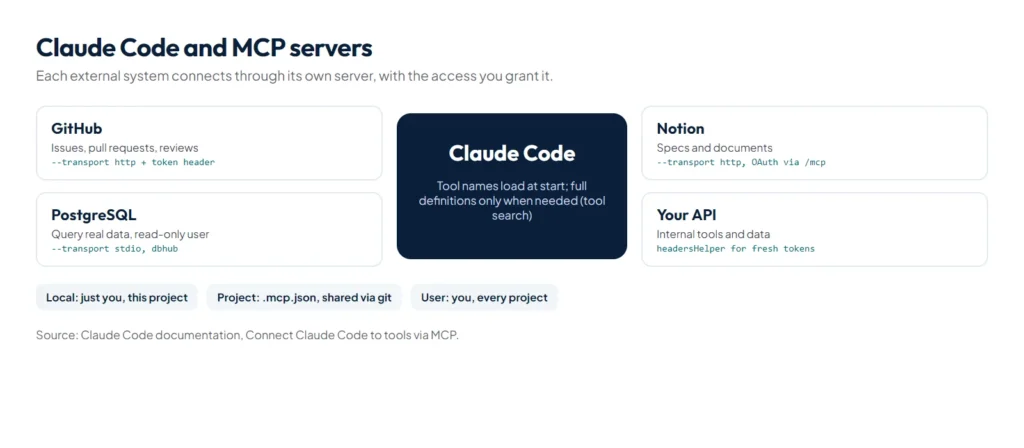
| Scope | Who sees it | Stored in |
|---|---|---|
| Local (default) | You, in this project | ~/.claude.json |
| Project | Everyone in the repository | .mcp.json, committed |
| User | You, in every project | ~/.claude.json |
Choose with --scope local, --scope project or --scope user. When the same server name exists at several scopes, local wins over project, which wins over user.
How do you share servers without sharing secrets?
A committed .mcp.json should never contain a real key. Claude Code expands environment variables in it, with an optional default:
{
  "mcpServers": {
    "api-server": {
      "type": "http",
      "url": "${API_BASE_URL:-https://api.example.com}/mcp",
      "headers": {
        "Authorization": "Bearer ${API_KEY}"
      }
    }
  }
}
Expansion works in command, args, env, url and headers. Each teammate sets API_KEY in their own environment, and the file stays safe to commit. The first time someone uses a project server, Claude Code asks them to approve it; claude mcp reset-project-choices clears those decisions.
How do you log in to MCP servers?
- OAuth: run
/mcpin a session and follow the browser login, or runclaude mcp login sentryfrom your shell. - API keys: pass them as a header (
--header) or an environment variable (--env). - Short-lived tokens: a
headersHelperscript can fetch fresh headers for each connection. A helper declared in a project’s.mcp.jsononly runs once you trust the folder.
How do you use resources and prompts?
Type @ and a server’s resources appear next to your files in the autocomplete menu. Reference one as @server:protocol://resource/path, for example:
Can you analyze @github:issue://123 and suggest a fix?
Compare @postgres:schema://users with @docs:file://database/user-model
Referenced resources are fetched and attached automatically. Prompts a server exposes appear in the / menu as /servername:promptname (MCP), and you can also type them as /mcp__github__pr_review 456, with arguments separated by spaces.
What happens when a server needs your input?
Through elicitation, a server can pause a task to ask you something. In form mode, Claude Code shows a dialog with the fields the server defines; in URL mode, it asks whether to open a link in your browser, for flows such as sign-in. No setup is needed on your side, and an Elicitation hook can answer routine requests automatically.
How do you manage servers?
claude mcp list          # all configured servers
claude mcp get notion    # details for one server
claude mcp remove notion # remove it

# inside a session
/mcp                     # status, logins, reconnect, enable or disable
How much context does MCP use?
Less than it used to. Tool search is on by default, so only tool names and server instructions load at session start and a tool’s full definition loads when Claude needs it. Claude Code imposes no fixed per-server tool cap; the practical limit is your context budget. Tool results are capped too: Claude Code warns when one passes 10,000 tokens and limits it at 25,000 by default, which you can raise with MAX_MCP_OUTPUT_TOKENS. Run /context all to see what each loaded MCP tool uses.
Slow tools no longer freeze the session either. A main-conversation MCP call still running after two minutes moves to a background task, so Claude keeps working and the result arrives as a notification (Claude Code v2.1.212 or later). Change the threshold with CLAUDE_CODE_MCP_AUTO_BACKGROUND_MS, or set it to 0 to turn this off.
MCP, a CLI tool or a skill?
For services that have a good command-line tool, Anthropic notes that CLI tools are the most context-efficient option: Claude already knows how to use gh, aws and similar tools. MCP shines where no good CLI exists, or where you want authentication and actions handled by a purpose-built server. The strongest pattern combines MCP with a skill: the server provides the connection, and a skill documents your schema, naming and query patterns so Claude uses the connection well. If you build your own server, Anthropic’s guide to writing effective tools for agents is the best starting point.
How do you use MCP safely?
- Use least privilege: give database servers a read-only user, as in
postgresql://readonly:pass@host/db, unless writing is the point. - Trust the source: a server can read whatever you connect it to and acts with the permissions you grant. Prefer servers from the service’s vendor.
- Review shared configs: read a project’s
.mcp.jsonbefore approving it. Note that a non-interactiveclaude -prun connects project servers without asking; use--strict-mcp-configordisabledMcpjsonServersto keep them out of automated runs. - Control tool permissions: MCP tools follow your allow, ask and deny rules.
mcp__puppeteermatches every tool from that server andmcp__puppeteer__puppeteer_navigatematches one. - Centralise for organisations: administrators can ship a fixed server set with
managed-mcp.jsonand restrict servers withallowedMcpServersanddeniedMcpServers.
Building a server with a step that must always involve a person, such as granting access? Set _meta["anthropic/requiresUserInteraction"] to true on that tool. Claude Code then prompts on every call, even in auto and bypassPermissions modes, and allow rules can’t skip it.
Two practical examples
# GitHub, for code reviews and issues
claude mcp add --transport http github https://api.githubcopilot.com/mcp/ \
  --header "Authorization: Bearer YOUR_GITHUB_PAT"

# PostgreSQL, read-only, through dbhub
claude mcp add --transport stdio db -- npx -y @bytebase/dbhub \
  --dsn "postgresql://readonly:pass@prod.db.com:5432/analytics"
Can Claude Code be an MCP server too?
Yes. claude mcp serve starts Claude Code as a stdio MCP server that other applications can connect to. It prints nothing when it starts, because a stdio server talks over standard input and output; a silent terminal means it is waiting for a client. In Claude Desktop, add it to claude_desktop_config.json with the full path to the claude command and the arguments mcp serve.
Summary
MCP connects Claude Code to the systems your work lives in, through tools, resources, prompts and elicitation. Add servers with claude mcp add, share team servers through a committed .mcp.json that uses environment variables for secrets, sign in with /mcp, give each server the least access it needs, and pair it with a skill that explains how to use it. Plugins can bundle MCP servers with skills and agents; see our guide to Claude Code plugins. To automate business workflows across tools, see our AI automation service and our guide to AI automation for small businesses.
References
- Connect Claude Code to tools via MCP, Claude Code documentation
- Model Context Protocol, official site and documentation
- MCP specification, latest revision
- Introducing the Model Context Protocol, Anthropic, November 2024
- Writing effective tools for AI agents, Anthropic Engineering