On this page
- When should you use a hook instead of CLAUDE.md or a skill?
- Which hook events matter most?
- How does a hook work?
- How do you return a structured decision?
- Hook 1: format every file Claude edits
- Hook 2: block edits to protected files
- Hook 3: get a desktop alert when Claude needs you
- Hook 4: re-inject key rules after compaction
- Which hook types are there besides shell commands?
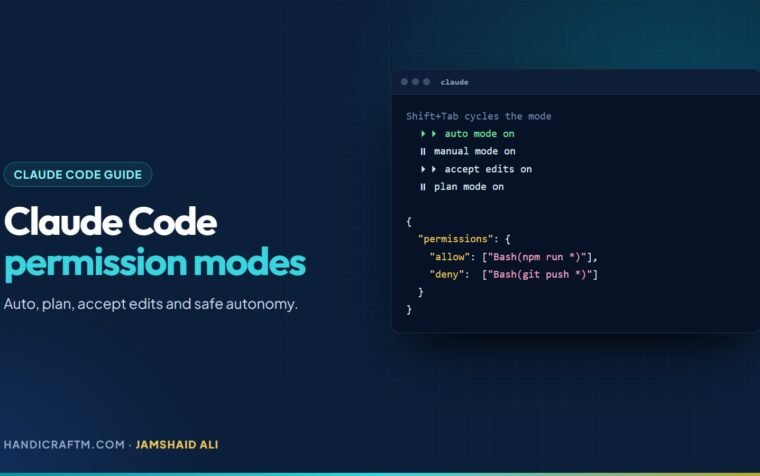
- How do hooks interact with permission modes?
- Where do hooks live?
- What should you know about hook security?
- How do you debug a hook?
- Summary
- References
Hooks are your own shell commands, and optionally HTTP endpoints, MCP tool calls, prompts or subagents, that Claude Code runs automatically at fixed points in its lifecycle: when a session starts, before a tool runs, after an edit, when Claude stops, and at more than 30 lifecycle events in all. Unlike instructions in CLAUDE.md, which Claude usually follows, hooks always run. You configure them in a settings file as event, matcher and handler; a hook that exits with code 2 blocks the action and tells Claude why.
Anthropic’s guidance is blunt: “Use hooks for actions that must happen every time with zero exceptions.” If you’ve ever told Claude “don’t touch the .env file” and hoped for the best, a hook is the fix.
When should you use a hook instead of CLAUDE.md or a skill?
| Hook | CLAUDE.md or skill | |
|---|---|---|
| Runs | Your handler, every time its event fires | Instructions Claude reads and interprets |
| Guaranteed? | Yes, the trigger is deterministic | Usually followed, never enforced |
| Context cost | Zero for command hooks, unless they return output | Loaded into context |
| Best for | Formatting, blocking unsafe actions, logging, alerts | Conventions, knowledge and workflows that need judgment |
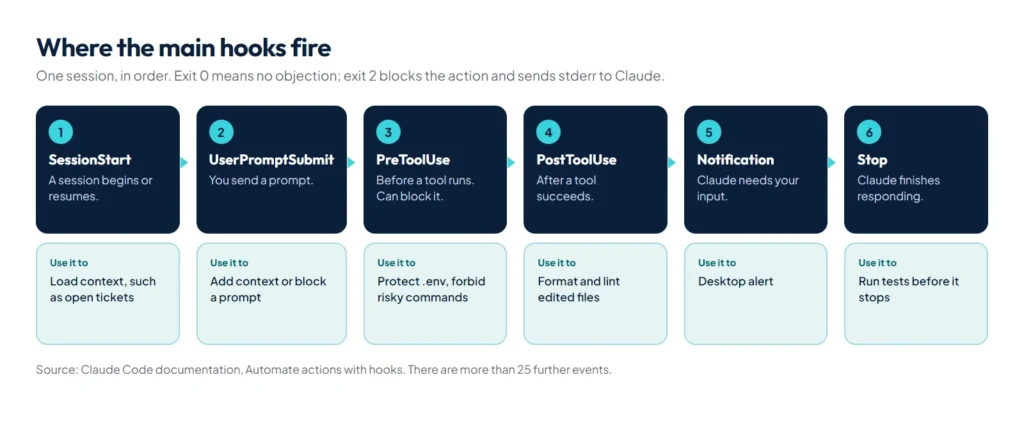
Which hook events matter most?
| Event | Fires | Typical use |
|---|---|---|
SessionStart | When a session begins, resumes, clears or compacts | Load context, such as today’s tickets |
UserPromptSubmit | When you send a prompt, before Claude sees it | Add context or block certain prompts |
PreToolUse | Before a tool call runs; can block it | Protect files, forbid dangerous commands |
PermissionRequest | When a tool call needs a permission decision | Auto-answer routine approvals |
PostToolUse | After a tool call succeeds | Format and lint edited files |
Notification | When Claude Code sends a notification | Desktop alert when Claude needs you |
Stop | When Claude finishes responding | Run tests and refuse to stop until they pass |
PreCompact, PostCompact | Around context compaction | Save or restore state around a summary |
FileChanged | When a watched file changes on disk | Reload environment files on any change |
SessionEnd | When a session terminates | Log or notify a team channel |
The full list in the hooks guide also covers Setup for one-time CI preparation, PermissionDenied when auto mode refuses a call, PostToolBatch after parallel tool calls, InstructionsLoaded when a CLAUDE.md or rule file loads, subagents, tasks, worktrees, model switches and MCP elicitations.
How does a hook work?
Claude Code sends the hook a JSON description of the event on standard input: common fields such as session_id and cwd, plus event data such as tool_name and tool_input. The hook does its work and answers with its exit code:
- Exit 0: no objection. For a
PreToolUsehook, the normal permission flow still applies; forSessionStartandUserPromptSubmit, plain text printed to stdout is added to Claude’s context. - Exit 2: block the action. What you write to stderr becomes feedback, so Claude can adjust. A few events, such as
SessionStart, can’t be blocked. - Anything else: usually a non-blocking error that the transcript reports as a hook error.
When several hooks match the same event, they all run in parallel and to completion. For PreToolUse the most restrictive answer wins, in the order deny, defer, ask, allow, but a deny from one hook doesn’t stop a sibling hook’s side effects, such as writing a log line. Many examples use jq to read the JSON, so install it first.
How do you return a structured decision?
Exit codes only block or stay silent. For more control, exit 0 and print JSON instead. This PreToolUse output denies a call and tells Claude what to do instead:
{
  "hookSpecificOutput": {
    "hookEventName": "PreToolUse",
    "permissionDecision": "deny",
    "permissionDecisionReason": "Use rg instead of grep for better performance"
  }
}
"ask" shows the normal prompt and "allow" skips it. To add context from a UserPromptSubmit hook, put additionalContext inside hookSpecificOutput; at the top level, Claude Code silently ignores it. PostToolUse and Stop hooks use a top-level "decision": "block" instead. Choose either exit codes or JSON for each hook, not both.
Hook 1: format every file Claude edits
Add this to .claude/settings.json to run Prettier after each edit or write:
{
  "hooks": {
    "PostToolUse": [
      {
        "matcher": "Edit|Write",
        "hooks": [
          {
            "type": "command",
            "command": "jq -r '.tool_input.file_path' | xargs npx prettier --write"
          }
        ]
      }
    ]
  }
}
Swap Prettier for your own formatter or linter, such as php-cs-fixer or ruff format. One gap to know: Claude can also change files through shell commands, which an Edit|Write matcher never sees. If every change must be caught, for compliance or audit logs, add a Stop hook that checks git status --porcelain once per turn, or a FileChanged hook for specific files.
Hook 2: block edits to protected files
Save this script as .claude/hooks/protect-files.sh and make it executable:
#!/bin/bash
INPUT=$(cat)
FILE_PATH=$(echo "$INPUT" | jq -r '.tool_input.file_path // empty')
FILE_PATH="${FILE_PATH//\\//}"   # normalise Windows separators

for pattern in ".env" "package-lock.json" ".git/"; do
  if [[ "$FILE_PATH" == *"$pattern"* ]]; then
    echo "Blocked: $FILE_PATH matches protected pattern '$pattern'" >&2
    exit 2
  fi
done
exit 0
Then register it as a PreToolUse hook:
{
  "hooks": {
    "PreToolUse": [
      {
        "matcher": "Edit|Write",
        "hooks": [
          { "type": "command", "command": "\"$CLAUDE_PROJECT_DIR\"/.claude/hooks/protect-files.sh" }
        ]
      }
    ]
  }
}
Ask Claude to add a comment to .env, and the edit is blocked before it happens, with the reason passed back to Claude.
Hook 3: get a desktop alert when Claude needs you
Put a Notification hook in ~/.claude/settings.json so you can work on something else while Claude runs. On macOS:
{
  "hooks": {
    "Notification": [
      {
        "matcher": "permission_prompt|idle_prompt",
        "hooks": [
          {
            "type": "command",
            "command": "osascript -e 'display notification \"Claude Code needs your attention\" with title \"Claude Code\"'"
          }
        ]
      }
    ]
  }
}
The matcher limits alerts to the moments Claude is waiting on you: a permission prompt or an idle prompt. On Linux, use notify-send; on Windows, a short PowerShell command that shows a toast or plays a sound does the same job.
Hook 4: re-inject key rules after compaction
Compaction summarises the conversation and can drop details. A SessionStart hook with the compact matcher puts critical context back every time:
{
  "hooks": {
    "SessionStart": [
      {
        "matcher": "compact",
        "hooks": [
          {
            "type": "command",
            "command": "echo 'Reminder: use Bun, not npm. Run bun test before committing.'; git log --oneline -5"
          }
        ]
      }
    ]
  }
}
For context every session needs, CLAUDE.md is still the right place; use this for dynamic state such as recent commits or the current sprint.
Which hook types are there besides shell commands?
| Type | What it does | Default timeout |
|---|---|---|
command | Runs a shell command or script | 10 minutes |
http | POSTs the event JSON to a URL and reads the decision from the response body | 10 minutes |
mcp_tool | Calls a tool on a configured MCP server | 10 minutes |
prompt | Asks a Claude model for a single-turn judgement | 30 seconds |
agent | Spawns a subagent that can read files and run commands before deciding (experimental) | 60 seconds |
A prompt hook answers with "ok": true or "ok": false and a reason. On a Stop event, a false answer feeds the reason back so Claude keeps working:
{
  "hooks": {
    "Stop": [
      {
        "hooks": [
          {
            "type": "prompt",
            "prompt": "Check if all tasks are complete. If not, respond with {\"ok\": false, \"reason\": \"what remains to be done\"}."
          }
        ]
      }
    ]
  }
}
Use a prompt hook when the event data alone is enough to decide, and an agent hook, which can take up to 50 tool-use turns, when the decision depends on the real state of the code, such as whether the test suite passes. HTTP hooks suit a shared audit service for a whole team; a non-2xx response is a non-blocking error unless you set onFailure: "block", and environment variables in headers resolve only if listed in allowedEnvVars.
How do hooks interact with permission modes?
PreToolUse hooks fire before any permission-mode check, in every mode. A hook that returns deny blocks the tool even in bypassPermissions mode or with --dangerously-skip-permissions, which makes hooks the way to enforce a policy users can’t switch off by changing modes. The reverse doesn’t hold: a hook returning allow can’t override a deny rule from settings, and hooks in settings files and plugins can tighten restrictions but never loosen them past what your permission rules allow.
Where do hooks live?
| Location | Applies to |
|---|---|
~/.claude/settings.json | All your projects |
.claude/settings.json | One project, shared through git |
.claude/settings.local.json | One project, just you |
| Managed policy settings | The whole organisation |
Plugin hooks/hooks.json | Wherever the plugin is enabled |
| Skill or subagent frontmatter | While that skill or subagent is active |
Run /hooks to see every configured hook grouped by event. Hooks from all sources merge: every matching hook fires.
What should you know about hook security?
Hooks run with your user permissions. A repository’s .claude/settings.json can define hooks, and a non-interactive claude -p run executes them even in a folder you have never trusted, unless you start with --bare or pass --settings '{"disableAllHooks": true}'. Review the hooks in any repository or plugin before you run Claude Code on it.
How do you debug a hook?
- Run
/hooksto confirm it is registered under the right event. - Check the matcher: it is case-sensitive and matches tool names such as
BashorEdit|Write. - Test the script on its own:
echo '{"tool_name":"Bash","tool_input":{"command":"ls"}}' | ./my-hook.sh; echo $? - Run
claude --debugor/debugto see which hooks matched, their exit codes and their full output. - If a
Stophook keeps Claude going forever, Claude Code overrides it after eight blocks in a row; check thestop_hook_activefield and exit early when it is true. - Make sure nothing in your shell profile prints text before a hook’s JSON output.
Our free Claude Code hooks generator writes these settings.json blocks for you: pick the event and the command, then copy the result.
Summary
Hooks turn “please always” into “always”: formatting after every edit, blocks on protected files, alerts when Claude needs you, rules restored after compaction, tests before Claude stops. Use exit code 2 or JSON decisions for control, prompt and agent hooks when a decision needs judgment, and remember that a PreToolUse deny beats every permission mode. For the instructions side of the same coin, see our CLAUDE.md guide, and for packaging hooks with other components, our guide to Claude Code plugins.
References
- Automate actions with hooks, Claude Code documentation
- Hooks reference, Claude Code documentation
- Configure permissions, Claude Code documentation
- Settings files and precedence, Claude Code documentation