On this page
- What do you need to start a WhatsApp store?
- How do you set up your WhatsApp business profile?
- How should you plan prices, delivery and returns?
- How do you create a WhatsApp Business catalog?
- How do you sell on WhatsApp, from first message to delivery?
- How do you get customers to your WhatsApp store?
- What are the limits of a WhatsApp store?
- Summary
- References
To create an online store on WhatsApp, install the free WhatsApp Business app, fill in your business profile, add each product to the Catalog with photos, a name and its country of origin, group items into collections, and share your catalog link on Instagram, Facebook, your website and packaging. Orders then arrive as chats, so you also need a simple routine for confirming orders, taking payment and recording each sale. This guide covers the setup, the catalog rules WhatsApp applies, an order workflow you can copy, and when to add a proper website.
We set up WhatsApp ordering for small businesses in Pakistan and build the websites they move on to later. The catalog steps and rules below come from WhatsApp’s own Help Center, checked in November 2026. App screens change between versions, so menu names on your phone may differ slightly.
What do you need to start a WhatsApp store?
- The WhatsApp Business app. It is free and separate from normal WhatsApp. You can move your existing number to it, but use a number you will keep, because customers will save it.
- Clear product photos. Square photos on a plain background look neat in the catalog grid.
- A price list and stock list. Decide prices, delivery charges and delivery areas before you share anything.
- A payment method. Most Pakistani WhatsApp sellers take bank transfer, JazzCash or Easypaisa, or cash on delivery.
- A delivery partner if you ship outside your city.
How do you set up your WhatsApp business profile?
Before you add products, complete the profile, because it is the first thing a new buyer checks. In the app’s settings, open your business profile and fill in:
- Business name and category exactly as customers know you, for example “Zara Lawn House, Clothing store”.
- A short description with what you sell, your city and delivery areas, and your order hours.
- Address or “online only”, business hours, email and website if you have one. Buyers trust a store more when they can see where it is.
- A clear logo or shop photo as the profile picture.
Then set three messages once: a greeting for first time chats, an away message for after hours that says when you will reply, and quick replies for your payment details, delivery charges and return policy.
How should you plan prices, delivery and returns?
Most arguments in WhatsApp selling come from things that were never written down. Decide these before you share the catalog and put them in a pinned message or your description:
- Delivery charges by area, for example one rate inside your city and one for the rest of Pakistan, and who pays when an order is refused.
- Advance payment rules. Many sellers ask for full payment on custom or stitched items and allow cash on delivery on ready stock.
- Delivery time in working days, and what happens on public holidays.
- Exchange and return policy: how many days, what condition, and who pays the courier.
Write the same rules on your website or Instagram later, so customers see one policy everywhere.
How do you create a WhatsApp Business catalog?
WhatsApp’s catalog help article gives these steps for the app:
- Open the Tools tab and tap Catalog.
- Tap Add new item, then Add photos and videos. You can add up to 10 images or videos per item, and a video can be up to 50 MB.
- Enter the product or service name.
- Choose the country of origin. WhatsApp requires it for every new or edited item.
- Add the optional fields: price, sale price, description, website link and product code.
- Tap Save.
Every image and video is reviewed against WhatsApp’s Business Messaging Policy, and customers only see an item after WhatsApp approves it. Rejected items show a red exclamation mark; tap the item and choose Request another review if you think the decision was wrong. Then use collections to group items, for example Lawn suits, Kids, or Under Rs 3,000, so buyers do not scroll through everything.
Catalog tips that bring more orders
- Put the price in every item. “Price on DM” adds a message before every sale and many buyers leave.
- Use the product code field for your own stock code. It makes orders easy to match to your stock sheet.
- Write sizes, fabric, colors and delivery time in the description, the questions you answer most.
- Remove sold out items the same day. An order for something you do not have costs you the customer.
How do you sell on WhatsApp, from first message to delivery?
The catalog shows products, but the sale happens in the chat. This is the order routine we suggest to small sellers:
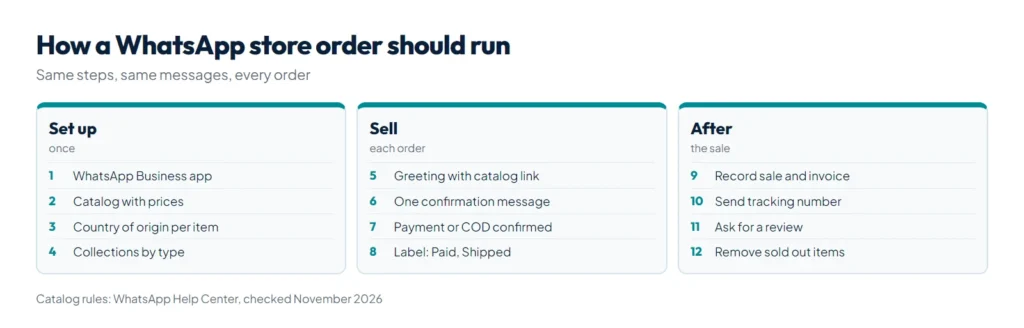
- Greet and point to the catalog. Set a greeting message in the app that says hello and links your catalog.
- Confirm the order in one message. Item, size, quantity, price, delivery charge, total, name, address and phone. Ask the buyer to reply “Confirm”.
- Take payment or confirm cash on delivery. For advance payments, send your account details as a saved quick reply so there are no typing mistakes.
- Label the chat. Use labels such as New order, Paid, Shipped and Delivered so nothing is forgotten.
- Record the sale. Add it to a sheet or a simple stock app, and give the buyer a proper bill. Our free invoice generator for Pakistan makes a PKR invoice you can send as a PDF.
- Send the tracking number when you ship, and ask for a review or a photo after delivery.
Order confirmation message you can copy
Order confirmation
Item: Blue lawn suit (code LS-104), size M x 1
Price: Rs 3,200 + delivery Rs 200 = Rs 3,400
Name / address / phone: ...
Delivery: 3 to 5 working days
Reply CONFIRM to place the order.
A Roman Urdu version works just as well for many buyers, for example “Order confirm karne ke liye CONFIRM likh dein.”
How do you get customers to your WhatsApp store?
- Share the catalog link from the app on your Instagram profile, Facebook page and in Stories.
- Add a chat button to every channel. Our free WhatsApp link generator makes a wa.me link with a ready message and a QR code for packaging, shop counters and flyers. Our guide on how to create a WhatsApp link shows where to place it.
- Use your Google Business Profile if you have a shop. See how to rank on Google Maps.
- Post new arrivals as Status updates for people who already saved your number.
What are the limits of a WhatsApp store?
A WhatsApp store is cheap and familiar to buyers, but it has clear limits as you grow:
| Limit | What it means | What fixes it |
|---|---|---|
| One phone does the selling | Several staff cannot reply from one number in the basic app setup | The WhatsApp Business API with a shared inbox |
| No Google traffic | A catalog does not rank in Google search | A website with product pages |
| Manual orders and stock | Every order is typed and counted by hand | A store or inventory system |
| Every item is reviewed | New items wait for approval and some categories are refused | Your own website, where you set the rules |
| Your account is the store | If the number is banned or lost, the store goes with it | A website and email list you own |
When chats become too many for one person, read our guide to the WhatsApp Business API in Pakistan and its per message prices. When you want Google traffic and card or wallet payments, an online store is the next step; we build them through our ecommerce and retail service. Selling on Instagram as well? See our guide to Instagram shop in Pakistan.
Summary
To create an online store on WhatsApp, use the free WhatsApp Business app, build a catalog with prices, photos and the required country of origin, group items into collections and wait for WhatsApp’s review. Then run every order the same way: confirm in one message, take payment, label the chat, record the sale and send tracking. Promote the store with a catalog link and a click to chat link from our WhatsApp link generator on every channel. Add a website once you need Google traffic, several staff or automated orders.