On this page
- How do you create a WhatsApp link with a message?
- Which way of making the link should you use?
- What should the pre-filled message say?
- Where should you put your WhatsApp link?
- How can you track clicks on a WhatsApp link?
- Should you use the WhatsApp Business app for your link?
- What mistakes stop a WhatsApp link from working?
- Summary
- References
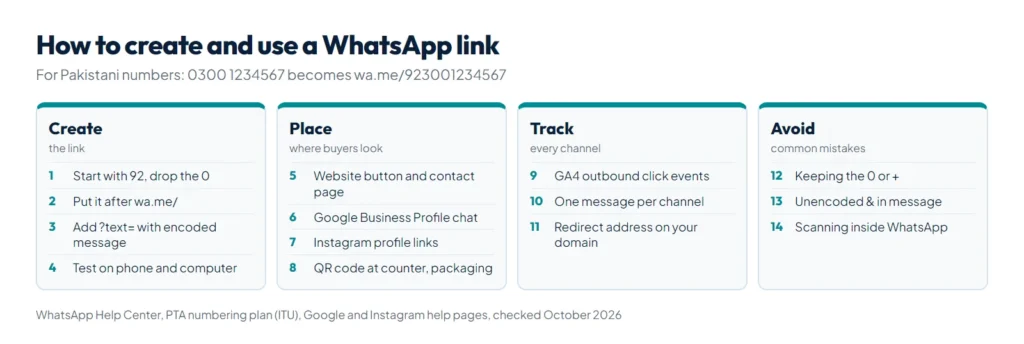
To create a WhatsApp link, put your full phone number in international format after https://wa.me/, without a plus sign, spaces or the leading 0, then add ?text= and a URL-encoded message if you want one. For a Pakistani number, 0300 1234567 becomes https://wa.me/923001234567. A free WhatsApp link generator does the conversion and the encoding for you and adds a QR code. This guide covers how to write the link, where to put it, how to track clicks and the mistakes that break it.

We build WordPress websites for businesses in Pakistan, our own site has a floating WhatsApp button, and we made the free generator mentioned below. The link rules here come from WhatsApp’s own help pages, the number rules from the Pakistan Telecommunication Authority’s numbering plan, and each placement step from that platform’s help center, all checked in October 2026.
How do you create a WhatsApp link with a message?
WhatsApp calls this feature click to chat. Its click to chat help page says the link opens a chat with you even if the person has not saved your number, as long as your number has an active WhatsApp account, and that it works on phones and on WhatsApp Web. It takes four steps:
- Write your number in international format. Start with the country code, then the number without its first 0, and leave out the plus sign, brackets, dashes and spaces. Pakistan’s country code is 92, and the PTA’s national numbering plan, filed with the ITU, gives every mobile number 10 digits after it: a 3 followed by 9 more digits. So 0300 1234567 becomes 923001234567.
- Put it after https://wa.me/. The result,
https://wa.me/923001234567, is already a working chat link. - Add a message if you want one. Add
?text=and the message in URL-encoded form: a space becomes%20and a new line becomes%0A. - Test it. Open the link on a phone and a computer before you print or publish it, and check the number and message.
A finished link with a message looks like this:
https://wa.me/923001234567?text=Hi%2C%20I%20want%20the%20price%20of%20the%20blue%20kurtaIf you leave out the number and keep only the message (https://wa.me/?text= plus your text), WhatsApp shows the person a list of their contacts to send it to. That suits a share button, not a contact button. Our free WhatsApp link generator does all four steps in your browser: it accepts any Pakistani number format, encodes the message, including Urdu, and gives you a QR code and a website button.
Which way of making the link should you use?
There are three practical ways. All of them open the same kind of chat, but they differ in what you can change after the link is out.
| Method | Message | QR code | Changing it later | Best for |
|---|---|---|---|---|
| Write the wa.me link by hand | Typed into the link, encoded | Needs a separate QR tool | Share a new link | One quick link |
| Free WhatsApp link generator | Encoded for you, Urdu included | PNG download | Share a new link | Website buttons, print and several channels |
| WhatsApp Business app short link | Optional default message set in the app | Built in, under Tools, Short link | Edit the default message; resetting the QR code stops the old one working | Businesses already on WhatsApp Business |
WhatsApp’s help pages add two details about the Business short link. The app creates it automatically when you set up the account, and when someone opens it in a web browser, they first see a page with your business information and a button to continue to the chat.
What should the pre-filled message say?
The message appears in the chat’s text box, so the customer only has to press send. A good one tells you what the person wants before you reply:
- Name the product or service. “Hi, I want the price of the blue kurta” saves a round of questions. On product pages, put the product name in each button’s message.
- Match your customers’ language. English, Roman Urdu and Urdu all work. Roman Urdu uses plain letters, so the link stays short. Each Urdu letter becomes six characters in the link, such as
%D8%A7for alif, because it is stored as two bytes and each byte is written as a code. WhatsApp still shows the customer normal Urdu text. - Keep it to one line. A long message, above all in Urdu script, makes the QR code denser and harder to scan when it is printed small.
- Add the channel. A short tag such as “(Google Maps)” or “(flyer)” tells you where the chat came from, as the tracking section below explains.
Symbols with a meaning in web addresses need encoding too: encodeURIComponent, the browser function most generators use, turns & into %26. MDN notes that an unencoded ampersand can be read as the start of a new field, which cuts your message short.
Where should you put your WhatsApp link?
Put it where people decide to contact you. These places cover most small businesses in Pakistan:
| Place | How to add it | Good to know |
|---|---|---|
| Website header, contact page and product pages | A button, or a floating button in the corner, with your wa.me link | WhatsApp names contact pages, landing pages and mobile sites as places for its Chat on WhatsApp button |
| Google Business Profile | Edit profile, Contact, Chat, choose WhatsApp, paste your click to chat URL | Select regions only, and hidden if you also add a text message number |
| Instagram profile | Edit profile, Links, Add link, paste the wa.me link | Up to 5 links per profile |
| Facebook Page | WhatsApp Business app: Tools, Facebook & Instagram, Facebook | Adds a WhatsApp button to the Page |
| Shop counter, packaging, visiting cards, menus | Print the QR code | WhatsApp suggests printing the Business QR code for storefronts |
| Email signature and invoices | A text link such as “Chat with us on WhatsApp” | Use the same link everywhere so it is easy to update |
The Google steps come from the Business Profile help page on chatting with customers, which also says the profile must be claimed and verified. Instagram also has a WhatsApp contact option for professional accounts connected to a WhatsApp Business or API number. Its help page for adding a WhatsApp link said “This feature is not currently available in your country” when we opened it from Pakistan on 25 October 2026, so a wa.me link in your profile links, as Instagram’s help page on adding websites describes, is the dependable route. If your Google profile is not set up yet, start with our guide on how to rank on Google Maps.
How can you track clicks on a WhatsApp link?
WhatsApp’s click to chat page does not mention any click statistics, and a click on a wa.me link never reaches your website, so you measure on your side. Four methods, from the easiest:
| Method | What it shows | Works for print and QR codes |
|---|---|---|
| Google Analytics 4 outbound clicks | Clicks on wa.me links on your website, with the full link | No |
| A different message per channel | Where each chat came from, in the first message | Yes |
| A redirect address on your own domain | Visits to that address in your server statistics | Yes |
| Google Business Profile performance | Chat activity from your profile | No |
- Google Analytics 4: with enhanced measurement switched on, GA4 records a
clickevent each time someone follows a link to another domain, with the link URL and link domain as parameters, according to Google’s enhanced measurement page. Filter on the link domainwa.me. If each button has its own message, the link URL shows which button was used. - A message per channel: put “(Google Maps)”, “(Instagram)” or “(flyer)” in each version of the link and count them in your chats each week. It is the only method here that works for printed QR codes without a website.
- A redirect address: point a short address on your domain, such as
yoursite.com/whatsapp, to your wa.me link, and print that address or its QR code. Your hosting statistics count the visits, and if your number changes you update one redirect instead of reprinting every QR code. On WordPress, a redirect plugin or one server rule does the job.
Google’s chat help page points to chat metrics in the profile’s performance report. If you want every lead saved in a CRM with its source, next to a WhatsApp button, that is what our lead generation funnels service sets up.
Should you use the WhatsApp Business app for your link?
A wa.me link works with any number that has an active WhatsApp account, so you do not need WhatsApp Business to start. For a shop or service business, the Business app adds a few extras, according to WhatsApp’s help pages:
- A short link and QR code under Tools, with an optional default message you can edit.
- A reset option: resetting the QR code stops the old one working, which WhatsApp suggests if a code you shared on social media attracts spam.
- Landline support: it is the only WhatsApp app that can register a landline. VoIP, toll-free and UAN (111) numbers cannot be registered at all.
- A link to your Facebook Page, which then shows a WhatsApp button. A WhatsApp Business number can also be connected to a professional Instagram account as a contact option.
When one phone can no longer handle your chats, or you need automatic replies and several agents, read our guide to the WhatsApp Business API in Pakistan, which compares the app with the API and covers its costs.
What mistakes stop a WhatsApp link from working?
| Mistake | Example | Fix |
|---|---|---|
| Keeping the leading 0 | wa.me/03001234567 | wa.me/923001234567 |
| Plus sign, 00, dashes or brackets | wa.me/+92-300-1234567 | Digits only, starting with 92 |
| A 0 left after the country code | wa.me/9203001234567 | Remove the 0 after 92 |
| Wrong number of digits | wa.me/92300123456 | 10 digits after 92 for a mobile |
| Message not encoded | ?text=Price & delivery | ?text=Price%20%26%20delivery |
| Scanning your printed QR code inside WhatsApp | The WhatsApp camera | Use the phone’s camera app or Google Lens, because WhatsApp’s camera only reads official WhatsApp QR codes |
| A landline that is not on WhatsApp Business | wa.me/924235761234 | Register it on the WhatsApp Business app, or use a mobile number |
The first two rows match WhatsApp’s own example of a link not to use: https://wa.me/+001-(XXX)XXXXXXX. Two habits save trouble later: keep one master copy of each link in a document so every channel uses the same version, and print a test copy of any QR code at its final size before you print hundreds.
Summary
A WhatsApp link is https://wa.me/ plus your number in international format, with an optional ?text= message that must be URL-encoded. For Pakistan, drop the 0 and start with 92, so 0300 1234567 becomes 923001234567. Put the link on your website, Google Business Profile, Instagram links and printed QR codes, give each channel its own message so you can track it, and test every version. Our free WhatsApp link generator builds the link, the QR code and a website button in one step, and our website development team can add tracked WhatsApp buttons to your site.
References
- How to use click to chat, WhatsApp Help Center
- National numbering plan: Pakistan, ITU, communication from the Pakistan Telecommunication Authority, 9 November 2021
- How to create short links, WhatsApp Help Center
- How to share your WhatsApp Business QR code, WhatsApp Help Center
- How to reset your QR code for WhatsApp Business, WhatsApp Help Center
- How to register for the WhatsApp Business app, WhatsApp Help Center
- How to add a WhatsApp Business account to a Facebook Page, WhatsApp Help Center
- Chat with customers from your Business Profile, Google Business Profile Help
- Add a website to your Instagram profile, Instagram Help Center
- Connect or disconnect your Instagram and WhatsApp accounts, Instagram Help Center
- Enhanced measurement events, Google Analytics Help
- encodeURIComponent(), MDN Web Docs