
On this page
- What is n8n and how does it work?
- Is n8n free? What the license allows
- How much does n8n cost? Cloud and self-hosted prices in October 2026
- How does n8n count executions?
- Three n8n workflows for a Pakistani small business
- Worked example: which n8n plan do these three workflows need?
- n8n vs Zapier vs Make
- Is n8n the right choice for your business?
- Summary
- References
n8n is a workflow automation tool: you connect apps such as WhatsApp, Google Sheets, Gmail and WooCommerce on a visual canvas, and n8n runs the steps for you every time a trigger fires, with AI steps where you need them. You can use n8n Cloud from €20 a month billed yearly, or run the free Community edition on your own server under n8n’s fair-code Sustainable Use License.
We build AI automations and WhatsApp workflows for businesses in Pakistan. The license and price details below come from n8n’s own pricing page and documentation, checked in October 2026, and every node in the workflows is listed in n8n’s integration docs.
What is n8n and how does it work?
n8n’s documentation calls it “a fair-code licensed workflow automation tool that combines AI features with business process automation”. A workflow is a chain of nodes on a canvas. It starts with a trigger node, such as a new WhatsApp message, a new WooCommerce order or a set time each day, followed by nodes that read, change or send data.
- Integrations: n8n’s integrations page lists more than 2,000, including Google Sheets, Gmail, WhatsApp, Telegram and WooCommerce. The HTTP Request node can call any other app’s API.
- Logic and code: If, Filter and Switch nodes branch or drop items, and the Code node runs JavaScript or Python.
- AI: nodes such as Text Classifier and AI Agent connect a chat model, for example from OpenAI or Anthropic, to sort messages or draft replies.
- Executions: one complete run of a workflow is one execution, and n8n prices its plans by them.
Is n8n free? What the license allows
The self-hosted Community edition is free. Its code is published under n8n’s own Sustainable Use License, a fair-code license (files with .ee. in their names fall under the n8n Enterprise License). Because the license limits commercial use, n8n does not call itself open source. n8n Cloud is a paid subscription with separate terms.
n8n’s license FAQ gives a simple test: “If workflows are only created or modified by you or people in your organization, you can use n8n under the Community license for free.”
| Allowed under the Community license | Not allowed without a commercial agreement |
|---|---|
| Running n8n for your own business, or for personal, learning or research projects | Hosting n8n as a service where your clients build their own workflows |
| Building automations for clients on your instance, as long as clients cannot create or edit them | Letting outside users build or configure workflows through your product, the n8n API, MCP or an AI agent |
| Charging clients for building, setting up and maintaining workflows, and for training and consulting | Forking n8n’s code to launch your own automation product |
| Installing and managing n8n on a client’s own server, if you are not also hosting it for them | White-labeling n8n by removing its branding |
| Running several Community instances | Using paid features that need a license key without buying one |
This matters for freelancers and agencies: “n8n automation fiverr” and “n8n jobs pakistan” both appear in Google’s suggestions in Pakistan. Building and maintaining workflows for clients is allowed; reselling access to n8n itself is not. For gray areas, the FAQ asks you to email license@n8n.io before launch.
How much does n8n cost? Cloud and self-hosted prices in October 2026
n8n Cloud is priced in euros. These are the prices on n8n’s pricing page on 24 October 2026, before taxes. The rupee figures use the State Bank of Pakistan’s mark-to-market rate of Rs 309.78 per euro for 23 October 2026; your bank’s card rate and charges will differ.
| Plan | Where it runs | Executions a month | Billed yearly | Billed monthly |
|---|---|---|---|---|
| Community edition | Your own server | No quota (only paid plans have one) | Free | Free |
| Starter | n8n Cloud | 2,500 | €20 a month (€240 a year), about Rs 6,200 | €24, about Rs 7,400 |
| Pro | n8n Cloud | 10,000 | €50 a month (€600 a year), about Rs 15,500 | €60, about Rs 18,600 |
| Business | Your own server only, with a license key | 40,000 | About €667 a month (€8,000 a year) | €800 |
| Enterprise | n8n Cloud or your own server | Custom | Contact sales | Contact sales |
- Limits: Starter allows 5 concurrent executions, runs of up to 5 minutes and 7 days of logs. Pro allows up to 50, 40 minutes and 30 days, plus admin roles and workflow history. A 50,000-execution Pro size costs €145 a month, or €1,450 a year.
- Free trial: 14 days of n8n Cloud with Pro features, no card, up to 1,000 executions.
- Every plan includes unlimited users, workflows and integrations. Cloud data is stored in the EU, in Frankfurt.
Self-hosting is free in license terms, not in effort. n8n’s hosting guide says it “requires technical knowledge”, recommends it for expert users and warns that mistakes “can lead to data loss, security issues, and downtime”. n8n releases a new minor version most weeks, so someone must apply updates. The server is billed separately: a DigitalOcean Basic Droplet with 2 GiB of memory was US$12 a month in October 2026, and n8n’s guide says a basic shared CPU plan is enough for most usage. The free edition also has no sharing: only the instance owner and a workflow’s creator can open it.
How does n8n count executions?
A run counts once, however many steps it has. The trigger decides how often runs happen, per n8n’s executions documentation:
- Webhook triggers, such as the WhatsApp and WooCommerce triggers: one execution for every inbound request that starts the workflow.
- Schedule Trigger: one execution every time it fires. A daily schedule uses 30 or 31 a month; one that runs every 5 minutes uses about 8,600 to 8,900.
- Polling triggers, such as the Gmail Trigger: one execution only when new data is found.
- Not counted: test runs from the editor, sub-workflows called by a parent workflow, and runs of an error workflow.
Three n8n workflows for a Pakistani small business
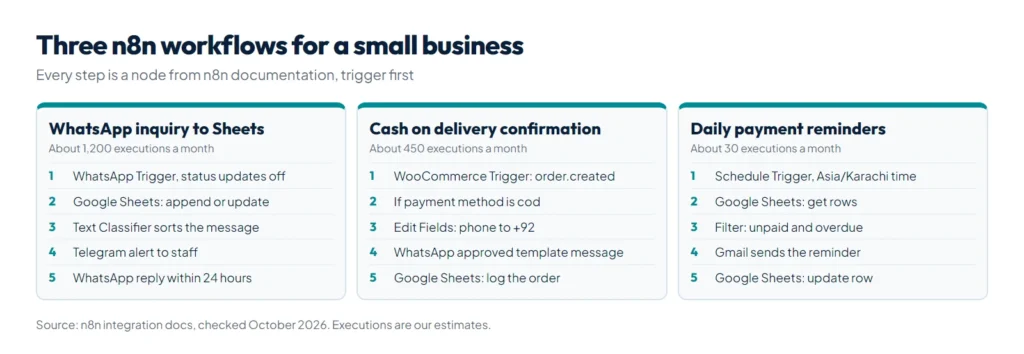
Each workflow uses only nodes from n8n’s documentation; the daily volumes are our assumptions. For more ideas, see our guide to AI automation for small businesses.
1. WhatsApp inquiry to Google Sheets, with an alert to staff
For a clinic, academy or service business. It needs the WhatsApp Business Platform, not just the phone app; our WhatsApp Business API guide for Pakistan covers setup and costs.
- WhatsApp Trigger, event Messages. Add the option Receive Message Status Updates and clear it (see below).
- Google Sheets, Append or Update Row, matched on the phone number, so a customer who writes three times stays one row.
- Text Classifier with a chat model: price question, booking, complaint or other. Test it on real chats in English, Urdu and Roman Urdu first.
- Telegram, Send Message: alert the right staff member.
- WhatsApp Business Cloud, Send: a short reply with your timings or booking link, allowed because the customer’s message opened Meta’s 24-hour customer service window.
Why step 1 matters: Meta’s messages webhook also reports each message you send as sent, delivered and read. The node’s help text says you can filter these “to avoid multiple executions for one WhatsApp message”. At 40 inquiries a day, that is about 1,200 executions a month with status updates off, and up to about 4,800 with them on.
2. Cash on delivery order confirmation for a WooCommerce store
- WooCommerce Trigger, event order.created, not order.updated, which fires again whenever the order changes.
- If: continue only when the payment method is
cod, WooCommerce’s code for cash on delivery. - Edit Fields (Set): rewrite the billing phone from 03001234567 to +923001234567. Meta’s docs say that without the plus sign and country code, your business number’s country code is added in front, so the message can reach the wrong number.
- WhatsApp Business Cloud, Send Template: an approved template with the order number and total, asking the buyer to confirm. Outside the 24-hour window, Meta only allows approved templates.
- Google Sheets, Append Row: log the order for dispatch. Replies arrive through workflow 1.
At 15 orders a day this uses about 450 executions a month. Meta bills template messages separately.
3. Daily fee or invoice reminders from a Google Sheet
- Schedule Trigger: every day at 10:00. Set the workflow timezone to Asia/Karachi first: on self-hosted n8n the default is New York time, which would send a 10:00 reminder in the Pakistani evening.
- Google Sheets, Get Row(s): read the fees or invoices sheet.
- Filter: keep rows marked Unpaid whose due date has passed.
- Gmail, Send: a polite reminder with the amount and how to pay.
- Google Sheets, Update Row: write today’s date in a Last reminder column.
This uses about 30 executions a month, however many reminders it sends. For all three, add an error workflow that starts with the Error Trigger node and messages you on Telegram when anything fails; its runs do not count toward your quota.
Worked example: which n8n plan do these three workflows need?
| Workflow | Our assumption | Executions a month |
|---|---|---|
| WhatsApp inquiries, status updates off | 40 messages a day | 1,200 |
| Cash on delivery confirmations | 15 orders a day | 450 |
| Daily reminders | 1 run a day | 30 |
| Total | 1,680 |
1,680 executions fit Starter’s 2,500: about Rs 6,200 a month billed yearly, or Rs 7,400 month to month. With WhatsApp status updates on, the first workflow alone can reach about 4,800, taking the total to about 5,280 and onto Pro. Self-hosted, there is no quota; you pay for the server and upkeep. AI steps are billed per token by your AI provider, which our AI token cost calculator estimates.
n8n vs Zapier vs Make
The biggest difference is what each one charges for. Prices are from each company’s own pages, October 2026.
| n8n | Zapier | Make | |
|---|---|---|---|
| What you pay for | Executions: one per complete workflow run | Tasks: each successful action; triggers and built-in Filter, Formatter and Paths steps do not count | Credits: most modules use one credit each time they process data |
| Free option | Community edition on your own server; 14-day Cloud trial | Free plan: 100 tasks a month, two-step Zaps only | Free plan: 1,000 credits a month |
| Entry paid plan | Starter: €20 a month billed yearly, 2,500 executions | Professional: from US$19.99 a month, task tiers from 750 a month | Core: from US$9 a month for 10,000 credits |
| Where it runs | n8n Cloud or your own server | Zapier’s cloud | Make’s cloud |
| Apps listed | 2,000+ integrations | 9,000+ apps | Not compared here |
| Our view: best fit | Long or busy workflows, or when you want to self-host | Quick two-step automations with no setup | Visual scenarios at a low entry price |
Take workflow 1: on Zapier, a sheet row, a staff alert and a WhatsApp reply are three tasks per inquiry, so 1,200 inquiries use about 3,600 tasks. On n8n they are 1,200 executions.
Is n8n the right choice for your business?
- n8n Cloud if your workflows have many steps or run often and you do not want a server.
- Self-hosted Community edition if someone can handle Docker, backups and weekly updates, or you want the data on your own server.
- Zapier or Make if your automations are short and few, and nobody wants to touch anything technical.
- Get help when payments or customer data are involved. Our AI automation service builds workflows with error alerts and approval steps.
Summary
n8n is a fair-code workflow automation tool that connects apps through nodes and charges by executions, one per complete run. The self-hosted Community edition is free for your own business and lets you charge clients for building workflows, but not resell n8n itself. n8n Cloud Starter cost €20 a month billed yearly (€24 monthly) for 2,500 executions in October 2026, enough for the three example workflows if WhatsApp status updates are off. To have these workflows built and monitored for you, see our AI automation service.
References
- n8n: Plans and pricing
- n8n Docs: License FAQ
- n8n Docs: Understand executions
- n8n Docs: Deploy to DigitalOcean
- n8n Docs: Schedule Trigger node
- Meta: WhatsApp Cloud API webhooks
- Meta: WhatsApp user phone number formats
- Zapier: Plans and pricing
- Make: Make vs n8n
- State Bank of Pakistan: M2M revaluation rates, 23 October 2026