On this page
You can add a loan or EMI calculator to WordPress in three ways: install a calculator plugin, register a shortcode in a small custom plugin, or paste HTML and JavaScript into a Custom HTML block with no plugin at all. Whichever you choose, it should use the standard reducing-balance formula, EMI = P × r × (1 + r)^n / ((1 + r)^n – 1). On a PKR 2,000,000 loan at 14% a year for 5 years, that gives an EMI of about PKR 46,537, and the free code at the end of this guide calculates it for you.
We build WordPress sites and calculator plugins for finance, tax and property businesses in Pakistan, including our own Finance Studio plugin. The numbers in this guide were calculated with the same code we give you, and checked against the standard loan payment formula.
What are the ways to add a loan calculator to WordPress?
| Method | Best for | Effort | Watch out for |
|---|---|---|---|
| A calculator plugin | A quick, standard calculator | Install, then place a shortcode or block | Abandoned plugins, styling that clashes, scripts loaded on every page |
| A shortcode in a small custom plugin | The same calculator on many pages | A developer writes a few dozen lines | Someone has to maintain the code |
| A Custom HTML block | One calculator on one page, no plugin | Paste the code below | Only some user roles can save scripts |
| A calculator product or custom build | Banks, leasing firms, dealers and developers that need PDFs, rate control and branding | Buy or commission | Cost |
Option 1: a calculator plugin
Search the WordPress.org plugin directory for “EMI calculator” or “loan calculator” and check three things before installing: when it was last updated, which WordPress version it is tested up to, and how many sites use it. The range is wide. When we checked in October 2026, one plugin, EMI Calculator (slug rio-emi-calculator), had been updated that month, was tested up to WordPress 7.1.3 and runs from the shortcode [rio-emi-calculator]. Another, Emi Calc, was last updated in 2015, was tested only up to WordPress 4.2.39 and carried the directory’s warning that it “hasn’t been tested with the latest 3 major releases of WordPress”. If a new plugin breaks your site, our WordPress plugin conflict finder helps you find which one caused it.
Option 2: a shortcode in a small custom plugin
WordPress does not run PHP inside post content, so shortcodes exist to place dynamic output, such as a calculator, with a tag like [emi_calculator]. A developer registers the tag with add_shortcode() in a small plugin or child theme, returns the calculator’s HTML, and loads the script only on pages that use it. This is the cleanest route if the same calculator appears on many pages and you want its settings in one place.
Option 3: no plugin, a Custom HTML block
Add a Custom HTML block to the page and paste the code at the end of this guide. Since WordPress 7.0 the block has separate HTML, CSS and JavaScript panels, but only for users with the unfiltered_html capability; for everyone else WordPress strips tags such as <script> when the post is saved. On a normal single site, Administrators and Editors have that capability. On a multisite network, only Super Admins do.
What is the EMI formula?
EMI means equated monthly installment: the same payment every month, covering that month’s interest plus part of the loan. On a reducing-balance loan, interest is charged only on what is still owed, so the interest part shrinks each month and the principal part grows. The formula is the standard monthly loan payment formula:
EMI = P × r × (1 + r)^n / ((1 + r)^n - 1)
- P is the loan amount (the principal).
- r is the monthly rate: the annual rate divided by 12, then by 100. For 14% a year, r = 14 / 12 / 100 = 0.011667.
- n is the number of monthly installments. Five years is 60.
- If the rate is 0%, the formula divides by zero, so use EMI = P / n instead.
Worked example: EMI on a PKR 2,000,000 loan
Take PKR 2,000,000 at 14% a year for 5 years. The 14% is an example, not a quote from any lender.
- Monthly rate: r = 14 / 12 / 100 = 0.011667.
- Growth factor: (1 + r)^60 = 2.00561.
- EMI = 2,000,000 × 0.011667 × 2.00561 / (2.00561 – 1) = PKR 46,537 a month (46,536.50 before rounding).
- Total paid: 46,536.50 × 60 = PKR 2,792,190, so the total interest is PKR 792,190.
- Month 1: the interest is 2,000,000 × 0.011667 = PKR 23,333, so only PKR 23,203 of the first EMI reduces the loan.
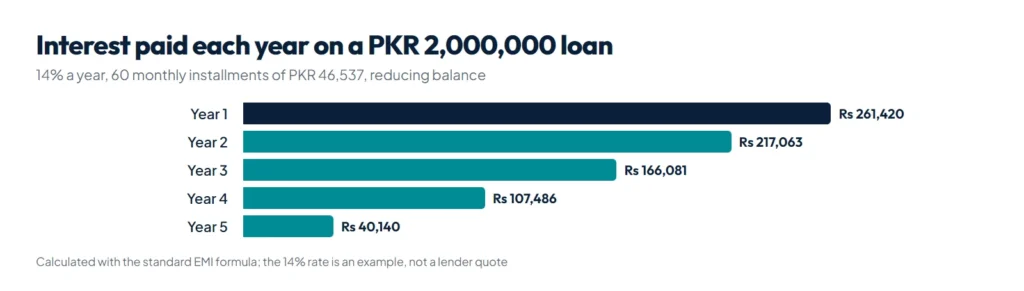
| Year | Interest paid (PKR) | Principal repaid (PKR) | Balance at year end (PKR) |
|---|---|---|---|
| 1 | 261,420 | 297,018 | 1,702,982 |
| 2 | 217,063 | 341,375 | 1,361,607 |
| 3 | 166,081 | 392,357 | 969,250 |
| 4 | 107,486 | 450,952 | 518,298 |
| 5 | 40,140 | 518,298 | 0 |
| Total | 792,190 | 2,000,000 |
Two lessons for anyone building a calculator. Show the total interest, not only the EMI, because it is the figure borrowers rarely see. And say which method you use: if an installment plan charged a flat rate instead, interest would be worked out on the full PKR 2,000,000 for all 5 years, PKR 1,400,000 in total, and the monthly payment would be PKR 56,667.
What does a good loan calculator need?
- Mobile first: inputs with
inputmode="decimal"so phones show a number keyboard, large tap targets, and a result that appears without scrolling. - Accessible: a visible label tied to every input, error messages in text, full keyboard use, and the result in an aria-live region set to polite, so screen readers announce it when it changes.
- PKR formatting: Intl.NumberFormat with the
en-PKlocale and thePKRcurrency shows 2000000 as “Rs 2,000,000” in Chrome. If your readers prefer lakh grouping, theen-INlocale writes 20,00,000. - Clear assumptions next to the result: reducing balance, monthly installments, the rate the user typed, and no processing fees, insurance or takaful, or taxes. Call it an estimate, not an offer.
- The right words for the product. Islamic financing uses its own terms; Meezan Bank’s Car Ijarah page, for example, talks about monthly rentals and profit rates. Match your labels to the product you describe.
- Sensible limits: reject empty or negative values, cap the tenure and handle a 0% rate.
- Light code: a calculator needs a few lines of JavaScript, not a library loaded on every page. Our guide to WordPress speed optimization explains why that matters.
Finance Studio: our calculator plugin, and what it does not do
Finance Studio is our WordPress plugin with seven Pakistan tax and finance calculators: income tax, Zakat, property registry costs, Islamic inheritance, an ATL checker, a currency converter and custom duty. To be clear, it does not include a loan or EMI calculator today. We build custom calculators, such as a loan calculator, on the same engine as a quoted job.
What that engine gives a finance website, compared with a basic snippet:
- Rates kept in editable rule sets with an effective date, a source note, revision history and rollback. Plugin updates never overwrite a rate you have edited.
- A Download PDF report button with the figures, the rate version and source, a reference code and a QR code.
- Placement as an Elementor widget, a Gutenberg block or a shortcode, so it works with any theme.
- Calculations on the server only when a visitor presses Calculate, a small frontend script with no framework, and rate-limited REST endpoints with an OpenAPI 3.0 description for a mobile app.
It needs WordPress 6.4 or newer and PHP 8.1 or newer with the BCMath extension. It costs PKR 2,200 a month, PKR 15,000 a year or PKR 35,000 once for lifetime use, per website. It suits tax consultants, accountants, and property and Islamic finance websites, and we also build sites for real estate agencies and developers that publish installment plans.
Copy-paste EMI calculator (no plugin)
Paste this into a Custom HTML block. It formats results in rupees, works on phones, announces results to screen readers and handles a 0% rate. With the default values it shows a monthly EMI of Rs 46,537, a total interest of Rs 792,190 and a total of Rs 2,792,190.
<div class="emi-calc">
  <style>
    .emi-calc { max-width: 26rem; }
    .emi-calc label { display: block; margin-top: .75rem; font-weight: 600; }
    .emi-calc input { width: 100%; box-sizing: border-box; padding: .6rem; font-size: 1rem; }
    .emi-calc button { margin-top: 1rem; padding: .7rem 1.2rem; font-size: 1rem; }
  </style>
  <label for="emi-amount">Loan amount (PKR)</label>
  <input id="emi-amount" type="number" inputmode="decimal" min="1" value="2000000">
  <label for="emi-rate">Annual rate (%)</label>
  <input id="emi-rate" type="number" inputmode="decimal" min="0" step="0.01" value="14">
  <label for="emi-months">Tenure (months)</label>
  <input id="emi-months" type="number" inputmode="numeric" min="1" max="360" value="60">
  <button type="button" id="emi-go">Calculate EMI</button>
  <p id="emi-out" aria-live="polite"></p>
  <p><small>Estimate only: reducing balance, monthly installments. Fees, insurance and taxes are not included.</small></p>
</div>
<script>
(function () {
  var pkr = new Intl.NumberFormat('en-PK', {
    style: 'currency', currency: 'PKR', minimumFractionDigits: 0, maximumFractionDigits: 0
  });
  function num(id) { return parseFloat(document.getElementById(id).value); }
  document.getElementById('emi-go').addEventListener('click', function () {
    var out = document.getElementById('emi-out');
    var p = num('emi-amount'), n = Math.round(num('emi-months')), r = num('emi-rate') / 12 / 100;
    if (!(p > 0) || !(n > 0) || !(r >= 0)) {
      out.textContent = 'Please enter a loan amount, a rate of 0 or more and a tenure in months.';
      return;
    }
    var f = Math.pow(1 + r, n);
    var emi = r === 0 ? p / n : p * r * f / (f - 1);
    out.textContent = 'Monthly EMI: ' + pkr.format(emi) +
      '. Total interest: ' + pkr.format(emi * n - p) +
      '. Total paid: ' + pkr.format(emi * n) + '.';
  });
})();
</script>
Summary
To add a loan calculator to WordPress, use a maintained plugin for a quick standard tool, a shortcode in a small custom plugin to reuse one calculator across pages, or the code above in a Custom HTML block if you want no plugin. Whichever you pick, use the reducing-balance formula EMI = P × r × (1 + r)^n / ((1 + r)^n – 1), show the total interest, format amounts in rupees and state your assumptions: PKR 2,000,000 at 14% for 5 years is PKR 46,537 a month and PKR 792,190 in interest. For Pakistan tax and finance calculators with PDF reports and editable rates, or a custom loan calculator built on the same engine, see Finance Studio.
References
- WordPress Plugin Handbook: Shortcodes
- WordPress documentation: Custom HTML block
- WordPress documentation: Roles and capabilities
- Wikipedia: Mortgage calculator, monthly payment formula
- MDN: Intl.NumberFormat
- MDN: aria-live
- WordPress.org: EMI Calculator plugin
- WordPress.org: Emi Calc plugin
- Meezan Bank: Car Ijarah