
On this page
- Is Meta Verified available in Pakistan?
- Personal, creator or business: which version do you need?
- How much does Meta Verified cost in Pakistan?
- What do you get with Meta Verified?
- Meta Verified vs business verification: what is the difference?
- What changed in 2026: Meta One
- Is Meta Verified worth it for a business in Pakistan?
- How to apply on WhatsApp Business, step by step
- Summary
- References
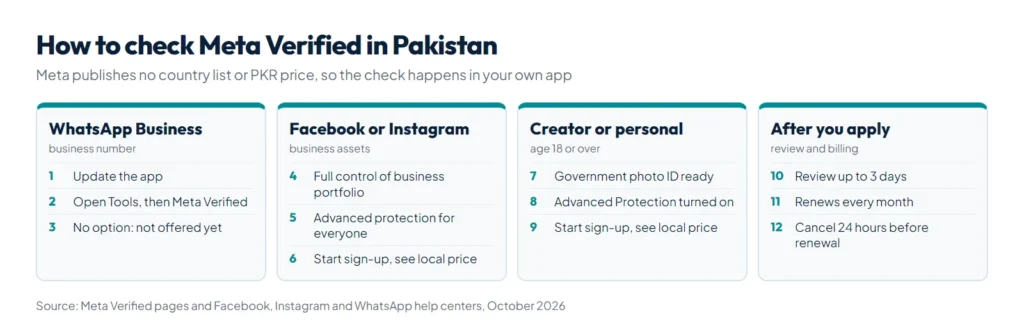
Meta does not publish a list of Meta Verified countries or a price in Pakistani rupees. As of October 2026, its pages say Meta Verified is available “in select regions”, list prices in US dollars (USD 14.99 a month for the Business Standard plan) and tell you to start sign-up to see your local price, so the only reliable check for Pakistan is the Meta Verified option inside your own Facebook, Instagram or WhatsApp Business app. This guide shows how to check, which version you need, what you get and when it is worth paying for.
We manage Facebook Pages, Instagram accounts, WhatsApp Business numbers and Meta ad accounts for businesses in Pakistan as part of our performance marketing service. Everything below comes from Meta’s own pages: the Meta Verified product pages and the Facebook, Instagram and WhatsApp help centers, read on 24 October 2026. Where Meta publishes nothing for Pakistan, we say so.
Is Meta Verified available in Pakistan?
Meta does not name Pakistan on any page, either as available or as excluded. Here is what it does say:
- The Meta Verified page for creators says it is “available in select regions for creators who meet certain eligibility requirements”.
- The Meta Verified for businesses page says it is available in selected regions for eligible businesses, and offers a waiting list to businesses that are not yet eligible.
- WhatsApp’s help center says the feature may not be available to you yet, and that if you do not see the Meta Verified option in the WhatsApp Business app, it is not available to you.
- Meta also says it decides which plans a business sees from its activity on Meta’s apps, such as profile visits, post engagement and message volume.
In August 2024 Meta’s newsroom said Meta Verified was “now available to businesses globally”, but its current pages still speak of selected regions and plans that vary by account. In practice, two Pakistani businesses can see different options, so check each account yourself.
How to check in two minutes
- WhatsApp Business: update the app, then tap Tools in the chat list and look for Meta Verified. No option means it is not offered to that number yet.
- Facebook Page or Instagram professional account: log in as the business and start the subscription from the Meta Verified for businesses page. Meta says the plans, features and local price for your account appear once you start.
- Personal or creator profile: start from the creator page with your Facebook or Instagram profile. If Meta has not rolled it out in your region, no price is shown.
Personal, creator or business: which version do you need?
Meta runs separate subscriptions for creators and for businesses, with different rules.
| Version | Profiles it covers | Main requirements |
|---|---|---|
| Creators and individuals | Instagram personal or creator profile, Facebook personal or creator profile, up to one of each | Age 18 or the age of majority, a government-issued photo ID, Advanced Protection on, minimum activity, located in a country where it is available |
| Business on Facebook or Instagram | Facebook business Page and Instagram professional business profile in the same business portfolio | Full control of the business portfolio, complete profiles, advanced protection for everyone with access, an ID whose name is similar to the business name |
| Business on WhatsApp | WhatsApp Business app profile | Age 18, a phone number in a country where it is available, time on the app, a recent message sent, a profile name and picture |
A business can verify up to two assets from the same portfolio, such as a Page and a WhatsApp number, or three when signing up in the Facebook mobile app or Meta Business Suite on a computer. Government and political organizations cannot subscribe on WhatsApp.
How much does Meta Verified cost in Pakistan?
Meta has not published a Pakistan price. Its pages give US dollar list prices and say your local price appears when you start sign-up, adding that pricing “may not be available if Meta Verified has not yet been rolled out in your region”. These are the published monthly prices:
| Plan | Creators (USD a month) | Businesses (USD a month) |
|---|---|---|
| Standard | 14.99 in the app, 11.99 on the web | 14.99 |
| Plus | 49.99 | 49.99 |
| Premium | 149.99 | 149.99 |
| Max | 499.99 | 499.99 |
- Business prices are per Facebook Page, Instagram account or WhatsApp number. Meta says subscribing a Page and an Instagram account together saves 20%.
- New business subscribers may get a 12-month introductory discount, which Meta says is not offered in every region.
- Creators can buy Standard on the web or in the app, but Plus, Premium and Max only in the mobile app.
- Bought directly from Meta, it takes Visa, Mastercard and American Express credit and debit cards. Bought in the app, Apple or Google payment methods apply. Ask your bank to allow international online payments before you start.
What do you get with Meta Verified?
All plans include the verified badge and impersonation protection. On Facebook the badge shows on your Page and in Messenger, on Instagram it also shows on Threads, and on WhatsApp it shows on your business profile, chat header and channel. The benefits apply only to the profile, Page or number you subscribe.
| Business plan | Facebook and Instagram extras | WhatsApp extras |
|---|---|---|
| Standard | Enhanced support by chat or email, search optimization, images on profile links | One verified channel, a business web page, four linked devices |
| Plus | Faster support, featured profile, two links in reels a month | Three verified channels, six linked devices, business broadcasts |
| Premium | Call requests from support, four links in reels, two employees protected | Five channels, eight devices, 10 protected business accounts |
| Max | Case monitoring, six links in reels, five employees protected | Ten channels, ten devices, 50 protected business accounts |
Two cautions. Meta says enhanced support “may not be available to all subscribers at this time”. And no Meta page promises more reach or sales: search optimization means appearing higher when people search for your name inside Meta’s apps.
Meta Verified vs business verification: what is the difference?
Many Pakistani businesses mix these up. Business verification in Meta Business Suite is free and confirms your legal business to Meta. Meta says it is needed for some advertising, developer, billing and spending features, and states that it does not give you a verified badge. You enter your legal name, address, phone number and a website that loads over HTTPS, upload documents if no matching record is found, and confirm by email, phone, text, WhatsApp or domain verification. A decision can take up to 14 business days.
Meta Verified is the paid subscription that adds the badge, impersonation protection and support. If you are setting up the API, start with our guide to the WhatsApp Business API in Pakistan.
What changed in 2026: Meta One
Meta’s Meta Verified pages now carry a notice that Meta Verified features are available in Meta One, a new subscription that builds on Meta Verified. The Meta One help center says it is in limited testing and not available everywhere yet. Its plans for creators and businesses, called Essential, Advanced, Expert and Max, include the verified badge once your identity is verified. If your app shows Meta One instead of Meta Verified, compare the plans it lists before you pay.
Is Meta Verified worth it for a business in Pakistan?
It is worth paying for when:
- Fake Pages or WhatsApp numbers copy your brand and take orders or advance payments from your customers. Impersonation protection and protected business accounts target exactly this.
- You sell mostly through WhatsApp chats and want customers to see the badge in the chat header.
- Several staff answer the same WhatsApp number and you need more linked devices.
- You run ads and want a support route when an account is restricted or hacked.
It is not worth it, or not yet, when:
- You expect the badge alone to bring followers or sales.
- Your business name, logo or number may change soon. Meta warns that changing business information after subscribing may cancel the subscription, and a new WhatsApp number cancels it automatically.
- Your ID name does not match your business name closely enough to pass review.
Do the free steps first: turn on Advanced Protection or two-factor login, complete your profiles, finish business verification and publish your official numbers on your own business website. A WhatsApp chat link on your site gives customers one number they can trust.
How to apply on WhatsApp Business, step by step
WhatsApp’s subscription guide lists these steps:
- In the WhatsApp Business app, tap Tools, then Meta Verified, then Continue.
- Choose the package Meta recommends for your business.
- Select the accounts to verify. You can bundle linked Facebook or Instagram accounts.
- Pay the first month. Meta refunds it if it cannot verify your business.
- Select your business, choose a verification method and submit your details.
- Wait for review, which can take up to three business days. The blue tick then appears on your profile.
On Facebook and Instagram the order is the same: choose a plan, pick the assets, set up payment, verify your business details and wait up to three working days.
Summary
Meta does not publish a country list or a PKR price for Meta Verified, so as of October 2026 the answer for Pakistan is in your own app: look for Meta Verified under Tools in WhatsApp Business, or start sign-up from your Facebook Page, Instagram account or creator profile to see the plans and local price. Meta’s US prices run from USD 14.99 to 499.99 a month per profile. The badge, impersonation protection and support help most when fake accounts copy your brand or you sell through WhatsApp; they do not promise reach. Business verification in Business Suite is a separate, free step that gives no badge. If you want your Meta accounts, ads and WhatsApp set up and protected properly, talk to our performance marketing team.
References
- Meta: Meta Verified for creators, plans, pricing and FAQs
- Meta for Business: Meta Verified for businesses, plans and pricing
- Meta Business Help Center: About Meta Verified for businesses
- Meta Business Help Center: Billing and payments for Meta Verified business subscriptions
- Instagram Help Center: Eligibility requirements for Meta Verified creator subscriptions
- WhatsApp Help Center: Eligibility requirements for Meta Verified for Business on WhatsApp
- WhatsApp Help Center: How to subscribe to Meta Verified for Business on WhatsApp
- Meta Business Help Center: How to verify your business in Meta Business Suite
- Meta Help Center: About Meta One plans