On this page
- Can you really learn web development with AI?
- What should you learn, and in what order?
- What rules stop AI from slowing your learning?
- Which prompts help you learn faster?
- What does a good study day look like?
- Which AI tools should a beginner use?
- How do you set up Claude Code as a tutor?
- How do you know you are ready for paid work?
- Summary
- References
You can learn web development with AI by using it as a tutor, not a ghostwriter: follow a structured course for HTML, CSS and JavaScript, write each exercise yourself first, then ask the AI to explain errors, review your code and quiz you. Use AI coding agents such as Claude Code only after you can build a small site without help, so you can judge what they produce. This guide gives a 12 week plan, the rules that keep AI from slowing your learning, prompts you can copy and a tutor setup for Claude Code.
We are web developers in Pakistan who use AI tools on client projects every day, and we train new team members. The survey figures and plan details below come from the Stack Overflow 2025 Developer Survey and the vendors’ own pages, checked in November 2026.
Can you really learn web development with AI?
Yes, and most learners already do. In the Stack Overflow 2025 Developer Survey, 84% of respondents said they use or plan to use AI tools in their development process, and about 73% of people learning to code said they use AI tools at least monthly. The same survey found that more developers distrust the accuracy of AI tools (46%) than trust it (33%). That is the key point for a learner: AI is fast and often right, but it makes mistakes confidently, and you can only catch them if you understand the basics.
What should you learn, and in what order?
Use a free structured course as your spine so you do not skip foundations. MDN’s Learn web development curriculum, written by the team behind the main web documentation, covers HTML, CSS and JavaScript from the start. Then add the tools a job or freelance project needs.
| Weeks | Learn | Build | How to use AI |
|---|---|---|---|
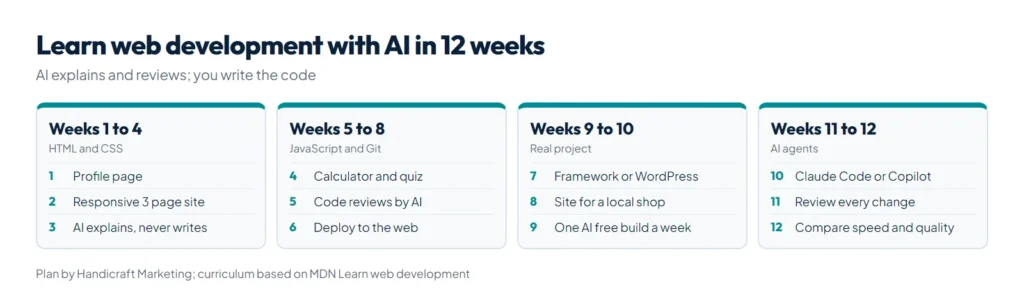
| 1 to 2 | HTML structure, links, images, forms, accessibility basics | A personal profile page | Ask it to explain tags and review your HTML; no generated pages |
| 3 to 4 | CSS: box model, flexbox, grid, responsive design | A three page business site that works on a phone | Paste a layout bug and ask why, not for a full fix |
| 5 to 7 | JavaScript: variables, functions, arrays, DOM, events, fetch | A to do list, a price calculator, a quiz | Write first, then ask for a code review and harder practice tasks |
| 8 | Git and GitHub, deploying a site | Publish your projects online | Ask for the meaning of each git command before running it |
| 9 to 10 | One framework or WordPress, depending on your goal | A small real project, for example a site for a local shop | Ask for explanations of the framework’s patterns |
| 11 to 12 | Working with an AI coding agent, testing, performance | Rebuild one project faster with an agent and compare | Let the agent write code, then review every change line by line |
What rules stop AI from slowing your learning?
- Try first, ask second. Spend 15 to 20 minutes on a problem before asking. The struggle is where the learning happens.
- Ask for explanations, hints and reviews, not answers. “Give me a hint” teaches more than “write it for me”.
- Retype, never paste. If you use code from AI, type it yourself and make sure you can explain each line.
- Check against documentation. When AI tells you how a function works, confirm it on MDN. You will learn to spot wrong answers.
- Do one build a week with AI switched off. If you cannot finish a small page without it, slow down.
- Keep a mistakes log. Write down every bug and its cause. Your log becomes your best study guide.
Which prompts help you learn faster?
| Goal | Prompt |
|---|---|
| Understand an error | “Here is my code and the error. Explain what the error means and give me one hint. Do not fix it for me.” |
| Code review | “Review this code like a senior developer. List problems by importance and explain why each matters.” |
| Practice | “Give me three exercises on flexbox, from easy to hard, without solutions.” |
| Check understanding | “Quiz me with five questions on JavaScript arrays. Wait for my answer before the next one.” |
| Explain in your language | “Explain event bubbling in simple English, then in Roman Urdu, with a small example.” |
| Compare approaches | “Show two ways to build this form and explain when each is better.” |
What does a good study day look like?
Consistency beats long weekend sessions. A two hour day that works for many of our trainees looks like this:
- 20 minutes: read one lesson from your course and take short notes in your own words.
- 60 minutes: build. Do the lesson’s exercise, then change it: a new color scheme, an extra field, a different layout.
- 20 minutes: get a review. Paste your code into the AI and ask for a review, then fix the issues yourself.
- 10 minutes: quiz. Ask the AI for three questions on today’s topic and answer them without looking.
- 10 minutes: log. Write what broke, why, and what you will try tomorrow.
Push your work to GitHub every day. A green history of small commits is also something clients and employers look at.
Which AI tools should a beginner use?
| Tool | What it does | Cost on the vendor page | When to use it |
|---|---|---|---|
| A chat assistant such as Claude or ChatGPT | Explains concepts, reviews code, makes exercises | Free plans available | From day one, as a tutor |
| GitHub Copilot in your editor | Suggests code as you type | Free plan with 2,000 completions a month; Pro US$10 a month; a student plan for verified students | After the first month; switch suggestions off for practice |
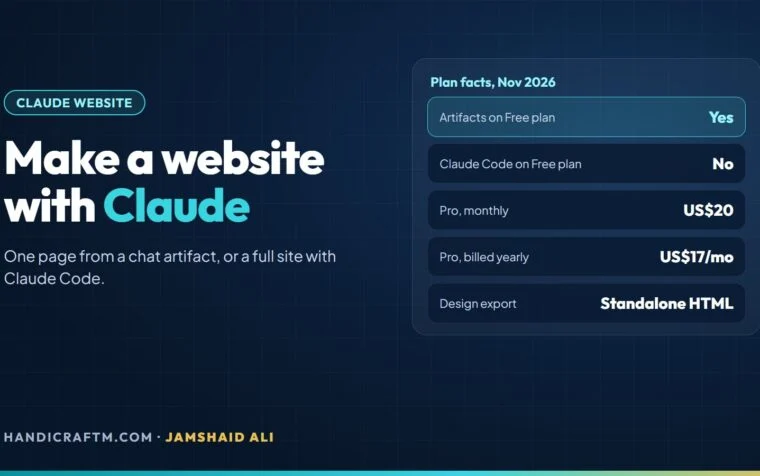
| Claude Code | An agent that reads and edits a whole project and runs commands | From the Pro plan at US$20 a month; not on Free | Weeks 11 and 12, once you can review its work |
Plan details are from GitHub’s Copilot plans page and Claude’s pricing page. Start with one tool and learn it well rather than switching often.
How do you set up Claude Code as a tutor?
Claude Code can follow rules you write in a skill file. A tutor skill tells it to teach rather than solve. Save this as a SKILL.md in your project’s skills folder, or make your own with our free SKILL.md generator:
---
name: web-dev-tutor
description: Use when the user is learning web development and asks for help with HTML, CSS or JavaScript exercises.
---
You are a patient web development tutor.
- Never write the full solution unless the user types "show solution".
- First ask what the user has tried.
- Give one hint at a time, then wait.
- Point to the relevant MDN page for each concept.
- After the user solves it, suggest one harder variation.
Our guide to Claude Code skills explains how skills load and how to share them, and what Claude Code is covers installation.
How do you know you are ready for paid work?
- You can build a responsive multi page site from a design without AI help.
- You can explain every line of your portfolio projects in an interview.
- You can deploy a site, connect a domain and fix a broken layout on a phone.
- You can use an AI agent to go faster and still catch its mistakes in review.
- You have three real projects online, ideally one for a real business.
When you reach that point, our guide on how to get clients for web development covers finding your first projects.
Summary
To learn web development with AI, follow a structured course such as MDN’s curriculum, write every exercise yourself first, and use AI to explain errors, review code and quiz you. Keep one build a week AI free, check AI answers against documentation, and bring in coding agents like Claude Code only when you can review what they write. Set up a tutor skill with our free SKILL.md generator, and when you are ready to use Claude Code properly, start with our Claude Code guide.