
On this page
- How does Google Business Profile verification work?
- Which verification methods can you get?
- How to pass video verification the first time
- What to do when your verification video is rejected
- How to check your verification status
- What address should you use in Pakistan when there is no clear street address?
- Why was my profile suspended, and how do I appeal?
- You are verified: what comes next?
- Summary
- References
Google Business Profile verification is how Google confirms that you really run the business on a profile, and you need it before you can edit the details, reply to customers and show fully on Search and Maps. Google chooses the methods you can use: a video recording, a phone call or text, an email, a live video call or a postcard, and some profiles are verified instantly. A review takes up to 5 business days, and most rejections come from a video that misses the business name, the location or proof that you manage the business.
We set up, verify and repair Google Business Profiles for local businesses in Pakistan as part of our SEO and local search service. This guide follows Google’s own Business Profile Help pages as they read in October 2026, and adds the details that trip up Pakistani businesses: addresses with no street number, home-based work, shop signs and documents.
How does Google Business Profile verification work?
Sign in to the Google Account that should own the profile, find your business (search for its name and city, or search “my business”) and select Get verified. Google then shows the methods open to you. Its verification help page says the methods depend on your business type, public information, region and business hours, that you cannot change them, and that you may need more than one. Google recommends video verification when you are eligible.
Once you finish the steps, Google reviews your submission. This can take up to 5 business days and, rarely, longer. You get a confirmation email when the profile is verified, and only then should you add managers such as your agency or staff.
Which verification methods can you get?
| Method | What you need | Watch out for |
|---|---|---|
| Video recording | A phone at the business and one unedited clip of at least 30 seconds | A missing business name, location or proof of management |
| Phone or text | Someone who can answer the business number shown on screen | Automated phone menus (IVR) cannot receive the code |
| Access to the email address shown on the verification screen | Use the exact address Google shows | |
| Live video call | Be at the business with a phone or laptop camera | Not offered to every business, and only during your opening hours |
| Postcard | A mailing address where post reaches you | Most codes take about 2 weeks, expire after 30 days, and are cancelled if you edit the name, address or category |
| Instant | Your website already verified in Google Search Console, or bulk verification for chains | Only some profiles qualify |
If you get a postcard, do not request a second one while you wait, because a new code cancels the first. Keep any code to yourself: Google says it will never ask you for the postcard code and that you should not share it, not even with people who manage your profile.
How to pass video verification the first time
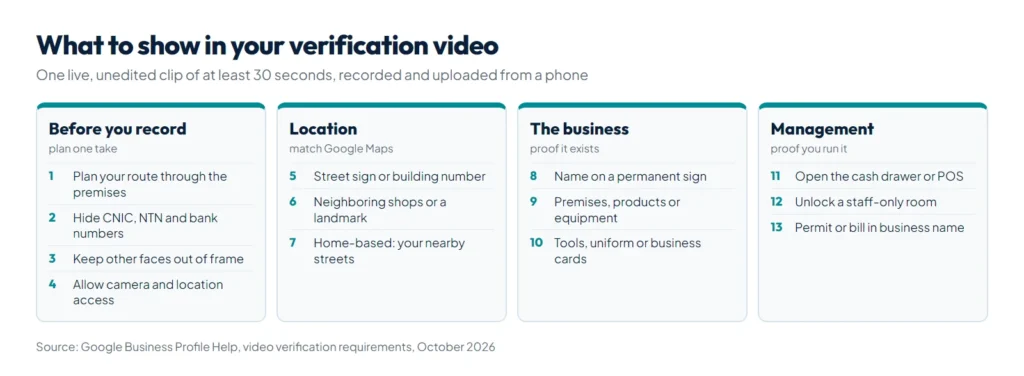
Google’s video verification requirements are strict about format. The video must be at least 30 seconds long, one complete recording with no breaks or edits, recorded live and uploaded from a mobile device through your Business Profile. You cannot record offline and upload later. Keep sensitive information out of the frame: bank account, tax and ID numbers, private details and other people’s faces.
Because it has to be one live take, plan the route before you press record. To start, open your profile on your phone, tap Get verified, then Business video, allow camera, microphone and location access, and record.
Shot list for a shop, clinic or office that customers visit
- Location: start outside with a street sign, building number, neighboring shops or a well-known landmark, so the place matches Google Maps.
- The business: show your business name on a permanent fixture such as a sign, wall or window. It must match the name on your profile.
- Inside: walk in and show the premises, products or equipment.
- Management: do something only staff can do, such as opening the cash drawer, using your point-of-sale system or unlocking a storeroom or kitchen.
Shot list for a home-based or service-area business
- Area: film street signs and landmarks near your base. Google allows home-based businesses to film their immediate neighborhood, but asks you to avoid empty land and unmarked places.
- The business: show your tools, equipment, products or workspace, or business cards and branded clothing.
- Management: perform part of a service, open a branded vehicle, or show a business permit, invoice or utility bill in the profile’s name.
Two cautions for Pakistan. First, Google wants the name on a permanent fixture, so a flex banner tied up for the day is a risk; if you have no permanent signage, Google says to set up a service-area business instead. Second, keep your CNIC, NTN and bank account numbers out of the shot. If you show a bill or permit, frame the name and address, not the numbers.
What to do when your verification video is rejected
Within 5 business days Google either confirms the profile or rejects the video with reasons. To fix a rejection:
- Open your Business Profile on your phone and tap Review issues to see what was missing. Google names three common problems: the business name is not visible on the storefront, the nearby area is not shown, and there is no proof that you are authorized to run the business.
- Record a new video that includes everything from the first one plus the missing items, then upload it. If the upload fails, try again.
- If you have met every requirement and still fail, use another method if one is offered. Google asks you to contact support only after trying the methods available to you.
How to check your verification status
Sign in with the account that manages the profile and use Google’s verification status tool, or open the profile itself. Here is what you may see:
- A confirmation email: you are verified.
- “Get verified” shows again: Google could not fully verify the business. Verify again, using another method if one is listed.
- “Review issues”: your video was not accepted. Follow the steps above.
- A request for more information: this usually follows recent changes to your details. Provide what is asked or update your information, then select Get verified again.
What address should you use in Pakistan when there is no clear street address?
Many Pakistani addresses are plot, block or sector numbers, or describe a place as “near” a landmark. Google’s guidelines for representing your business cover this:
- Enter the official address. Add cross-streets and nearby landmarks only where the official street address does not pinpoint the business.
- If the address has no street number, or Google cannot find it, pin the location directly on the map.
- Put a shop, suite or floor number in Address line 2, not in line 1.
- P.O. boxes and remote mailboxes are not accepted, and a virtual office, meaning an address you rent but do not work from, is not eligible at all.
- Use your real-world name, without keywords or locations, and do not repeat it in two scripts, such as English and Urdu.
When to use a service area instead of an address
If customers never come to you, as with a home tutor, AC technician, plumber or home-based caterer, remove the address from the profile and set a service area. Google lets you add up to 20 service areas by city, postal code or other area, not a radius, and the whole area should stay within about 2 hours of driving from your base. A business that serves customers at its premises and also travels to them keeps the address and adds a service area.
Why was my profile suspended, and how do I appeal?
Google can suspend or disable profiles that break its guidelines, and a restricted Google Account takes its profiles down with it. Fix the cause before you appeal, because Google says appeals can only be submitted once.
- Compare the profile with the guidelines: real name, real address or a service area, the right category and no virtual office.
- Open the appeals tool with the account that manages the profile, then choose the profile and the decision. The tool shows the reason and the policy involved.
- Attach evidence whose name and address match the profile exactly. Google accepts registration paperwork, a business license, tax certificate documents and utility bills such as electricity, phone, water or internet. For a Pakistani business that could be your registration certificate, your FBR registration (NTN) certificate or a utility bill in the business name. Unlike the video, appeal evidence can include tax documents, because Google asks for them.
- Submit and wait for Google’s email. If the appeal is denied, you may request an additional review with evidence you did not include the first time.
Do not create a new profile for the same business. If the whole Google Account is restricted, appeal the restriction at myaccount.google.com/restrictions first, then the profile.
You are verified: what comes next?
Verification lets you compete; it does not rank you. Google’s own tips put verification first, followed by accurate details, replies to reviews and photos. Our guide on how to rank on Google Maps covers categories, reviews and the website signals that come next, and our SEO checklist covers the website side. Add your agency or staff as managers rather than sharing your login, and keep hours current for Ramadan, Eid and public holidays. Clinics should also read our guide to a website for doctors and clinics, since the profile and the site need to match.
Summary
To verify a Google Business Profile, select Get verified and use a method Google offers. For video, record one live, unedited clip of at least 30 seconds that shows the location, your business name on a permanent sign and proof that you run the business, with no ID, tax or bank numbers in view. Expect up to 5 business days for review; if the video is rejected, open Review issues and record again with the missing parts. In Pakistan, pin the map when the address has no street number and use a service area if customers do not visit you. Once verified, follow our guide on ranking on Google Maps, or let our SEO and local search service handle verification, the profile and your website together.
References
- Google Business Profile Help: Verify your business on Google
- Google Business Profile Help: Video verification requirements
- Google Business Profile Help: Guidelines for representing your business on Google
- Google Business Profile Help: Service areas for service-area businesses
- Google Business Profile Help: Fix suspended or disabled profiles
- Google Business Profile Help: Tips to improve your local ranking on Google