On this page
- What does MRZ stand for on a passport?
- Where is the MRZ on a Pakistani passport?
- How to read line 1 of the MRZ
- How to read line 2 of the MRZ
- What is the Pakistani passport number format?
- How do MRZ check digits work?
- What can check digits not tell you?
- Common MRZ reading mistakes
- How can travel agencies read MRZs faster?
- Summary
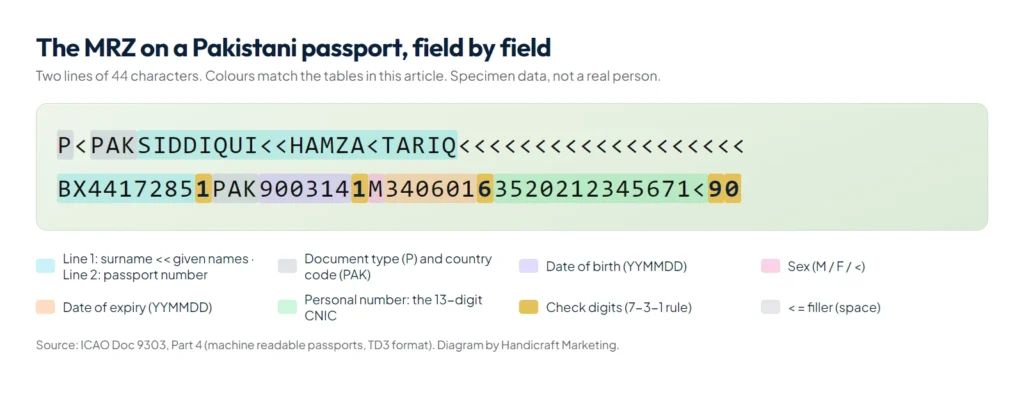
The MRZ (machine readable zone) is the two lines of 44 characters at the bottom of a passport’s photo page. On a Pakistani passport it holds the holder’s name, passport number, nationality, date of birth, sex, expiry date and 13-digit CNIC, and most of these fields end with a check digit. Scanners read it in a second, and the check digits let anyone confirm that a passport number or date was typed correctly.
If you run a travel agency, you probably type dozens of these details every week for visas, tickets and Umrah groups. This guide explains every character of the MRZ code on a Pakistani passport, shows how to verify a check digit by hand, and lists the mistakes behind most rejected applications. All examples use a specimen passport, not a real person.
What does MRZ stand for on a passport?
MRZ stands for machine readable zone. Its layout is defined by the International Civil Aviation Organization in ICAO Doc 9303, the standard that every passport-issuing country follows. Passports use the TD3 format: two lines of 44 characters each, printed in the OCR-B font so machines can read it reliably. That is why the MRZ looks the same on Pakistani, Saudi, British or Indian passports, even though the rest of the page looks different.
Where is the MRZ on a Pakistani passport?
Open the passport at the photo page (the data page). The MRZ is the two lines of capital letters, numbers and < symbols along the bottom edge. Everything above it, such as the printed name, father’s name and place of birth, is called the visual inspection zone.
The MRZ only carries some of the details. Father or husband name, place of birth, date of issue, issuing authority, tracking number and booklet number are printed on the page but not in the MRZ, so they always have to be read from the printed text.
How to read line 1 of the MRZ
Line 1 holds the document type, the issuing country and the name.
| Positions | Specimen | Meaning |
|---|---|---|
| 1 | P | Document type: P for passport |
| 2 | < | Passport subtype, usually a filler |
| 3 to 5 | PAK | Issuing country (three-letter code for Pakistan) |
| 6 to 44 | SIDDIQUI<<HAMZA<TARIQ<<< | Surname, then <<, then given names. A single < replaces each space and the rest of the line is filled with < |
The name field has room for 39 characters, so very long names are shortened in the MRZ. Always copy the full name from the printed page, not from the MRZ.
How to read line 2 of the MRZ
Line 2 holds the numbers. The important fields are each followed by their own check digit.
| Positions | Specimen | Meaning |
|---|---|---|
| 1 to 9 | BX4417285 | Passport number |
| 10 | 1 | Check digit for the passport number |
| 11 to 13 | PAK | Nationality |
| 14 to 19 | 900314 | Date of birth as YYMMDD (14 March 1990) |
| 20 | 1 | Check digit for the date of birth |
| 21 | M | Sex: M, F, or < when unspecified |
| 22 to 27 | 340601 | Date of expiry as YYMMDD (1 June 2034) |
| 28 | 6 | Check digit for the expiry date |
| 29 to 42 | 3520212345671< | Personal number: on Pakistani passports, the 13-digit CNIC without dashes |
| 43 | 9 | Check digit for the personal number |
| 44 | 0 | Composite check digit for the whole line |
Two details trip people up. Dates are written year first with only two digits for the year, so 900314 is 14 March 1990; you work out the century from context, since a birth date cannot be in the future. And the CNIC appears without its dashes: 3520212345671 is the same number as 35202-1234567-1.
What is the Pakistani passport number format?
A Pakistani passport number has two letters followed by seven digits, for example AB1234567, nine characters in total. It is easy to mix up with the tracking number (11 digits) or the booklet number (a letter and seven digits), which are printed elsewhere on the page. Only the passport number appears at the start of MRZ line 2, which makes the MRZ the quickest place to confirm which number is which.
How do MRZ check digits work?
A check digit is a small calculation that proves the characters before it were read correctly. ICAO uses the same three steps for every field:
- Convert each character to a number: digits keep their value, A is 10, B is 11 and so on up to Z = 35, and < counts as 0.
- Multiply the values by the weights 7, 3, 1, 7, 3, 1 and so on, repeating from the left.
- Add the results and keep only the last digit of the total (the remainder after dividing by 10). That digit is the check digit.
Here is the specimen passport number BX4417285 worked through:
| Character | B | X | 4 | 4 | 1 | 7 | 2 | 8 | 5 |
|---|---|---|---|---|---|---|---|---|---|
| Value | 11 | 33 | 4 | 4 | 1 | 7 | 2 | 8 | 5 |
| Weight | 7 | 3 | 1 | 7 | 3 | 1 | 7 | 3 | 1 |
| Result | 77 | 99 | 4 | 28 | 3 | 7 | 14 | 24 | 5 |
77 + 99 + 4 + 28 + 3 + 7 + 14 + 24 + 5 = 261. The last digit is 1, which matches the check digit printed right after the passport number. Now imagine the last digit is typed as 6 instead of 5: the total becomes 262 and the check digit would be 2, which no longer matches the passport. The mistake is caught before it reaches a visa form.
The same rule protects the date of birth (900314 gives 1), the expiry date (340601 gives 6) and the CNIC field (gives 9). The last character of line 2 is a composite check digit calculated over the passport number, date of birth, expiry date and personal number together with their own check digits, so one wrong character anywhere in those fields shows up twice.
What can check digits not tell you?
- They catch most single typing or scanning errors, such as an 8 read as a B, or two swapped digits.
- They do not prove a passport is genuine. A forger can calculate valid check digits too, so treat them as a data-quality tool, not a security check.
- They do not cover fields outside the MRZ, such as father’s name, place of birth or date of issue. Those have to be compared with the printed page.
Common MRZ reading mistakes
- Look-alike characters: 0 and O, 1 and I, 5 and S, 8 and B, 2 and Z. Positions that must hold numbers, such as dates and the CNIC, can never contain letters, which helps you spot them.
- Miscounting the < symbols when typing a name by hand, which shifts every character after it.
- Blurry photos and glare. WhatsApp compresses photos heavily; ask clients to send the image as a document, or scan the page flat.
- The wrong century for older pilgrims: 551210 is 10 December 1955, not 2055.
- Trusting a shortened MRZ name. Use the printed name for tickets and visas.
How can travel agencies read MRZs faster?
Typing one MRZ by hand is fine. Typing 40 for an Umrah group is where mistakes creep in. There are two practical options:
- At the counter, one passport at a time: Safar Studio, our travel agency software, reads the MRZ from a phone photo, a webcam or a USB MRZ reader, validates the check digits and fills in the pilgrim file.
- For a whole group: Passport Extractor reads a folder of passport photos, PDFs or a ZIP from WhatsApp on your own PC, checks every MRZ field against its check digit and exports the group to Excel. Anything it cannot prove goes to a review screen instead of being guessed.
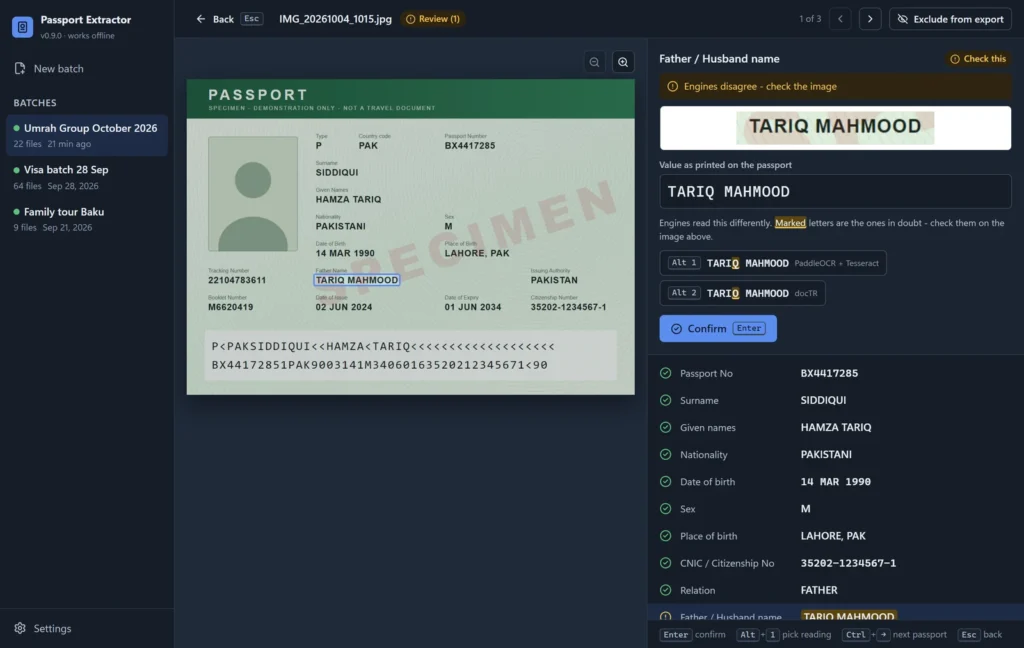
For a closer look at bulk scanning and what to look for in a tool, read our guide to passport OCR software and scanning passports to Excel.
Summary
The MRZ code on a Pakistani passport packs the key identity details into two 44-character lines: the name on line 1, and the passport number, nationality, date of birth, sex, expiry date and CNIC on line 2. Each of those fields ends with a check digit calculated with the 7-3-1 rule, the fastest way to catch a typing mistake before it becomes a rejected visa. Use the MRZ to verify numbers and dates, and the printed page for full names and the details the MRZ does not carry.